3.2.1.4 Scrapy
文档摘要
本文属于新闻推荐实战-数据层-构建物料池之scrapy爬虫框架基础。对于开源的推荐系统来说数据的不断获取是非常重要的,scrapy是一个非常易用且强大的爬虫框架,有固定的文件结构、类和方法,在实际使用过程中我们只需要按照要求实现相应的类方法,就可以完成我们的爬虫任务。文中给出了新闻推荐系统中新闻爬取的实战代码,希望读者可以快速掌握scrapy的基本使用方法,并能够举一反三。 Scrapy基础及新闻爬取实战 python环境的安装 python 环境,使用miniconda搭建,安装miniconda的参考链接:https://blog.csdn.net/pdcfighting/article/details/111503057。
本文属于新闻推荐实战-数据层-构建物料池之scrapy爬虫框架基础。对于开源的推荐系统来说数据的不断获取是非常重要的,scrapy是一个非常易用且强大的爬虫框架,有固定的文件结构、类和方法,在实际使用过程中我们只需要按照要求实现相应的类方法,就可以完成我们的爬虫任务。文中给出了新闻推荐系统中新闻爬取的实战代码,希望读者可以快速掌握scrapy的基本使用方法,并能够举一反三。
Scrapy基础及新闻爬取实战
python环境的安装
python 环境,使用miniconda搭建,安装miniconda的参考链接:https://blog.csdn.net/pdcfighting/article/details/111503057。
在安装完miniconda之后,创建一个新闻推荐的虚拟环境,我这边将其命名为news_rec_py3,这个环境将会在整个新闻推荐项目中使用。
conda create -n news_rec_py3 python==3.8
Scrapy的简介与安装
Scrapy 是一种快速的高级 web crawling 和 web scraping 框架,用于对网站内容进行爬取,并从其页面提取结构化数据。
Ubuntu下安装Scrapy,需要先安装依赖Linux依赖
sudo apt-get install python3 python3-dev python3-pip libxml2-dev libxslt1-dev zlib1g-dev libffi-dev libssl-dev
在新闻推荐系统虚拟conda环境中安装scrapy
pip install scrapy
scrapy项目结构
默认情况下,所有scrapy项目的项目结构都是相似的,在指定目录对应的命令行中输入如下命令,就会在当前目录创建一个scrapy项目
scrapy startproject myproject
项目的目录结构如下:
myproject/ scrapy.cfg myproject/ __init__.py items.py middlewares.py pipelines.py settings.py spiders/ __init__.py
- scrapy.cfg: 项目配置文件
- myproject/ : 项目python模块, 代码将从这里导入
- myproject/ items.py: 项目items文件,
- myproject/ pipelines.py: 项目管道文件,将爬取的数据进行持久化存储
- myproject/ settings.py: 项目配置文件,可以配置数据库等
- myproject/ spiders/: 放置spider的目录,爬虫的具体逻辑就是在这里实现的(具体逻辑写在spider.py文件中),可以使用命令行创建spider,也可以直接在这个文件夹中创建spider相关的py文件
- myproject/ middlewares:中间件,请求和响应都将经过他,可以配置请求头、代理、cookie、会话维持等
spider
spider是定义一个特定站点(或一组站点)如何被抓取的类,包括如何执行抓取(即跟踪链接)以及如何从页面中提取结构化数据(即抓取项)。换言之,spider是为特定站点(或者在某些情况下,一组站点)定义爬行和解析页面的自定义行为的地方。
爬行器是自己定义的类,Scrapy使用它从一个网站(或一组网站)中抓取信息。它们必须继承 Spider 并定义要做出的初始请求,可选的是如何跟随页面中的链接,以及如何解析下载的页面内容以提取数据。
对于spider来说,抓取周期是这样的:
- 首先生成对第一个URL进行爬网的初始请求,然后指定一个回调函数,该函数使用从这些请求下载的响应进行调用。要执行的第一个请求是通过调用
start_requests()方法,该方法(默认情况下)生成Request中指定的URL的start_urls以及parse方法作为请求的回调函数。 - 在回调函数中,解析响应(网页)并返回 item objects ,
Request对象,或这些对象的可迭代。这些请求还将包含一个回调(可能相同),然后由Scrapy下载,然后由指定的回调处理它们的响应。 - 在回调函数中,解析页面内容,通常使用 选择器 (但您也可以使用beautifulsoup、lxml或任何您喜欢的机制)并使用解析的数据生成项。
- 最后,从spider返回的项目通常被持久化到数据库(在某些 Item Pipeline )或者使用 Feed 导出 .
下面是官网给出的Demo:
import scrapy class QuotesSpider(scrapy.Spider): name = "quotes" # 表示一个spider 它在一个项目中必须是唯一的,即不能为不同的spider设置相同的名称。 # 必须返回请求的可迭代(您可以返回请求列表或编写生成器函数),spider将从该请求开始爬行。后续请求将从这些初始请求中相继生成。 def start_requests(self): urls = [ 'http://quotes.toscrape.com/page/1/', 'http://quotes.toscrape.com/page/2/', ] for url in urls: yield scrapy.Request(url=url, callback=self.parse) # 注意,这里callback调用了下面定义的parse方法 # 将被调用以处理为每个请求下载的响应的方法。Response参数是 TextResponse 它保存页面内容,并具有进一步有用的方法来处理它。 def parse(self, response): # 下面是直接从response中获取内容,为了更方便的爬取内容,后面会介绍使用selenium来模拟人用浏览器,并且使用对应的方法来提取我们想要爬取的内容 page = response.url.split("/")[-2] filename = f'quotes-{page}.html' with open(filename, 'wb') as f: f.write(response.body) self.log(f'Saved file {filename}')
Xpath
XPath 是一门在 XML 文档中查找信息的语言,XPath 可用来在 XML 文档中对元素和属性进行遍历。在爬虫的时候使用xpath来选择我们想要爬取的内容是非常方便的,这里就提一下xpath中需要掌握的内容,参考资料中的内容更加的详细(建议花一个小时看看)。
要了解xpath, 需要先了解一下HTML(是用来描述网页的一种语言), 这个的细节就不详细展开
划重点:
-
**xpath路径表达式:**XPath 使用路径表达式来选取 XML 文档中的节点或者节点集。这些路径表达式和我们在常规的电脑文件系统中看到的表达式非常相似。节点是通过沿着路径 (path) 或者步 (steps) 来选取的。
-
了解如何使用xpath语法选取我们想要的内容,所以需要熟悉xpath的基本语法
scrapy爬取新闻内容实战
在介绍这个项目之前先说一下这个项目的基本逻辑。
环境准备:
- 首先Ubuntu系统里面需要安装好MongoDB数据库,这个可以参考开源项目MongoDB基础
- python环境中安装好了scrapy, pymongo包
项目逻辑:
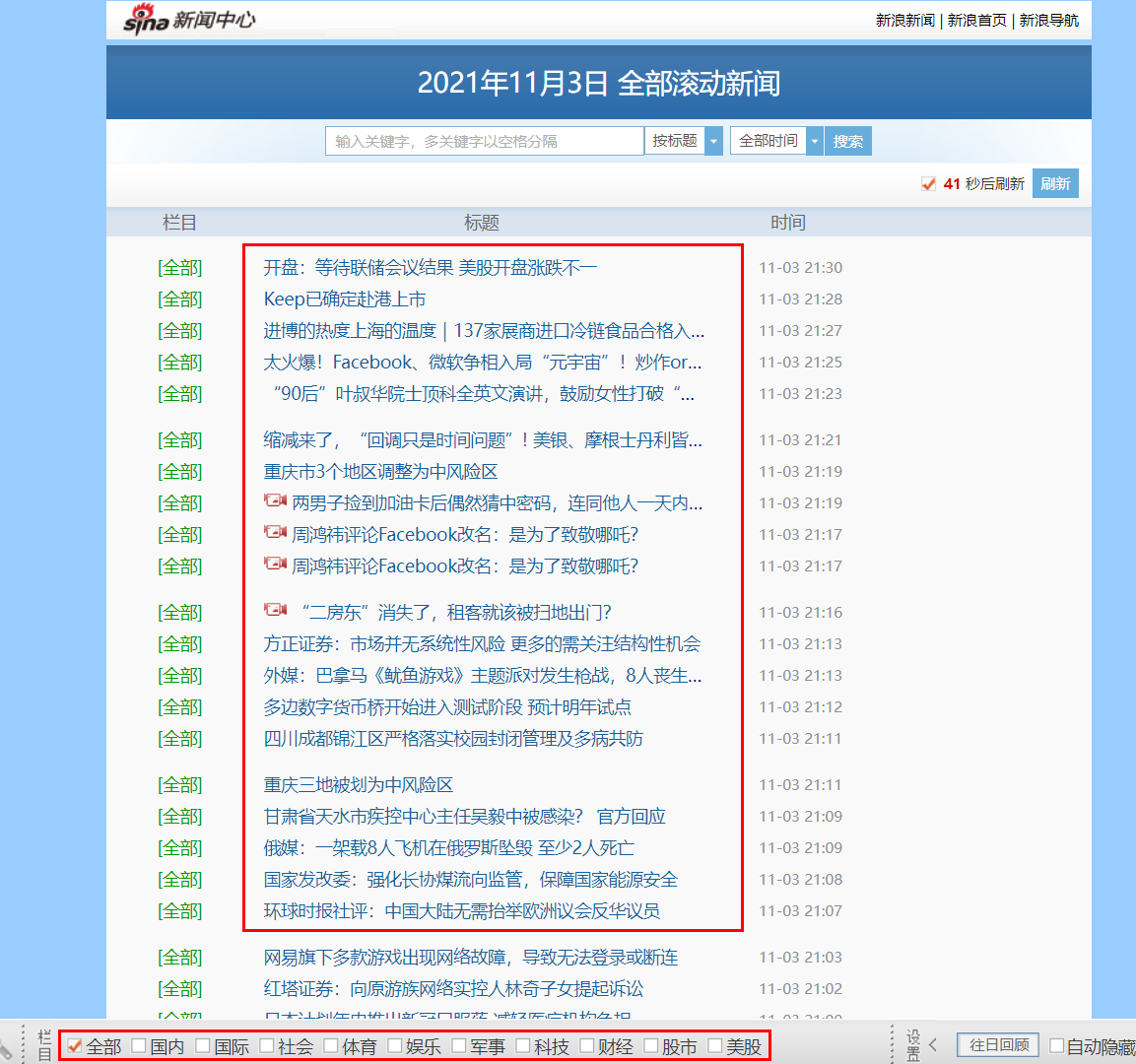
- 每天定时从新浪新闻网站上爬取新闻数据存储到mongodb数据库中,并且需要监控每天爬取新闻的状态(比如某天爬取的数据特别少可能是哪里出了问题,需要进行排查)
- 每天爬取新闻的时候只爬取当天日期的新闻,主要是为了防止相同的新闻重复爬取(当然这个也不能完全避免爬取重复的新闻,爬取新闻之后需要有一些单独的去重的逻辑)
- 爬虫项目中实现三个核心文件,分别是sina.py(spider),items.py(抽取数据的规范化及字段的定义),pipelines.py(数据写入数据库)
因为新闻爬取项目和新闻推荐系统是放在一起的,为了方便提前学习,下面直接给出项目的目录结构以及重要文件中的代码实现,最终的项目将会和新闻推荐系统一起开源出来
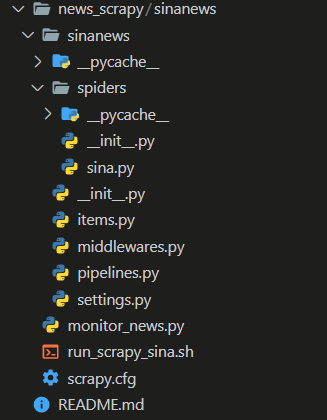
- 创建一个scrapy项目:
scrapy startproject sinanews
- 实现items.py逻辑
# Define here the models for your scraped items # # See documentation in: # https://docs.scrapy.org/en/latest/topics/items.html import scrapy from scrapy import Item, Field # 定义新闻数据的字段 class SinanewsItem(scrapy.Item): """数据格式化,数据不同字段的定义 """ title = Field() # 新闻标题 ctime = Field() # 新闻发布时间 url = Field() # 新闻原始url raw_key_words = Field() # 新闻关键词(爬取的关键词) content = Field() # 新闻的具体内容 cate = Field() # 新闻类别
-
实现sina.py (spider)逻辑
这里需要注意的一点,这里在爬取新闻的时候选择的是一个比较简洁的展示网站进行爬取的,相比直接去最新的新浪新闻观光爬取新闻简单很多,简洁的网站大概的链接:https://news.sina.com.cn/roll/#pageid=153&lid=2509&k=&num=50&page=1
# -*- coding: utf-8 -*- import re import json import random import scrapy from scrapy import Request from ..items import SinanewsItem from datetime import datetime class SinaSpider(scrapy.Spider): # spider的名字 name = 'sina_spider' def __init__(self, pages=None): super(SinaSpider).__init__() self.total_pages = int(pages) # base_url 对应的是新浪新闻的简洁版页面,方便爬虫,并且不同类别的新闻也很好区分 self.base_url = 'https://feed.mix.sina.com.cn/api/roll/get?pageid=153&lid={}&k=&num=50&page={}&r={}' # lid和分类映射字典 self.cate_dict = { "2510": "国内", "2511": "国际", "2669": "社会", "2512": "体育", "2513": "娱乐", "2514": "军事", "2515": "科技", "2516": "财经", "2517": "股市", "2518": "美股" } def start_requests(self): """返回一个Request迭代器 """ # 遍历所有类型的新闻 for cate_id in self.cate_dict.keys(): for page in range(1, self.total_pages + 1): lid = cate_id # 这里就是一个随机数,具体含义不是很清楚 r = random.random() # cb_kwargs 是用来向解析函数parse中传递参数的 yield Request(self.base_url.format(lid, page, r), callback=self.parse, cb_kwargs={"cate_id": lid}) def parse(self, response, cate_id): """解析网页内容,并提取网页中需要的内容 """ json_result = json.loads(response.text) # 将请求回来的页面解析成json # 提取json中我们想要的字段 # json使用get方法比直接通过字典的形式获取数据更方便,因为不需要处理异常 data_list = json_result.get('result').get('data') for data in data_list: item = SinanewsItem() item['cate'] = self.cate_dict[cate_id] item['title'] = data.get('title') item['url'] = data.get('url') item['raw_key_words'] = data.get('keywords') # ctime = datetime.fromtimestamp(int(data.get('ctime'))) # ctime = datetime.strftime(ctime, '%Y-%m-%d %H:%M') # 保留的是一个时间戳 item['ctime'] = data.get('ctime') # meta参数传入的是一个字典,在下一层可以将当前层的item进行复制 yield Request(url=item['url'], callback=self.parse_content, meta={'item': item}) def parse_content(self, response): """解析文章内容 """ item = response.meta['item'] content = ''.join(response.xpath('//*[@id="artibody" or @id="article"]//p/text()').extract()) content = re.sub(r'\u3000', '', content) content = re.sub(r'[ \xa0?]+', ' ', content) content = re.sub(r'\s*\n\s*', '\n', content) content = re.sub(r'\s*(\s)', r'\1', content) content = ''.join([x.strip() for x in content]) item['content'] = content yield item
-
数据持久化实现,piplines.py
这里需要注意的就是实现SinanewsPipeline类的时候,里面很多方法都是固定的,不是随便写的,不同的方法又不同的功能,这个可以参考scrapy官方文档。
# Define your item pipelines here # # Don't forget to add your pipeline to the ITEM_PIPELINES setting # See: https://docs.scrapy.org/en/latest/topics/item-pipeline.html # useful for handling different item types with a single interface import time import datetime import pymongo from pymongo.errors import DuplicateKeyError from sinanews.items import SinanewsItem from itemadapter import ItemAdapter # 新闻item持久化 class SinanewsPipeline: """数据持久化:将数据存放到mongodb中 """ def __init__(self, host, port, db_name, collection_name): self.host = host self.port = port self.db_name = db_name self.collection_name = collection_name @classmethod def from_crawler(cls, crawler): """自带的方法,这个方法可以重新返回一个新的pipline对象,并且可以调用配置文件中的参数 """ return cls( host = crawler.settings.get("MONGO_HOST"), port = crawler.settings.get("MONGO_PORT"), db_name = crawler.settings.get("DB_NAME"), # mongodb中数据的集合按照日期存储 collection_name = crawler.settings.get("COLLECTION_NAME") + \ "_" + time.strftime("%Y%m%d", time.localtime()) ) def open_spider(self, spider): """开始爬虫的操作,主要就是链接数据库及对应的集合 """ self.client = pymongo.MongoClient(self.host, self.port) self.db = self.client[self.db_name] self.collection = self.db[self.collection_name] def close_spider(self, spider): """关闭爬虫操作的时候,需要将数据库断开 """ self.client.close() def process_item(self, item, spider): """处理每一条数据,注意这里需要将item返回 注意:判断新闻是否是今天的,每天只保存当天产出的新闻,这样可以增量的添加新的新闻数据源 """ if isinstance(item, SinanewsItem): try: # TODO 物料去重逻辑,根据title进行去重,先读取物料池中的所有物料的title然后进行去重 cur_time = int(item['ctime']) str_today = str(datetime.date.today()) min_time = int(time.mktime(time.strptime(str_today + " 00:00:00", '%Y-%m-%d %H:%M:%S'))) max_time = int(time.mktime(time.strptime(str_today + " 23:59:59", '%Y-%m-%d %H:%M:%S'))) if cur_time > min_time and cur_time <= max_time: self.collection.insert(dict(item)) except DuplicateKeyError: """ 说明有重复 """ pass return item
- 配置文件,settings.py
# Scrapy settings for sinanews project # # For simplicity, this file contains only settings considered important or # commonly used. You can find more settings consulting the documentation: # # https://docs.scrapy.org/en/latest/topics/settings.html # https://docs.scrapy.org/en/latest/topics/downloader-middleware.html # https://docs.scrapy.org/en/latest/topics/spider-middleware.html from typing import Collection BOT_NAME = 'sinanews' SPIDER_MODULES = ['sinanews.spiders'] NEWSPIDER_MODULE = 'sinanews.spiders' # Crawl responsibly by identifying yourself (and your website) on the user-agent #USER_AGENT = 'sinanews (+http://www.yourdomain.com)' # Obey robots.txt rules ROBOTSTXT_OBEY = True # Configure maximum concurrent requests performed by Scrapy (default: 16) #CONCURRENT_REQUESTS = 32 # Configure a delay for requests for the same website (default: 0) # See https://docs.scrapy.org/en/latest/topics/settings.html#download-delay # See also autothrottle settings and docs # DOWNLOAD_DELAY = 3 # The download delay setting will honor only one of: #CONCURRENT_REQUESTS_PER_DOMAIN = 16 #CONCURRENT_REQUESTS_PER_IP = 16 # Disable cookies (enabled by default) #COOKIES_ENABLED = False # Disable Telnet Console (enabled by default) #TELNETCONSOLE_ENABLED = False # Override the default request headers: #DEFAULT_REQUEST_HEADERS = { # 'Accept': 'text/html,application/xhtml+xml,application/xml;q=0.9,*/*;q=0.8', # 'Accept-Language': 'en', #} # Enable or disable spider middlewares # See https://docs.scrapy.org/en/latest/topics/spider-middleware.html #SPIDER_MIDDLEWARES = { # 'sinanews.middlewares.SinanewsSpiderMiddleware': 543, #} # Enable or disable downloader middlewares # See https://docs.scrapy.org/en/latest/topics/downloader-middleware.html #DOWNLOADER_MIDDLEWARES = { # 'sinanews.middlewares.SinanewsDownloaderMiddleware': 543, #} # Enable or disable extensions # See https://docs.scrapy.org/en/latest/topics/extensions.html #EXTENSIONS = { # 'scrapy.extensions.telnet.TelnetConsole': None, #} # Configure item pipelines # See https://docs.scrapy.org/en/latest/topics/item-pipeline.html # 如果需要使用itempipline来存储item的话需要将这段注释打开 ITEM_PIPELINES = { 'sinanews.pipelines.SinanewsPipeline': 300, } # Enable and configure the AutoThrottle extension (disabled by default) # See https://docs.scrapy.org/en/latest/topics/autothrottle.html #AUTOTHROTTLE_ENABLED = True # The initial download delay #AUTOTHROTTLE_START_DELAY = 5 # The maximum download delay to be set in case of high latencies #AUTOTHROTTLE_MAX_DELAY = 60 # The average number of requests Scrapy should be sending in parallel to # each remote server #AUTOTHROTTLE_TARGET_CONCURRENCY = 1.0 # Enable showing throttling stats for every response received: #AUTOTHROTTLE_DEBUG = False # Enable and configure HTTP caching (disabled by default) # See https://docs.scrapy.org/en/latest/topics/downloader-middleware.html#httpcache-middleware-settings #HTTPCACHE_ENABLED = True #HTTPCACHE_EXPIRATION_SECS = 0 #HTTPCACHE_DIR = 'httpcache' #HTTPCACHE_IGNORE_HTTP_CODES = [] #HTTPCACHE_STORAGE = 'scrapy.extensions.httpcache.FilesystemCacheStorage' MONGO_HOST = "127.0.0.1" MONGO_PORT = 27017 DB_NAME = "SinaNews" COLLECTION_NAME = "news"
- 监控脚本,monitor_news.py
# -*- coding: utf-8 -*- import sys, time import pymongo import scrapy from sinanews.settings import MONGO_HOST, MONGO_PORT, DB_NAME, COLLECTION_NAME if __name__ == "__main__": news_num = int(sys.argv[1]) time_str = time.strftime("%Y%m%d", time.localtime()) # 实际的collection_name collection_name = COLLECTION_NAME + "_" + time_str # 链接数据库 client = pymongo.MongoClient(MONGO_HOST, MONGO_PORT) db = client[DB_NAME] collection = db[collection_name] # 查找当前集合中所有文档的数量 cur_news_num = collection.count() print(cur_news_num) if cur_news_num < news_num: print("the news nums of {}_{} collection is less then {}".\ format(COLLECTION_NAME, time_str, news_num))
- 运行脚本,run_scrapy_sina.sh
# -*- coding: utf-8 -*- """ 新闻爬取及监控脚本 """ # 设置python环境 python="/home/recsys/miniconda3/envs/news_rec_py3/bin/python" # 新浪新闻网站爬取的页面数量 page="1" min_news_num="1000" # 每天爬取的新闻数量少于500认为是异常 # 爬取数据 scrapy crawl sina_spider -a pages=${page} if [ $? -eq 0 ]; then echo "scrapy crawl sina_spider --pages ${page} success." else echo "scrapy crawl sina_spider --pages ${page} fail." fi # 检查今天爬取的数据是否少于min_news_num篇文章,这里也可以配置邮件报警 python monitor_news.py ${min_news_num} if [ $? -eq 0 ]; then echo "run python monitor_news.py success." else echo "run python monitor_news.py fail." fi
- 运行项目命令
sh run_scrapy_sina.sh
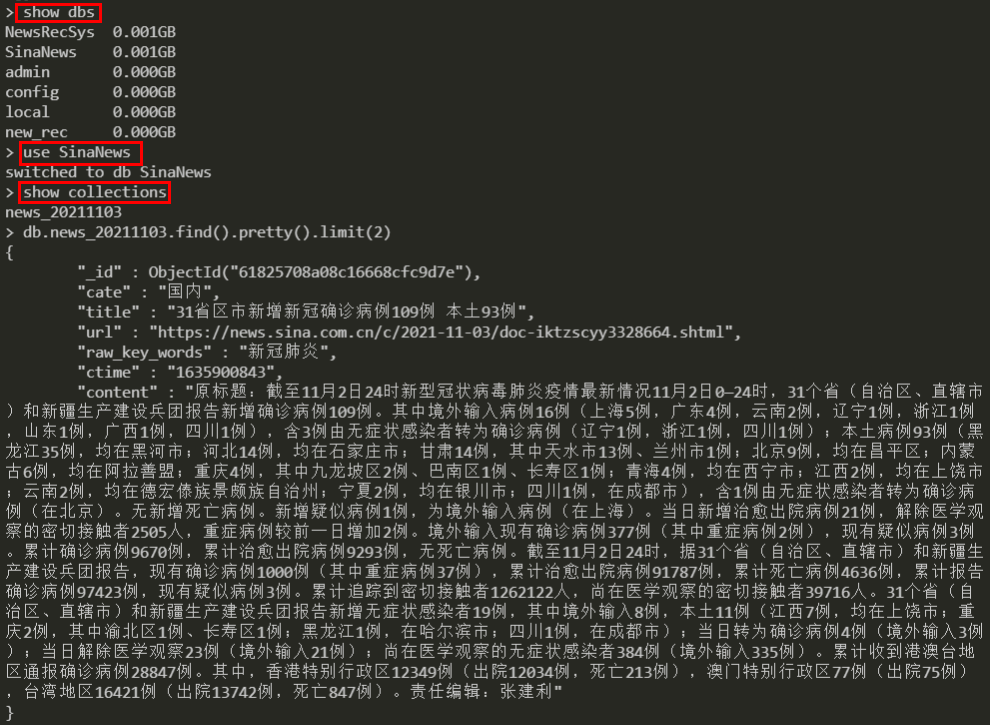
最终查看数据库中的数据: