17.2更加友好的Lua框架设计
文档摘要
17.2 更加友好的Lua框架设计 虽然上一节集成了Lua,并融入到了GameObject-Component的模式中,但是有很多槽点: GameObject同时管理着Cpp Component和Lua Component,并且两者是以Lua Table存在的。 Lua逻辑代码直接调用了导出的Cpp接口,没有隔离Lua逻辑与Cpp Native底层接口,且没有代码提示。 另外还有GameObject-Component的老问题: AddComponent传入的参数是组件名,而不是 这种形式。 GetComponent也是上面这个问题。 新老问题凑一堆,编写代码让人十分不爽,在使用Unity这么久之后,我觉得Unity集成Mono的经验可以套到Lua上。
17.2 更加友好的Lua框架设计
CLion项目文件位于 samples/integrate_lua/integrate_lua/lua_call_cpp_sol2_component_lua_wrap
虽然上一节集成了Lua,并融入到了GameObject-Component的模式中,但是有很多槽点:
- GameObject同时管理着Cpp Component和Lua Component,并且两者是以Lua Table存在的。
- Lua逻辑代码直接调用了导出的Cpp接口,没有隔离Lua逻辑与Cpp Native底层接口,且没有代码提示。
另外还有GameObject-Component的老问题:
- AddComponent传入的参数是组件名,而不是
AddComponent<Type>()这种形式。 - GetComponent也是上面这个问题。
新老问题凑一堆,编写代码让人十分不爽,在使用Unity这么久之后,我觉得Unity集成Mono的经验可以套到Lua上。
我们在编写Unity逻辑时,只是面对C#,而不会面向C++ 导出的API编程,就是说Unity对C++ Native接口,在C#层都进行了一层Wrap。
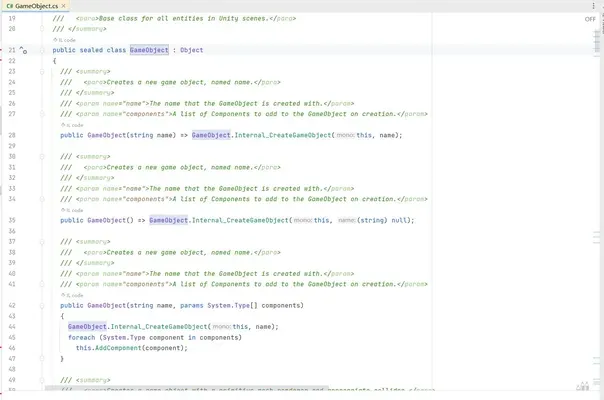
这样隔离了游戏引擎使用者和引擎开发者,同时C#层的Wrap可以提供代码提示等辅助功能,也可以进行一定的定制操作。
于是花了很久设计了更加友好的Lua框架。
新框架的目的:
- 支持使用
AddComponent<Type>()local animator=game_object:AddComponent(Animator) - 隔离,引擎使用者不需要接触到Cpp Native底层接口
- 有代码提示
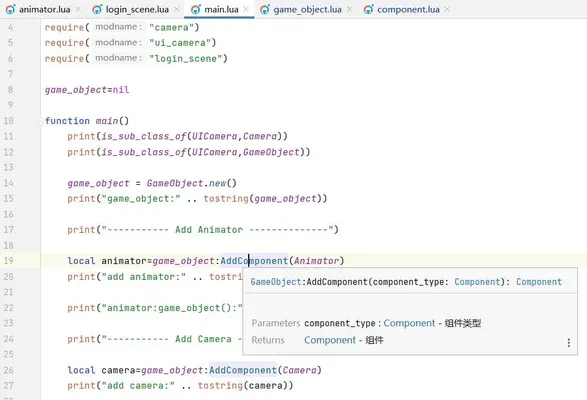
1. 项目结构
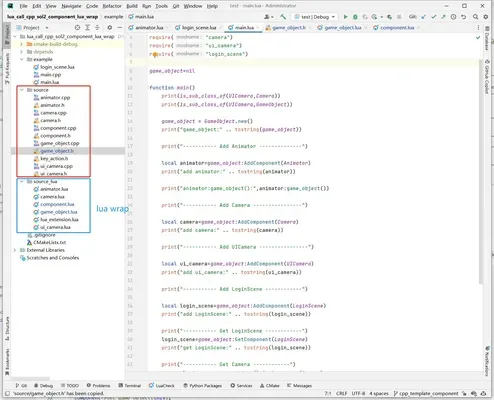
从项目文件结构就看出,对每个C++ Class,都有对应的Lua Wrap,这样就可以实现目的2、3,对引擎使用者隔离了CPP Native底层接口,并且可以添加代码提示。
2. AddComponent模板驱动
在C++侧,使用模板,来实现AddComponent<Type>()。
//file:source/game_object.h line:36 /// 添加组件,仅用于C++中添加组件。 /// \tparam T 组件类型 /// \return 组件实例 template <class T=Component> T* AddComponent(){ T* component=new T(); AttachComponent(component); component->Awake(); return dynamic_cast<T*>(component); } /// 附加组件实例 /// \param component_instance_table void AttachComponent(Component* component){ component->set_game_object(this); //获取类名 type t=type::get(*component); std::string component_type_name=t.get_name().to_string(); if(components_map_.find(component_type_name)==components_map_.end()){ std::vector<Component*> component_vec; component_vec.push_back(component); components_map_[component_type_name]=component_vec; }else{ components_map_[component_type_name].push_back(component); } }
在Lua侧,也有着单独的一套Component管理机制。
--file:source_lua/game_object.lua line:27 ---@param component_type Component @组件类型 ---@return Component @组件 function GameObject:AddComponent(component_type) local component_instance=component_type.new() if self.components_map_[component_type]==nil then self.components_map_[component_type]={} end table.insert(self.components_map_[component_type],component_instance) component_instance:set_game_object(self) return component_instance end --- 从GameObject上获取组件 --- @param component_type table @组件类型 --- @return table @组件实例 function GameObject:GetComponent(component_type) if self.components_map_[component_type] and #self.components_map_[component_type]>0 then return self.components_map_[component_type][1] end return nil end
Lua侧单独的Component管理机制,管理的其实是Lua侧的Component,而不是C++ 的Component。
来看下Lua Component的设计。
---file:source_lua/component.lua ---@class Component @组件 Component={} function Component:ctor() self.game_object_=nil self:InitCppComponent() self:SetToCpp() end --- 创建对应的C++实例 function Component:InitCppComponent() self.cpp_component_instance_=Cpp.Component() end --- 将Lua Component绑定到C++端 function Component:SetToCpp() self.cpp_component_instance_:set_lua_component_instance(self) end --- 返回组件所属的GameObject --- @return GameObject @返回组件所属的GameObject function Component:game_object() return self.game_object_ end function Component:set_game_object(game_object) self.game_object_=game_object game_object:cpp_game_object_instance():AttachComponent(self.cpp_component_instance_) self.cpp_component_instance_:Awake() end function Component:Awake() print("Component:Awake") end function Component:Update() print("Component:Update") end
以Animator这个C++ Component为例,当如下代码添加Animator:
--file:example/main.lua line:19 local animator=game_object:AddComponent(Animator)
首先走Lua GameObject:AddComponent(component_type) 接口。
--file:source_lua/game_object.lua line:27 ---@param component_type Component @组件类型 ---@return Component @组件 function GameObject:AddComponent(component_type) local component_instance=component_type.new() if self.components_map_[component_type]==nil then self.components_map_[component_type]={} end table.insert(self.components_map_[component_type],component_instance) component_instance:set_game_object(self) return component_instance end
这里实例化了Lua Component,首先执行构造函数。
---file:source_lua/component.lua ---@class Component @组件 Component={} function Component:ctor() self.game_object_=nil self:InitCppComponent() self:SetToCpp() end
先执行子类 Animator:InitCppComponent(),创建对应的C++实例。
--file:source_lua/animator.lua line:15 function Animator:InitCppComponent() ---@type Cpp.Animator self.cpp_component_instance_=Cpp.Animator() --创建对应的C++实例 end
然后将Lua Animator实例,注册到C++ Animator对象中。
--file:source_lua/component.lua line:22 --- 将Lua Component绑定到C++端 function Component:SetToCpp() self.cpp_component_instance_:set_lua_component_instance(self) end
//file:source/component.h line:25 /// 设置对应的Lua组件 /// \param lua_component_instance void set_lua_component_instance(sol::table& lua_component_instance){ lua_component_instance_=lua_component_instance; }
此时,Lua Animator 与 C++ Animator 就关联起来了,后续对 C++ Animator 的Awake() Update()就可以很方便的同步到 Lua Animator。
然后再让 C++ Animator 对象,挂到 GameObject 上。
function Component:set_game_object(game_object) self.game_object_=game_object game_object:cpp_game_object_instance():AttachComponent(self.cpp_component_instance_) self.cpp_component_instance_:Awake() end
这样,在Lua AddComponent的同时,也在C++ AddComponent了一份。
当C++ Animator调用Awake()时,同步到Lua Animator实例。
//file:source/component.h line:31 /// 同步调用Lua组件函数 /// \param function_name void SyncLuaComponent(const char* function_name){ if (!lua_component_instance_.valid()){ return; } sol::protected_function function_awake=lua_component_instance_[function_name]; if(!function_awake.valid()){ return; } auto result=function_awake(); if(result.valid()== false){ sol::error err = result; type t=type::get(this); std::string component_type_name=t.get_name().to_string(); SPDLOG_ERROR("\n---- RUN LUA_FUNCTION ERROR ----\nComponent call Awake error,type:{}\n{}\n------------------------",component_type_name,err.what()); } } virtual void Awake(){ std::cout<<"Cpp.Component Awake"<<std::endl; SyncLuaComponent("Awake"); }; virtual void Update(){ std::cout<<"Cpp.Component Update"<<std::endl; SyncLuaComponent("Update"); };
以AddComponent<Type>()这个接口,来描述新的框架设计:
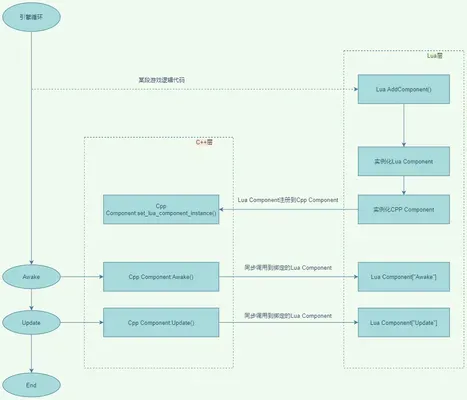
觉得比较绕的话,多调试几次就理解了。