18.4矩阵的主序
文档摘要
## 18.4 矩阵的主序 行主序,列主序是指计算机里一行一行存储,还是一列一列存储,数学上没有这个东西。 之前一直没有想过矩阵的主序问题,开始写Blender导出代码后,发现GLM和Blender矩阵格式不太一样,才开始学习这个。 1.数学上的矩阵 以位移举例来说明。 位移矩阵是作用于坐标向量的,所以是将矩阵放在向量前面,即 ,表示如下: $$ \left \begin{array}{cccc} 1 & 0 & 0 & x\\ 0 & 1 & 0 & y\\ 0 & 0 & 1 & z\\ 0 & 0 & 0 & 1 \end{array} \right| \left \begin{array}{cccc} x \\ y \\ z \\ 1 \end{array} \right $$
18.4 矩阵的主序
行主序,列主序是指计算机里一行一行存储,还是一列一列存储,数学上没有这个东西。
之前一直没有想过矩阵的主序问题,开始写Blender导出代码后,发现GLM和Blender矩阵格式不太一样,才开始学习这个。
1.数学上的矩阵
以位移举例来说明。
位移矩阵是作用于坐标向量的,所以是将矩阵放在向量前面,即trans * pos,表示如下:
数学上是没有行主序、列主序的定义的。
2.矩阵的内存布局
行主序、列主序指的是矩阵在内存中的存储方式。
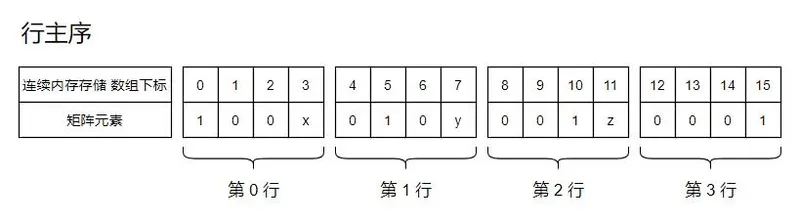
以上面的矩阵为例,行主序就是一行一行存储。
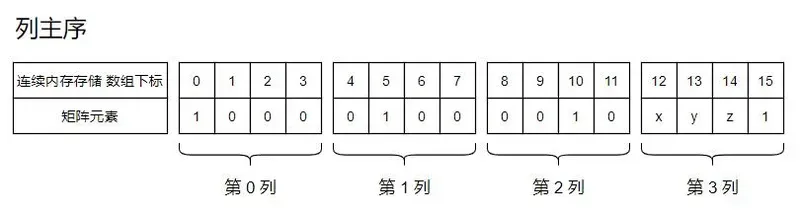
列主序就是一列一列存储。
3.Blender是行主序存储
下面代码输出T-Pos状态关节点的矩阵。
for i in range(0, len(bpy.context.visible_pose_bones)): bone = bpy.context.visible_pose_bones[i] matrix_local = armature_obj.data.bones[bone.name].matrix_local @ Matrix.Rotation(radians(-90), 4, "X") print(bone.name+":"+str(matrix_local))
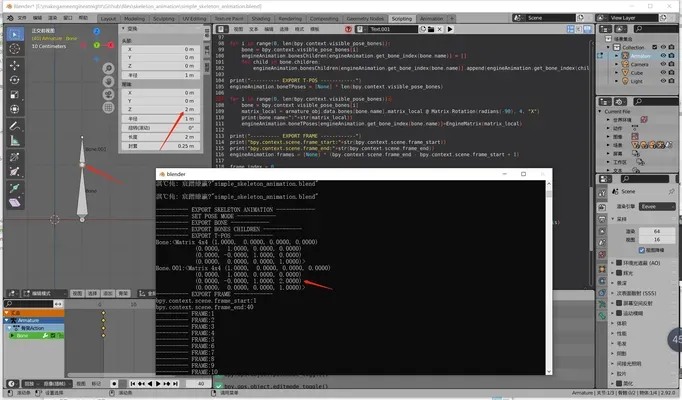
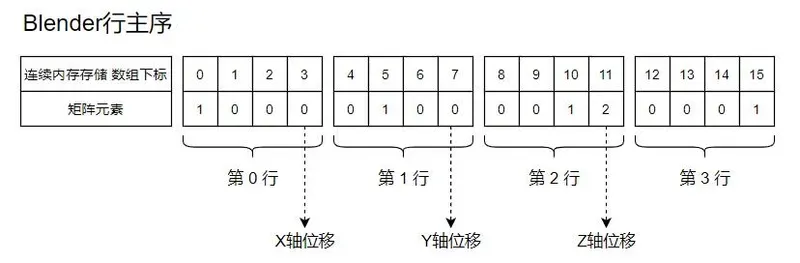
可以看到位移数据位于右侧一列,是行主序存储。
4.GLM是列主序存储
定义一个位移矩阵,x,y,z分别移动4,5,6,如下:
glm构造这个矩阵并输出:
glm::mat4 mat=glm::translate(glm::vec3(4.f,5.f,6.f)); std::cout<<glm::to_string_beauty(mat)<<std::endl;
输出的mat变量:
(1.000000, 0.000000, 0.000000, 0.000000), (0.000000, 1.000000, 0.000000, 0.000000), (0.000000, 0.000000, 1.000000, 0.000000), (4.000000, 5.000000, 6.000000, 1.000000)
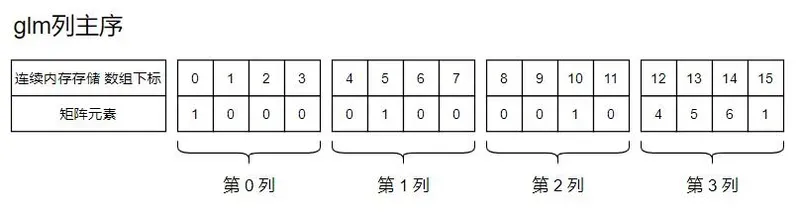
可以看到位移数据位于最下面一行,是列主序存储。
就是说数学上矩阵是这个形式:
只是glm用了列主序存储,所以打印出来是:
(1.000000, 0.000000, 0.000000, 0.000000), (0.000000, 1.000000, 0.000000, 0.000000), (0.000000, 0.000000, 1.000000, 0.000000), (4.000000, 5.000000, 6.000000, 1.000000)
将Blender的矩阵导出给glm使用,需要先转换一下。
乘法
如下代码:
glm::mat4 mat=glm::translate(glm::vec3(4.f,5.f,6.f)); std::cout<<glm::to_string_beauty(mat)<<std::endl; glm::vec4 pos=glm::vec4(7.f,8.f,9.f,1.f); std::cout<<glm::to_string(pos)<<std::endl; std::cout<<glm::to_string( mat * pos )<<std::endl;
位移矩阵左乘坐标向量,glm的乘法代码比较奇怪。
template <typename T, precision P> GLM_FUNC_QUALIFIER typename tmat4x4<T, P>::col_type operator* ( tmat4x4<T, P> const & m, typename tmat4x4<T, P>::row_type const & v ) { typename tmat4x4<T, P>::col_type const Mov0(v[0]); typename tmat4x4<T, P>::col_type const Mov1(v[1]); typename tmat4x4<T, P>::col_type const Mul0 = m[0] * Mov0; typename tmat4x4<T, P>::col_type const Mul1 = m[1] * Mov1; typename tmat4x4<T, P>::col_type const Add0 = Mul0 + Mul1; typename tmat4x4<T, P>::col_type const Mov2(v[2]); typename tmat4x4<T, P>::col_type const Mov3(v[3]); typename tmat4x4<T, P>::col_type const Mul2 = m[2] * Mov2; typename tmat4x4<T, P>::col_type const Mul3 = m[3] * Mov3; typename tmat4x4<T, P>::col_type const Add1 = Mul2 + Mul3; typename tmat4x4<T, P>::col_type const Add2 = Add0 + Add1; return Add2; }
以pos的每一位,构造了一个vec4,然后再和位移矩阵的每一行相乘,最后再相加。
整理一下代码,看的更明白。
template <typename T, precision P> GLM_FUNC_QUALIFIER typename tmat4x4<T, P>::col_type operator* ( tmat4x4<T, P> const & m, typename tmat4x4<T, P>::row_type const & v ) { typename tmat4x4<T, P>::col_type const Mov0(v[0]);//(7,7,7,7) typename tmat4x4<T, P>::col_type const Mov1(v[1]);//(8,8,8,8) typename tmat4x4<T, P>::col_type const Mov2(v[2]);//(9,9,9,9) typename tmat4x4<T, P>::col_type const Mov3(v[3]);//(1,1,1,1) typename tmat4x4<T, P>::col_type const Mul0 = m[0] * Mov0;//(1,0,0,0) * (7,7,7,7) = (7,0,0,0) typename tmat4x4<T, P>::col_type const Mul1 = m[1] * Mov1;//(0,1,0,0) * (8,8,8,8) = (0,8,0,0) typename tmat4x4<T, P>::col_type const Mul2 = m[2] * Mov2;//(0,0,1,0) * (9,9,9,9) = (0,0,9,0) typename tmat4x4<T, P>::col_type const Mul3 = m[3] * Mov3;//(4,5,6,1) * (1,1,1,1) = (4,5,6,1) //(7,0,0,0) + (0,8,0,0) + (0,0,9,0) + (4,5,6,1) = (7,8,9,0) + (4,5,6,1) typename tmat4x4<T, P>::col_type const Add2 = Mul0 + Mul1 + Mul2 + Mul3; return Add2; }
不论GLM的列主序也好,Blender的行主序也好,仅仅是存储形式的问题,在数学上都是指同一个矩阵。
Blender行主序,形式和数学上的一致,就可以直接拿来做计算。
GLM列主序,就转换一下,再拿来做计算。