18.2Blender导出骨骼动画
文档摘要
## 18.2 Blender导出骨骼动画 要导出哪些数据呢? 我们制作骨骼动画的时候,是先用父节点做大的摆动,然后再调整子节点。 子节点的坐标,是叠加了父节点的。 所以我们要导出节点间的父子关系,子节点相对父节点的位移。 以及每一帧父节点的移动,子节点的移动。 编写Blender代码 在Blender中可以很方便的用Python进行插件开发,具体如何运行插件代码在之前的 已经介绍过了。 我编写了一小段代码,将骨骼动画数据导出到自定义的格式。 代码文件位于: 值得注意的是,从Blender2.8之后,矩阵乘法用 替代 ,我在这上面浪费不少时间。 导出文件格式 执行上面代码后,得到了文件 。 文件结构如下: 下一篇就按照这个文件结构来进行解析,并播放骨骼动画。
18.2 Blender导出骨骼动画
要导出哪些数据呢?
我们制作骨骼动画的时候,是先用父节点做大的摆动,然后再调整子节点。
子节点的坐标,是叠加了父节点的。
所以我们要导出节点间的父子关系,子节点相对父节点的位移。
以及每一帧父节点的移动,子节点的移动。
1. 编写Blender代码
在Blender中可以很方便的用Python进行插件开发,具体如何运行插件代码在之前的第8章:绘制静态模型已经介绍过了。

我编写了一小段代码,将骨骼动画数据导出到自定义的格式。
代码文件位于:files\skeleton_animation\export_skeleton_animation.py
import bpy import json import os import struct from mathutils import Matrix from math import radians # 矩阵 class EngineMatrix: matrix = [] def __init__(self , blenderMatrix): self.matrix = [] for i in range(4): self.matrix.append([]) for j in range(4): self.matrix[i].append(blenderMatrix[j][i]) #调换y和z self.matrix[3][1] , self.matrix[3][2] = self.matrix[3][2] , self.matrix[3][1] def write_to_file(self , file): for i in range(4): for j in range(4): file.write(struct.pack('f' , self.matrix[i][j])) # 存储骨骼动画片段 class EngineAnimation: # 存储骨骼名字 [bone_name , bone_name , ...] bones=[] # 存储骨骼父子关系,数组下标表示第几个Bone [[1],[]] bonesChildren = [] # 存储骨骼 T-POSE,数组下标表示第几个Bone ["Bone.Matrix","Bone.001.Matrix"] boneTPoses = [] # 存储骨骼关键帧数据,外面数组下标表示第几帧,里面数组下表表示第几个Bone [["Bone.Matrix","Bone.001.Matrix"] , ["Bone.Matrix","Bone.001.Matrix"]] frames = [] def __init__(self): self.bonesChildren = {} self.boneTPoses = {} self.frames = {} def to_json(self): return json.dumps(self, default=lambda o: o.__dict__, sort_keys=True, indent=4) # 获取骨骼index def get_bone_index(self , boneName): return self.bones.index(boneName) def write_to_file(self , filePath): with open(filePath , "wb") as f: #写入文件头 f.write("skeleton_anim".encode()) #写入骨骼数量 f.write(struct.pack('H',len(self.bones))) #写入骨骼名字 for boneName in self.bones: f.write(struct.pack('H',len(boneName))) f.write(boneName.encode()) #写入骨骼父子关系 for boneChildren in self.bonesChildren: f.write(struct.pack('H',len(boneChildren))) for boneIndex in boneChildren: f.write(struct.pack('H',boneIndex)) #写入骨骼T-POSE for boneTPose in self.boneTPoses: boneTPose.write_to_file(f) # 写入关键帧帧数 f.write(struct.pack('H',len(self.frames))) #写入关键帧数据 for frame in self.frames: for boneMatrix in frame: boneMatrix.write_to_file(f) f.close() print("---------- EXPORT SKELETON ANIMATION ------------") engineAnimation=EngineAnimation() print("---------- SET POSE MODE ------------") if bpy.ops.object.mode_set.poll(): bpy.ops.object.mode_set(mode='POSE') armature_obj = bpy.data.objects["Armature"] print("---------- EXPORT BONE ------------") for i in range(0, len(bpy.context.visible_pose_bones)): bone = bpy.context.visible_pose_bones[i] engineAnimation.bones.append(bone.name) print("---------- EXPORT BONES CHILDREN ------------") engineAnimation.bonesChildren= [None] * len(bpy.context.visible_pose_bones) for i in range(0, len(bpy.context.visible_pose_bones)): bone = bpy.context.visible_pose_bones[i] engineAnimation.bonesChildren[engineAnimation.get_bone_index(bone.name)] = [] for child in bone.children: engineAnimation.bonesChildren[engineAnimation.get_bone_index(bone.name)].append(engineAnimation.get_bone_index(child.name)) print("---------- EXPORT T-POS ------------") engineAnimation.boneTPoses = [None] * len(bpy.context.visible_pose_bones) for i in range(0, len(bpy.context.visible_pose_bones)): bone = bpy.context.visible_pose_bones[i] matrix_local = armature_obj.data.bones[bone.name].matrix_local @ Matrix.Rotation(radians(-90), 4, "X") engineAnimation.boneTPoses[engineAnimation.get_bone_index(bone.name)]=EngineMatrix(matrix_local) print("---------- EXPORT FRAME ------------") print("bpy.context.scene.frame_start:"+str(bpy.context.scene.frame_start)) print("bpy.context.scene.frame_end:"+str(bpy.context.scene.frame_end)) engineAnimation.frames = [None] * (bpy.context.scene.frame_end - bpy.context.scene.frame_start + 1) frame_index = 0 for frame in range(bpy.context.scene.frame_start, bpy.context.scene.frame_end + 1): bpy.context.scene.frame_set(frame) print("---------- FRAME:"+str(frame)) engineAnimation.frames[frame_index] = [None] * len(bpy.context.visible_pose_bones) for i in range(0, len(bpy.context.visible_pose_bones)): bone = bpy.context.visible_pose_bones[i] matrix_basis = armature_obj.pose.bones[bone.name].matrix_basis # print(matrix_basis) engineAnimation.frames[frame_index][engineAnimation.get_bone_index(bone.name)]=EngineMatrix(matrix_basis) frame_index = frame_index + 1 print("---------- WRITE FILE ------------") blender_project_dir = os.path.dirname(bpy.data.filepath) if os.path.exists(blender_project_dir+"/export")==False: os.mkdir(blender_project_dir+"/export") engineAnimation.write_to_file(blender_project_dir+"/export/export.skeleton_anim") print("---------- EXPORT SUCCESS ------------") # print(engineAnimation.to_json())
值得注意的是,从Blender2.8之后,矩阵乘法用 @ 替代 *,我在这上面浪费不少时间。
Blender 2.80: Python API Changes https://wiki.blender.org/wiki/Reference/Release_Notes/2.80/Python_API#Matrix_Multiplication
2. 导出文件格式
执行上面代码后,得到了文件export.skeleton_anim。
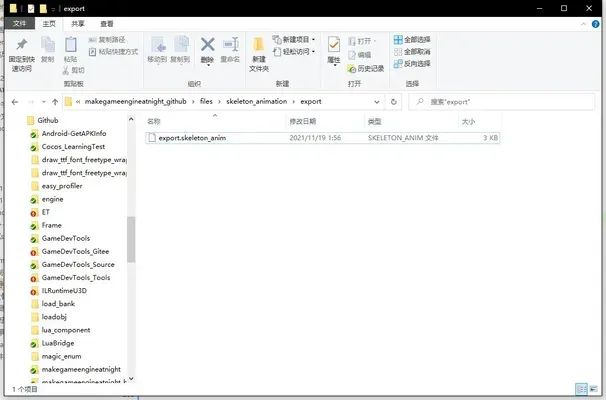
文件结构如下:

下一篇就按照这个文件结构来进行解析,并播放骨骼动画。
3. 其他
有一些东西需要注意:
-
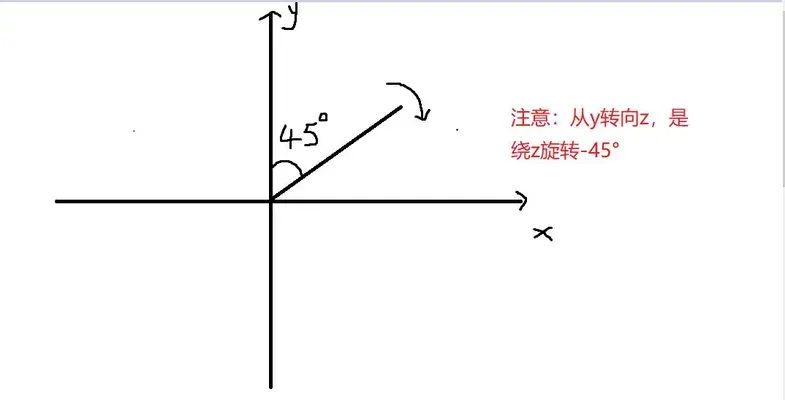
绕Z轴旋转,从Y转向X,角度是负数。
-
Blender是行主序,和数学上的表现一致,可以直接用作代数运算。
-
GLM是列主序,Blender导出到GLM要转换。
-
Blender T-Pos是Z朝上,导出到GLM要转换。
参考了以下文章:
https://docs.blender.org/api/2.93/bpy.context.html#bpy.context.visible_objects https://gamedev.stackexchange.com/questions/44058/exporting-bind-and-keyframe-bone-poses-from-blender-to-use-in-opengl