2.2.2分词方法介绍
文档摘要
comments: true title: 分词器 tokenizers 加载分词器 方法用于加载预训练的分词器。以下是该方法常用的参数及其介绍。 参数名称 | 功能 | 所要加载的分词器,其值为预训练模型名称或模型在本地的路径。 | 是否使用基于 的快速分词器。如果设置为 且模型支持快速分词器,则将优先使用快速分词器。否则,将使用基于 的标准分词器。 | 是否允许执行远程代码。默认情况下,为了安全起见,默认是关闭的。如果开发者完全信任代码来源,可以启用它以获得额外的功能,但请谨慎操作,因为这会增加安全风险。 经过上述代码,会产生一个与所预训练模型相对应的分词器实例。 !!! note "备注" 如果加载的是 模型,那么代码会返回一个 实例。
comments: true title: 分词器
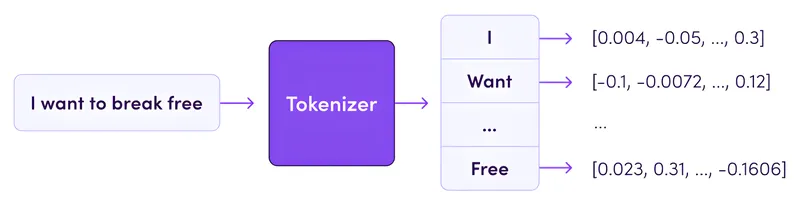
加载分词器
from_pretrained()方法用于加载预训练的分词器。以下是该方法常用的参数及其介绍。
from transformers import AutoTokenizer tokenizer = AutoTokenizer.from_pretrained('hfl/chinese-roberta-wwm-ext')
| 参数名称 | 功能 |
|---|---|
pretrained_model_name_or_path |
所要加载的分词器,其值为预训练模型名称或模型在本地的路径。 |
use_fast |
是否使用基于Rust的快速分词器。如果设置为True且模型支持快速分词器,则将优先使用快速分词器。否则,将使用基于Python的标准分词器。 |
trust_remote_code |
是否允许执行远程代码。默认情况下,为了安全起见,默认是关闭的。如果开发者完全信任代码来源,可以启用它以获得额外的功能,但请谨慎操作,因为这会增加安全风险。 |
经过上述代码,会产生一个与所预训练模型相对应的分词器实例。
!!! note "备注"
- 如果加载的是bert-base-uncased 模型,那么代码会返回一个BertTokenizer实例。
- 如果加载的是gpt2模型,那么代码会返回一个 GPT2Tokenizer 实例。
- \cdots
分词器属性与方法
分词器实例常用的方法和属性会因具体的分词器类而略有不同,但一般都会包含以下常用方法和属性:
| 方法 | 说明 | 输入示例 | 输出示例 |
|---|---|---|---|
tokenize(text) |
将文本分割成词或子词列表 | "这是一个句子。" |
['这', '是', '一', '个', '句', '子', '。'] |
encode(text) |
将文本编码成数字序列 | "这是一个句子。" |
[101, 6821, 3221, 671, 702, 1368, 2094, 511, 102] |
decode(ids) |
将数字序列解码回文本 | [101, 6821, 3221, 671, 702, 1368, 2094, 511, 102] |
'[CLS] 这是一个句子。 [SEP]' |
add_special_tokens(token_ids) |
添加特殊标记 | ||
convert_tokens_to_ids(tokens) |
将词或子词列表转换为数字 ID 列表 | ['这', '是', '一'] |
[6821, 3221, 671] |
convert_ids_to_tokens(ids) |
将数字 ID 列表转换为词或子词列表 | [1368, 2094, 511] |
['句', '子', '。'] |
save_pretrained(save_directory) |
保存分词器到本地目录 | "./local_chinese-roberta-wwm-ext" |
| 属性 | 说明 | 示例 | |
|---|---|---|---|
vocab_size |
词汇表大小 | tokenizer.vocab_size |
21128 |
bos_token |
开头标记 | tokenizer.bos_token |
None |
eos_token |
结尾标记 | tokenizer.eos_token |
None |
unk_token |
未知词标记 | tokenizer.unk_token |
'[UNK]' |
sep_token |
分隔符标记 | tokenizer.sep_token |
'[SEP]' |
pad_token |
填充标记 | tokenizer.pad_token |
'[PAD]' |
cls_token |
分类标记 | tokenizer.cls_token |
'[CLS]' |
mask_token |
掩码标记 | tokenizer.mask_token |
'[MASK]' |
vocab |
词汇表,词或子词到数字的映射 | tokenizer.vocab['[CLS]'] |
101 |
编码函数
在分词器的使用中,最重要的方法就是编码函数,因此需要单独了解编码函数。
def encode( self, text: Union[TextInput, PreTokenizedInput, EncodedInput], text_pair: Optional[Union[TextInput, PreTokenizedInput, EncodedInput]] = None, add_special_tokens: bool = True, padding: Union[bool, str, PaddingStrategy] = False, truncation: Union[bool, str, TruncationStrategy] = None, max_length: Optional[int] = None, stride: int = 0, return_tensors: Optional[Union[str, TensorType]] = None, **kwargs, ) -> List[int]:
以下是编码函数常用的参数、参数类型、默认值对照表。
| 参数 | 类型 | 默认值 | 说明 |
|---|---|---|---|
text |
Union[str, List[str], List[int]] |
进行编码时第一个句子。 | |
text_pair |
Optional[Union[str, List[str], List[int]]] |
None |
进行编码时第二个句子。 |
add_special_tokens |
bool |
True |
编码序列时是否添加特殊标记。 |
padding |
Union[bool, str, PaddingStrategy] |
False |
控制是否进行填充。 |
truncation |
Union[bool, str, TruncationStrategy] |
False |
控制当序列长度超过 max_length 时是否进行截断。 |
max_length |
Optional[int] |
None |
控制截断和填充参数使用的最大长度。 |
return_tensors |
Optional[Union[str, TensorType]] |
None |
默认为列表数据类型,也可以设置为 'tf','pt','np',分别表示返回的结果为 TensorFlow,PyTorch,Numpy 格式。 |
text = "这是一个测试句子。" text_pair = "这是第二个句子。" encoded_inputs = tokenizer(text, text_pair, add_special_tokens=False) encoded_inputs = tokenizer(text, text_pair, add_special_tokens=True)
{ 'input_ids': [ 6821, 3221, 671, 702, 3844, 6407, 1368, 2094, 511, 6821, 3221, 5018, 753, 702, 1368, 2094, 511 ], 'token_type_ids': [ 0, 0, 0, 0, 0, 0, 0, 0, 0, 1, 1, 1, 1, 1, 1, 1, 1 ], 'attention_mask': [ 1, 1, 1, 1, 1, 1, 1, 1, 1, 1, 1, 1, 1, 1, 1, 1, 1 ] }
{ 'input_ids': [ 101, 6821, 3221, 671, 702, 3844, 6407, 1368, 2094, 511, 102, 6821, 3221, 5018, 753, 702, 1368, 2094, 511, 102, ], 'token_type_ids': [ 0, 0, 0, 0, 0, 0, 0, 0, 0, 0, 0, 1, 1, 1, 1, 1, 1, 1, 1, 1, 1, ], 'attention_mask': [ 1, 1, 1, 1, 1, 1, 1, 1, 1, 1, 1, 1, 1, 1, 1, 1, 1, 1, 1, 1, 1, ] }
input_ids: 将输入文本分词并转换后对应于词汇表的索引。token_type_ids: 区分两个句子,第一个句子所有词的ID为0,第二个句子所有词的ID为1。attention_mask: 标识哪些是真实词(值为1),哪些是填充词(值为0)。这里没有填充,所以全是1。- 与 "不添加特殊标记" 相比,这里添加了:
[CLS]标记 (ID: 101) 在句子开头。[SEP]标记 (ID: 102) 在第一个句子末尾和整个输入末尾。
encoded_inputs = tokenizer( ["这是一个测试句子。", "这。"], padding="max_length", # 设置填充方式为 'max_length' truncation=True, # 句子长度超过 max_length 时进行截断 max_length=10, # 设置最大长度 return_tensors="pt", # 返回 PyTorch 张量 )
{ 'input_ids': tensor( [ [101, 6821, 3221, 671, 702, 3844, 6407, 1368, 2094, 102], [101, 6821, 511, 102, 0, 0, 0, 0, 0, 0], ] ), 'token_type_ids': tensor( [ [0, 0, 0, 0, 0, 0, 0, 0, 0, 0], [0, 0, 0, 0, 0, 0, 0, 0, 0, 0], ] ), 'attention_mask': tensor( [ [1, 1, 1, 1, 1, 1, 1, 1, 1, 1], [1, 1, 1, 1, 0, 0, 0, 0, 0, 0] # 只关注前4个token ] ) }
encoded_inputs = tokenizer(text, text_pair, truncation=False) encoded_inputs = tokenizer(text, text_pair, max_length=10, truncation=True)
{ 'input_ids': [ 101, 6821, 3221, 671, 702, 3844, 6407, 1368, 2094, 511, 102, 6821, 3221, 5018, 753, 702, 1368, 2094, 511, 102 ], 'token_type_ids': [ 0, 0, 0, 0, 0, 0, 0, 0, 0, 0, 0, 1, 1, 1, 1, 1, 1, 1, 1, 1 ], 'attention_mask': [ 1, 1, 1, 1, 1, 1, 1, 1, 1, 1, 1, 1, 1, 1, 1, 1, 1, 1, 1, 1 ] }
{ "input_ids": [101, 6821, 3221, 671, 702, 102, 6821, 3221, 5018, 102], "token_type_ids": [0, 0, 0, 0, 0, 0, 1, 1, 1, 1], "attention_mask": [1, 1, 1, 1, 1, 1, 1, 1, 1, 1] }
- 将输入文本截断到最大长度,保留了
[CLS]和[SEP]标记,并截取了部分句子内容。
encoded_inputs = tokenizer(text, text_pair, return_tensors=None) encoded_inputs = tokenizer(text, text_pair, return_tensors="pt") encoded_inputs = tokenizer(text, text_pair, return_tensors="tf") encoded_inputs = tokenizer(text, text_pair, return_tensors="np")
{ 'input_ids': tensor([[101, 6821, 3221, 671, 702, 3844, 6407, 1368, 2094, 511, 102, 6821, 3221, 5018, 753, 702, 1368, 2094, 511, 102]]), 'token_type_ids': tensor([[0, 0, 0, 0, 0, 0, 0, 0, 0, 0, 0, 1, 1, 1, 1, 1, 1, 1, 1, 1]]), 'attention_mask': tensor([[1, 1, 1, 1, 1, 1, 1, 1, 1, 1, 1, 1, 1, 1, 1, 1, 1, 1, 1, 1]]) }
{ 'input_ids': <tf.Tensor: shape=(1, 20), dtype=int32, numpy= array([[ 101, 6821, ..., 511, 102]])>, 'token_type_ids': <tf.Tensor: shape=(1, 20), dtype=int32, numpy=array([[0, 0, ..., 1, 1]])>, 'attention_mask': <tf.Tensor: shape=(1, 20), dtype=int32, numpy=array([[1, 1, ..., 1, 1]])> }
{ 'input_ids': array([[101, 6821, ..., 511, 102]]), 'token_type_ids': array([[0, 0, ..., 1, 1]]), 'attention_mask': array([[1, 1, ..., 1, 1]]) }
评论区
(0)
U