5.1 reshape与transpose的布局戏法
文档摘要
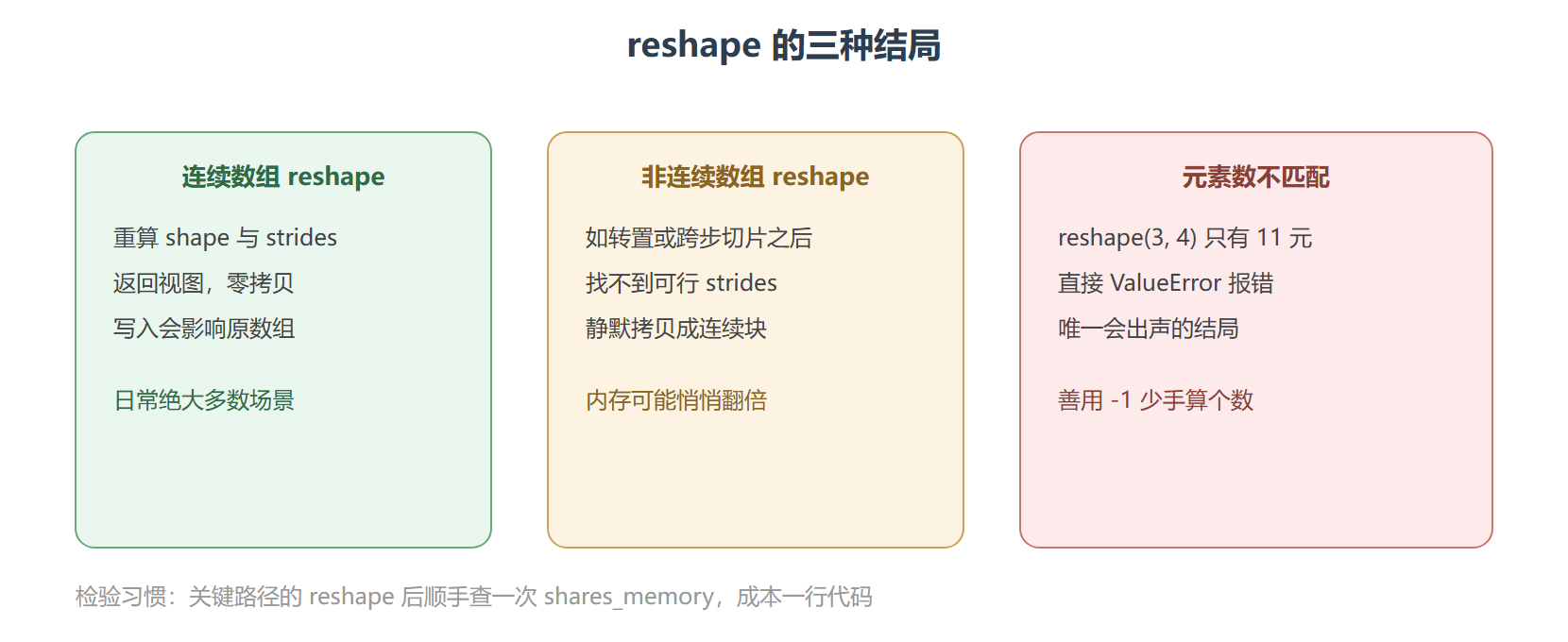
5.1 reshape与transpose的布局戏法 本节摘要:reshape 在内存连续时只重算 shape 与 strides,返回视图;转置 transpose 只交换 strides 中对应维度的步长,永远零拷贝。但当两者叠加(对非连续数组 reshape)时,NumPy 会静默拷贝。本节拆解这两个函数的机器动作,给出零拷贝条件表与图像通道格式转换的完整案例。 reshape:多数时候只改两个字段 reshape 能不能只改字段,取决于"新形状能否被原数组的某套 strides 描述"。连续数组几乎总能,所以日常 90% 的 reshape 都是免费的。 零拷贝失效的典型是对转置结果 reshape: 静默是这里的关键词:不报错、不打招呼,一份几 GB 的数组可能就这样翻倍。
5.1 reshape与transpose的布局戏法
本节摘要:reshape 在内存连续时只重算 shape 与 strides,返回视图;转置 transpose 只交换 strides 中对应维度的步长,永远零拷贝。但当两者叠加(对非连续数组 reshape)时,NumPy 会静默拷贝。本节拆解这两个函数的机器动作,给出零拷贝条件表与图像通道格式转换的完整案例。
reshape:多数时候只改两个字段
import numpy as np a = np.arange(12) # 连续一维 m = a.reshape(3, 4) # 变二维 print(m) # [[ 0 1 2 3] # [ 4 5 6 7] # [ 8 9 10 11]] print(np.shares_memory(m, a)) # True —— 视图 # -1 让 NumPy 自己算那一维 print(a.reshape(2, -1).shape) # (2, 6) print(a.reshape(-1,).shape) # (12,) # 改视图会怎样?共享内存,一如既往 m[0, 0] = 99 print(a[0]) # 99
reshape 能不能只改字段,取决于"新形状能否被原数组的某套 strides 描述"。连续数组几乎总能,所以日常 90% 的 reshape 都是免费的。
零拷贝失效的典型是对转置结果 reshape:
import numpy as np m = np.arange(6).reshape(2, 3) mt = m.T # strides 从 (24,8) 变 (8,24),仍是视图 print(np.shares_memory(mt, m)) # True r = mt.reshape(3, 2) # 想再变回 3x2 print(np.shares_memory(r, m)) # False —— 静默拷贝发生了! # 原因:转置后的内存排列是 0 3 1 4 2 5(按列走) # 而 reshape 要按行读出 0 3 1 / 4 2 5,不存在能描述这种跳跃的 strides # NumPy 只能先拷出一份新的连续数据
静默是这里的关键词:不报错、不打招呼,一份几 GB 的数组可能就这样翻倍。防御手段是关键路径上补一行 shares_memory 断言,或明确写 mt.reshape(3, 2) 前先想清楚数据要不要重排(要重排其实等价于拷贝语义)。
reshape 三种结局
transpose:交换步长的把戏
transpose 家族有三个常用成员:
import numpy as np m = np.arange(6).reshape(2, 3) print(m.T) # 二维专用的简写 # [[0 3] # [1 4] # [2 5]] print(np.transpose(m, (1, 0))) # 通用形式:轴顺序 (1,0) print(m.transpose(1, 0)) # 方法形式等价 # 三维才是 transpose 的主场:指定轴的任意排列 cube = np.arange(24).reshape(2, 3, 4) swapped = cube.transpose(1, 0, 2) # 交换前两维,第三维不动 print(swapped.shape) # (3, 2, 4) # swapaxes 只换两个轴,更轻量 print(cube.swapaxes(0, 2).shape) # (4, 3, 2)
转置永远零拷贝,但别忘 2.1 节的提醒:转置后的数组沿"新行方向"不再连续,后续大量计算可能变慢。一次转置免费、亿次访问买单。
案例:图像通道格式互转
完整过程。背景:深度学习框架吃 HWC 格式(高、宽、通道),某些预处理库输出 CHW(通道、高、宽),1080p 三通道图要来回转换。
操作:
import numpy as np import time h, w, c = 1080, 1920, 3 hwc = np.random.rand(h, w, c).astype(np.float32) # 约 24MB t0 = time.perf_counter() chw = hwc.transpose(2, 0, 1) # 零拷贝,瞬间完成 t1 = time.perf_counter() print("transpose 耗时:", round((t1 - t0) * 1000, 3), "毫秒") # 0.001 毫秒级 print("形状:", chw.shape) # (3, 1080, 1920) print("C 连续:", chw.flags["C_CONTIGUOUS"]) # False! # 下游接口要求连续时的真实成本 t0 = time.perf_counter() chw_c = np.ascontiguousarray(chw) t1 = time.perf_counter() print("转连续耗时:", round((t1 - t0) * 1000, 3), "毫秒") # 约 15 至 30 毫秒
结果:transpose 本身快到测不出,落成连续块要十几毫秒(24MB 数据的物理重排)。解读:如果下游每个 batch 都要连续 CHW,正确的做法是在数据预处理管线里一次性转好存盘,而不是训练循环里每次现转——免费的 transpose 加上不免费的连续化,等于每次都在付 20 毫秒的隐形税。变式:若下游只是偶尔整块读取,直接用非连续视图也没问题,连续化只在"反复访问"时才值得。
快问快答两则
问:reshape 和 resize 有什么区别?
答:reshape 不动数据块(能视图则视图),元素数必须不变;resize 会真的重新分配并搬移内存,可以改变元素总数(填零或截断),对已有其他引用的数组用 resize 还会报警。日常 99% 的场景用 reshape,resize 几乎只在图像缩放类需求里出现。
问:怎么快速确认一次 reshape 有没有偷偷拷贝?
答:一行断言:assert np.shares_memory(new, old)。视图成立则通过;拷贝发生则断言失败,提醒你这里的内存预算要按新块计算。把这类断言留在测试里,将来数据规模变化时它会替你把住关口。
import numpy as np a = np.arange(24).reshape(2, 3, 4) flat_view = a.reshape(24) # 连续,视图 t_view = a.transpose(1, 0, 2) # 转置,视图 combo = t_view.reshape(4, 6) # 大概率拷贝! print(np.shares_memory(flat_view, a)) # True print(np.shares_memory(t_view, a)) # True print(np.shares_memory(combo, a)) # False
本节要点回顾
- reshape 机制:连续数组只改 shape 与 strides 返回视图;非连续数组静默拷贝
- -1 占位:让 NumPy 自动推算某一维,防手算出错
- transpose 机制:交换或重排 strides,永远零拷贝,但结果不连续
- 静默拷贝风险:转置加 reshape 组合是内存翻倍的常见现场,关键路径加断言
- 决策顺序:先问"下游要连续吗",再决定是否 ascontiguousarray
下一节把形状操作补完:展平的两个孪生函数与维度升降的工具对。