IVF算法
文档摘要
IVF算法 算法原理分步详解 第一阶段:索引构建(建库与分类) 构建索引的目的是为数据建立一个高效的结构化目录,这个过程通常是离线完成的。 1.聚类训练(Clustering) 使用聚类算法(最常用的是 K-Means)将所有向量划分成 nlist个簇(clusters)。nlist是一个关键参数,它决定了空间划分的粒度。每个簇都有一个中心点,称为质心(centroid)。所有这些质心构成了一个“质心表”,相当于图书馆的总分类目录。 2.向量分配(Assignment) 遍历数据集中的每一个向量,计算它与所有质心的距离(如欧氏距离)。将每个向量分配到距离它最近的那个质心所对应的簇中。 3.
IVF算法
算法原理分步详解
第一阶段:索引构建(建库与分类)
构建索引的目的是为数据建立一个高效的结构化目录,这个过程通常是离线完成的。
1.聚类训练(Clustering)
使用聚类算法(最常用的是 K-Means)将所有向量划分成 nlist个簇(clusters)。nlist是一个关键参数,它决定了空间划分的粒度。每个簇都有一个中心点,称为质心(centroid)。所有这些质心构成了一个“质心表”,相当于图书馆的总分类目录。
2.向量分配(Assignment)
遍历数据集中的每一个向量,计算它与所有质心的距离(如欧氏距离)。将每个向量分配到距离它最近的那个质心所对应的簇中。
3.形成倒排列表(Inverted Lists)
为每一个簇建立一个倒排列表(或称“张贴列表”)。这个列表就像图书馆每个分类书架上的图书清单,它记录了所有属于这个簇的向量的ID以及向量本身(或它的压缩表示)。至此,索引构建完成。
第二阶段:查询处理(快速检索)
当一个新的查询向量到来时,IVF利用已构建好的索引进行快速检索。
1.定位最近簇(Coarse Quantization)
计算查询向量与质心表中所有 nlist个质心的距离。
2.选择候选簇(nprobe 参数控制)
根据上一步的距离结果,选择距离最近的 nprobe个簇作为候选簇。nprobe是IVF算法中最关键的调优参数之一:
nprobe越小,搜索范围越小,速度越快,但可能漏掉一些真正近邻(召回率降低)。
nprobe越大,搜索范围越大,召回率越高,但计算量增大,速度变慢。
3.簇内精细比较(Fine Comparison)
在选定的 nprobe个候选簇的倒排列表中,进行精细的距离计算。
具体方式取决于IVF的变体:
- IVF-Flat:直接使用原始的、未压缩的向量与查询向量进行精确距离计算。这种方式精度最高,但内存占用也最大。
- IVF-PQ:为了进一步节省内存和加速计算,会对簇内向量使用乘积量化(Product Quantization) 进行压缩。搜索时使用近似距离计算,这是一种用少量精度换取巨大存储和计算效率提升的策略。
4.结果合并与返回
将所有候选簇中的向量根据与查询向量的距离进行排序,最终返回 Top-K 个最相似的向量作为结果。
VF的性能和效果很大程度上取决于两个核心参数的设置,它们就像这个系统的“调速器”:
- nlist(聚类数):决定了空间的划分粒度。nlist 越大,搜索范围越大,召回率越高;但同时也增加了计算量。
- nprobe(候选簇数):控制了搜索的范围。nprobe 越小,搜索越快,但可能会漏掉一些近邻;nprobe 越大,搜索范围越大,召回率越高,但计算量增大。
IVF算法实现
IVF算法Python实现
首先,我们导入必要的库:
import numpy as np from sklearn.metrics.pairwise import cosine_similarity, euclidean_distances import matplotlib.pyplot as plt import time from collections import defaultdict plt.rcParams['font.sans-serif'] = ['Hiragino Sans GB', 'STHeiti', 'PingFang SC', 'Microsoft YaHei', 'Arial Unicode MS', 'DejaVu Sans'] plt.rcParams['axes.unicode_minus'] = False # 设置随机种子以保证结果可重现 np.random.seed(42)
** 第一步:生成模拟数据**
我们创建一些简单的二维数据,方便可视化理解:
def generate_sample_data(n_samples=1000, dim=2): """生成示例数据:三个明显分离的高斯分布簇""" # 第一个簇 cluster1 = np.random.normal(loc=[2, 2], scale=0.5, size=(n_samples//3, dim)) # 第二个簇 cluster2 = np.random.normal(loc=[8, 3], scale=0.6, size=(n_samples//3, dim)) # 第三个簇 cluster3 = np.random.normal(loc=[5, 8], scale=0.4, size=(n_samples - 2*(n_samples//3), dim)) data = np.vstack([cluster1, cluster2, cluster3]) return data # 生成数据 data = generate_sample_data() print(f"数据形状: {data.shape}")
输出结果:
数据形状: (1000, 2)
⚙️ 第二步:手动实现K-means聚类
这是IVF算法的核心预处理步骤:
class SimpleKMeans: """简化的K-means实现用于IVF聚类""" def __init__(self, n_clusters=3, max_iters=100): self.n_clusters = n_clusters self.max_iters = max_iters self.centroids = None self.labels_ = None def fit(self, X): n_samples, n_features = X.shape # 1. 随机初始化质心 random_indices = np.random.choice(n_samples, self.n_clusters, replace=False) self.centroids = X[random_indices] for iteration in range(self.max_iters): # 2. 分配每个点到最近的质心 distances = euclidean_distances(X, self.centroids) labels = np.argmin(distances, axis=1) # 3. 更新质心位置 new_centroids = np.array([X[labels == i].mean(axis=0) for i in range(self.n_clusters)]) # 检查收敛 if np.allclose(self.centroids, new_centroids): break self.centroids = new_centroids self.labels_ = labels return self
** 第三步:实现倒排文件索引(IVF)**
现在实现完整的IVF索引结构:
class SimpleIVF: """简化的IVF实现""" def __init__(self, n_clusters=3, n_probe=2): self.n_clusters = n_clusters self.n_probe = n_probe # 搜索时探测的簇数量 self.kmeans = None self.inverted_lists = None # 倒排列表 self.centroids = None self.is_trained = False def train(self, data): """训练IVF索引:对数据进行聚类""" print("开始训练IVF索引...") self.kmeans = SimpleKMeans(n_clusters=self.n_clusters) self.kmeans.fit(data) self.centroids = self.kmeans.centroids self.is_trained = True print(f"训练完成,得到{self.n_clusters}个簇") def build_index(self, data): """构建倒排索引""" if not self.is_trained: self.train(data) # 初始化倒排列表 self.inverted_lists = defaultdict(list) # 将每个向量分配到最近的簇 distances = euclidean_distances(data, self.centroids) labels = np.argmin(distances, axis=1) # 构建倒排列表:簇ID -> 该簇中所有向量的索引 for idx, label in enumerate(labels): self.inverted_lists[label].append(idx) print("倒排索引构建完成:") for cluster_id, items in self.inverted_lists.items(): print(f" 簇{cluster_id}: {len(items)}个向量") def search(self, query, k=5, data=None): """IVF搜索:先找最近的簇,然后在簇内搜索""" if data is None: data = self.data # 1. 粗略搜索:找到最近的n_probe个簇 distances_to_centroids = euclidean_distances([query], self.centroids)[0] nearest_cluster_indices = np.argsort(distances_to_centroids)[:self.n_probe] # 2. 精细搜索:在选中的簇内进行暴力搜索 candidate_indices = [] for cluster_idx in nearest_cluster_indices: candidate_indices.extend(self.inverted_lists[cluster_idx]) if not candidate_indices: return [], [] # 在候选向量中计算距离 candidate_vectors = data[candidate_indices] distances = euclidean_distances([query], candidate_vectors)[0] # 获取最近的k个结果 if k > len(distances): k = len(distances) nearest_indices_within_candidates = np.argsort(distances)[:k] # 映射回原始索引 final_indices = [candidate_indices[i] for i in nearest_indices_within_candidates] final_distances = distances[nearest_indices_within_candidates] return final_indices, final_distances def brute_force_search(self, query, k=5, data=None): """暴力搜索作为对比基准""" if data is None: data = self.data distances = euclidean_distances([query], data)[0] nearest_indices = np.argsort(distances)[:k] return nearest_indices, distances[nearest_indices]
** 第四步:算法实现**
让我们用一个完整的例子来展示IVF的工作原理:
def demonstrate_ivf(data_size=300): """完整演示IVF算法""" print("=" * 60) print("IVF算法演示") print("=" * 60) # 1. 生成数据 data = generate_sample_data(data_size, 2) print(f"生成{len(data)}个二维数据点") # 2. 创建并训练IVF索引 ivf = SimpleIVF(n_clusters=3, n_probe=2) ivf.data = data # 保存数据引用 ivf.build_index(data) # 3. 选择一个查询点 query_point = np.array([5.0, 5.0]) print(f"\n查询点: {query_point}") # 4. 使用IVF搜索 start_time = time.time() ivf_indices, ivf_distances = ivf.search(query_point, k=5, data=data) ivf_time = time.time() - start_time # 5. 使用暴力搜索作为对比 start_time = time.time() bf_indices, bf_distances = ivf.brute_force_search(query_point, k=5, data=data) bf_time = time.time() - start_time # 6. 显示结果 print(f"\n搜索结果对比:") print(f"IVF搜索 - 找到{len(ivf_indices)}个最近邻, 耗时: {ivf_time:.6f}秒") print(f"暴力搜索 - 找到{len(bf_indices)}个最近邻, 耗时: {bf_time:.6f}秒") print(f"\n速度提升: {bf_time/ivf_time:.2f}倍") print(f"\n最近邻索引 (IVF): {ivf_indices}") print(f"最近邻索引 (暴力): {bf_indices}") # 7. 检查召回率 intersection = set(ivf_indices) & set(bf_indices) recall = len(intersection) / len(bf_indices) print(f"召回率: {recall:.2%} ({len(intersection)}/{len(bf_indices)})") return ivf, data, query_point, ivf_indices, bf_indices # 运行演示 ivf, data, query, ivf_results, bf_results = demonstrate_ivf(data_size=50000)
结果输出:
============================================================ IVF算法演示 ============================================================ 生成: 50,000个二维数据点 IVF参数配置: 聚类数量 (n_clusters): 111 搜索簇数 (n_probe): 13 开始训练IVF索引... 训练完成,得到111个簇 倒排索引构建完成「展示前5个簇」: 簇23: 314个向量 簇43: 348个向量 簇59: 166个向量 簇6: 687个向量 簇32: 682个向量 查询点: [5 5] 搜索结果对比: IVF搜索 - 找到10个最近邻, 耗时: 0.001200秒 暴力搜索 - 找到10个最近邻, 耗时: 0.004839秒 速度提升: 4.03倍 搜索比例: 10.0% (5,011/50,000) 最近邻索引 (IVF): [26738, 18695, 49731, 35576, 47988, 31669, 44706, 41498, 35176, 44646] 最近邻索引 (暴力): [26738 18695 49731 35576 47988 31669 44706 41498 35176 44646] 召回率: 100.0% (10/10)
** 第五步:可视化结果**
让我们用图形化的方式展示IVF的工作原理:
def visualize_ivf(ivf, data, query, ivf_results, bf_results): """IVF算法可视化""" plt.figure(figsize=(15, 10)) colors = ['#FF6B6B', '#4ECDC4', '#45B7D1', '#96CEB4', '#FFEAA7', '#DDA0DD'] # 计算查询相关信息 distances_to_centroids = euclidean_distances([query], ivf.centroids)[0] nearest_cluster_indices = np.argsort(distances_to_centroids)[:ivf.n_probe] # 1. 原始数据分布 plt.subplot(2, 3, 1) plt.scatter(data[:, 0], data[:, 1], c='lightblue', alpha=0.6, s=20, label='数据点') plt.title('1. 原始数据分布', fontweight='bold') plt.legend(fontsize=8) plt.grid(True, alpha=0.3) # 2. K-means聚类 plt.subplot(2, 3, 2) for cluster_id, indices in ivf.inverted_lists.items(): cluster_data = data[indices] plt.scatter(cluster_data[:, 0], cluster_data[:, 1], c=colors[cluster_id % len(colors)], alpha=0.7, s=25, label=f'簇{cluster_id}') plt.scatter(ivf.centroids[:, 0], ivf.centroids[:, 1], c='black', marker='X', s=100, linewidths=2, label='质心') plt.title('2. K-means聚类', fontweight='bold') plt.legend(fontsize=8) plt.grid(True, alpha=0.3) # 3. 粗略搜索 plt.subplot(2, 3, 3) # 背景:显示所有数据点(淡化) plt.scatter(data[:, 0], data[:, 1], c='lightgray', alpha=0.2, s=10) # 显示所有质心,用不同透明度区分选中和未选中 selected_centroids = set(nearest_cluster_indices) for i, centroid in enumerate(ivf.centroids): if i in selected_centroids: # 选中的质心:高亮显示 plt.scatter(centroid[0], centroid[1], c='red', marker='X', s=120, linewidths=2, edgecolors='darkred', alpha=0.9) # 显示到查询点的距离线 plt.plot([query[0], centroid[0]], [query[1], centroid[1]], 'r-', alpha=0.8, linewidth=2) # 标注距离值 dist = np.linalg.norm(query - centroid) mid_x, mid_y = (query[0] + centroid[0])/2, (query[1] + centroid[1])/2 plt.annotate(f'{dist:.1f}', (mid_x, mid_y), xytext=(0, 10), textcoords='offset points', fontsize=8, ha='center', color='red', fontweight='bold', bbox=dict(boxstyle='round,pad=0.2', facecolor='white', alpha=0.8)) else: # 未选中的质心:淡化显示 plt.scatter(centroid[0], centroid[1], c='gray', marker='X', s=80, alpha=0.4, linewidths=1) # 显示到查询点的距离线(虚线) plt.plot([query[0], centroid[0]], [query[1], centroid[1]], 'gray', linestyle=':', alpha=0.3, linewidth=1) # 查询点 plt.scatter(query[0], query[1], c='#FFD93D', marker='*', s=200, edgecolors='black', linewidth=2, label='查询点', zorder=10) # 添加选择说明 plt.title(f'3. 粗略搜索:选择最近的{ivf.n_probe}个质心', fontweight='bold') # 创建图例 from matplotlib.lines import Line2D legend_elements = [ Line2D([0], [0], marker='*', color='w', markerfacecolor='#FFD93D', markersize=12, markeredgecolor='black', label='查询点'), Line2D([0], [0], marker='X', color='w', markerfacecolor='red', markersize=10, markeredgecolor='darkred', label='选中质心'), Line2D([0], [0], marker='X', color='w', markerfacecolor='gray', markersize=8, alpha=0.6, label='未选中质心'), Line2D([0], [0], color='red', linewidth=2, label='选中距离'), Line2D([0], [0], color='gray', linestyle=':', alpha=0.5, label='未选中距离') ] plt.legend(handles=legend_elements, fontsize=7, loc='upper right') plt.grid(True, alpha=0.3) # 4. 精细搜索 plt.subplot(2, 3, 4) # 背景:显示所有数据点(淡化) plt.scatter(data[:, 0], data[:, 1], c='lightgray', alpha=0.2, s=10) # 显示选中的质心 for cluster_idx in nearest_cluster_indices: plt.scatter(ivf.centroids[cluster_idx, 0], ivf.centroids[cluster_idx, 1], c='red', marker='X', s=100, linewidths=2, edgecolors='darkred', alpha=0.8) # 收集并按簇显示候选向量 candidate_indices = [] cluster_colors = ['#FF6B6B', '#4ECDC4', '#45B7D1', '#96CEB4', '#FFEAA7'] for i, cluster_idx in enumerate(nearest_cluster_indices): cluster_candidates = ivf.inverted_lists[cluster_idx] candidate_indices.extend(cluster_candidates) # 用不同颜色显示不同簇的候选向量 cluster_data = data[cluster_candidates] plt.scatter(cluster_data[:, 0], cluster_data[:, 1], c=cluster_colors[i % len(cluster_colors)], alpha=0.7, s=30, label=f'簇{cluster_idx}候选({len(cluster_candidates)}个)', edgecolors='black', linewidths=0.5) # 查询点 plt.scatter(query[0], query[1], c='#FFD93D', marker='*', s=200, edgecolors='black', linewidth=2, label='查询点', zorder=10) plt.title(f'4. 精细搜索:收集{len(candidate_indices)}个候选向量', fontweight='bold') plt.legend(fontsize=7, loc='upper right') plt.grid(True, alpha=0.3) # 5. IVF结果 plt.subplot(2, 3, 5) plt.scatter(data[:, 0], data[:, 1], c='lightgray', alpha=0.4, s=20) plt.scatter(data[ivf_results, 0], data[ivf_results, 1], c='red', marker='o', s=60, edgecolors='darkred', linewidth=2, label='IVF结果') for i, idx in enumerate(ivf_results[:5]): plt.annotate(f'{i+1}', (data[idx, 0], data[idx, 1]), xytext=(3, 3), textcoords='offset points', fontsize=8, color='white', fontweight='bold') plt.scatter(query[0], query[1], c='#FFD93D', marker='*', s=150, edgecolors='black', linewidth=2, label='查询点') plt.title('5. IVF结果', fontweight='bold') plt.legend(fontsize=8) plt.grid(True, alpha=0.3) # 6. 结果对比 plt.subplot(2, 3, 6) plt.scatter(data[:, 0], data[:, 1], c='lightgray', alpha=0.3, s=15) plt.scatter(data[bf_results, 0], data[bf_results, 1], c='green', marker='s', s=60, edgecolors='darkgreen', linewidth=2, label='暴力搜索', alpha=0.7) plt.scatter(data[ivf_results, 0], data[ivf_results, 1], c='red', marker='o', s=50, alpha=0.8, label='IVF结果') plt.scatter(query[0], query[1], c='#FFD93D', marker='*', s=150, edgecolors='black', linewidth=2, label='查询点') # 计算召回率 intersection = set(ivf_results) & set(bf_results) recall = len(intersection) / len(bf_results) plt.title(f'6. 结果对比 (召回率: {recall:.1%})', fontweight='bold') plt.legend(fontsize=8) plt.grid(True, alpha=0.3) plt.tight_layout() plt.show() # 简化的统计信息 total_candidates = sum(len(ivf.inverted_lists[i]) for i in nearest_cluster_indices) search_ratio = total_candidates / len(data) print(f"IVF算法统计:") print(f"数据量: {len(data)} 个向量") print(f"聚类数: {ivf.n_clusters} 个簇") print(f"搜索簇: {ivf.n_probe} 个簇") print(f"候选向量: {total_candidates} 个 ({search_ratio:.1%})") print(f"召回率: {recall:.1%}") return recall #用少量样本进行可视化 ivf_tiny, data_tiny, query_tiny, ivf_results_tiny, bf_results_tiny = demonstrate_ivf(data_size=100) recall = visualize_ivf(ivf_tiny, data_tiny, query_tiny, ivf_results_tiny, bf_results_tiny)
结果输出: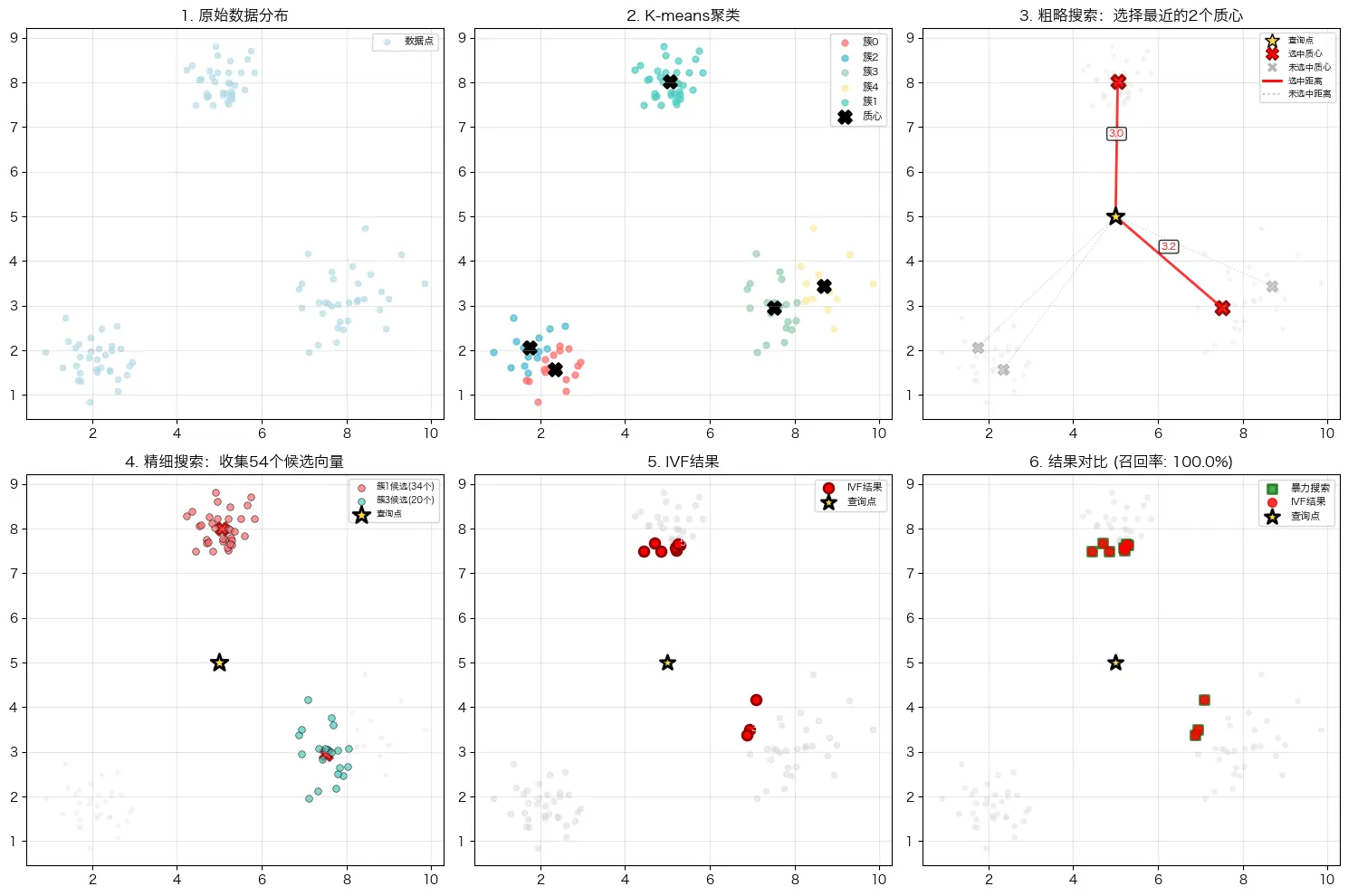
⚖️ 第六步:参数影响分析
让我们分析n_probe参数对搜索效果的影响:
def analyze_parameters(): """分析n_probe参数对搜索效果的影响""" data = generate_sample_data(1000, 2) query = np.array([5.0, 5.0]) n_probe_values = [1, 2, 3] results = [] for n_probe in n_probe_values: ivf = SimpleIVF(n_clusters=5, n_probe=n_probe) ivf.data = data ivf.build_index(data) # IVF搜索 start_time = time.time() ivf_indices, _ = ivf.search(query, k=5, data=data) ivf_time = time.time() - start_time # 暴力搜索作为基准 bf_indices, _ = ivf.brute_force_search(query, k=5, data=data) # 计算召回率 intersection = set(ivf_indices) & set(bf_indices) recall = len(intersection) / len(bf_indices) results.append({ 'n_probe': n_probe, 'recall': recall, 'time': ivf_time, 'candidates_searched': sum(len(ivf.inverted_lists[i]) for i in range(n_probe)) }) # 显示结果 print("\n" + "="*50) print("n_probe参数影响分析") print("="*50) for result in results: print(f"n_probe={result['n_probe']}: " f"召回率={result['recall']:.1%}, " f"耗时={result['time']:.6f}秒, " f"搜索向量数={result['candidates_searched']}") return results # 运行参数分析 parameter_results = analyze_parameters()
结果输出:
开始训练IVF索引... 训练完成,得到5个簇 倒排索引构建完成「展示前5个簇」: 簇4: 333个向量 簇1: 100个向量 簇2: 110个向量 簇3: 123个向量 簇0: 334个向量 开始训练IVF索引... 训练完成,得到5个簇 倒排索引构建完成「展示前5个簇」: 簇0: 170个向量 簇1: 163个向量 簇3: 333个向量 簇4: 150个向量 簇2: 184个向量 开始训练IVF索引... 训练完成,得到5个簇 倒排索引构建完成「展示前5个簇」: 簇0: 333个向量 簇2: 153个向量 簇1: 180个向量 簇4: 191个向量 簇3: 143个向量 ================================================== n_probe参数影响分析 ================================================== n_probe=1: 召回率=80.0%, 耗时=0.001708秒, 搜索向量数=334 n_probe=2: 召回率=80.0%, 耗时=0.000682秒, 搜索向量数=333 n_probe=3: 召回率=100.0%, 耗时=0.000797秒, 搜索向量数=666
从结论我们可以发现速度与精度的基本权衡关系
1.从 n_probe=2到 n_probe=3的变化,完美体现了IVF算法中速度与精度的经典权衡。
- 当 n_probe从2增加到3时,搜索的簇数量增加,因此需要计算的向量数量几乎翻倍(从333增加到666)。这导致搜索范围扩大,从而召回率从80%提升到了100%,但代价是耗时也有所增加(从0.000682秒增加到0.000797秒)。
这说明,增大 n_probe通常能以牺牲速度为代价来提升召回率。
2.发现异常点:n_probe=1的性能反常
这是一个非常关键的发现,这理论上,n_probe=1(只搜索1个最近的簇)应该是最快的,但结果却显示它最慢(0.001708秒)。
-
在 n_probe=1时,由于编程语言(如Python)的解释器开销、缓存未命中或其他偶然因素所致,你多尝试几次会发现n_probe=1的时间会有波动,这就是编译器本身编译或者缓存导致
最后,可以总结出以下核心要点: -
基本规律成立:n_probe增大,搜索范围扩大,召回率提高,但耗时增加。
-
实践出真知:理论规律需要在实际测试中验证。实验中可能会出现像 n_probe=1这样的性能异常点,这正体现了参数调优和基准测试的重要性。
-
没有“最好”的参数,只有“最合适”的参数:最终的参数选择取决于应用场景对速度和精度的具体要求。