2.8 Server Actions 服务端动作
2.8 Server Actions(服务端动作)
本节摘要:表单提交与数据变更,传统做法是"写 API 路由 + 客户端 fetch"。Server Actions 让函数直接在服务器上运行,表单提交只需一个 action 属性。本节讲清 Server Actions 的原理、表单用法、useActionState 与 revalidatePath,以及它的安全边界。
本节目标
阅读完本节,你应当能够:
- 定义并调用 Server Action
- 用 action 属性处理表单提交
- 用 useActionState 管理表单状态
- 用 revalidatePath 刷新数据
- 理解 Server Actions 的安全边界(防止滥用)
问题与直觉:表单提交为什么要"直达服务器"
传统全栈表单:前端表单 → fetch POST → API 路由 → 校验 → 写库 → 返回 JSON → 前端处理。中间隔了一层 API 中转。Server Actions 打破这层:表单直接调用一个服务器函数,校验、写库、返回结果一气呵成。
直觉类比:API 路由是"顾客到柜台办业务",Server Actions 是"柜台直接搬到顾客面前"——少排队、少中转,但流程(权限、记录)依然要守。
💡 关键直觉:Server Action 就是一个"在服务器上执行的函数",它可以通过表单 action、按钮 formAction 或直接调用触发。因为它在服务器运行,所以可以直接写数据库、读密钥——同时天然安全(逻辑不暴露给浏览器)。
核心原理:基础用法
2.1 定义 Server Action
// app/actions.ts "use server"; // 文件级:所有导出都是 Server Action export async function createPost(formData: FormData) { const title = formData.get("title"); const content = formData.get("content"); // 校验 if (!title || typeof title !== "string") { return { error: "标题必填" }; } // 写数据库(服务器端直接操作) await db.post.create({ data: { title, content } }); return { success: true }; }
两种声明方式:
- 文件级:文件顶部
"use server",所有导出均为 Action; - 内联:在服务器组件里用
"use server"包裹 async 函数。
2.2 表单中使用
// app/posts/new/page.tsx(服务器组件) import { createPost } from "@/app/actions"; export default function NewPostPage() { return ( <form action={createPost}> <input name="title" placeholder="标题" required /> <textarea name="content" placeholder="内容" /> <button type="submit">发布</button> </form> ); }
无需任何客户端 JS——form 的 action 直接指向服务器函数,提交时浏览器自动发送。
2.3 useActionState:表单状态管理
需要显示错误/加载状态时:
"use client"; import { useActionState } from "react"; import { createPost } from "@/app/actions"; export function NewPostForm() { const [state, formAction, pending] = useActionState(createPost, null); return ( <form action={formAction}> <input name="title" required /> <textarea name="content" /> {state?.error && <p className="text-red-500">{state.error}</p>} <button disabled={pending}> {pending ? "提交中..." : "发布"} </button> </form> ); }
useActionState 三个返回值:state(Action 返回值)、formAction(绑定到 form)、pending(是否执行中)。
2.4 revalidatePath:更新缓存数据
Action 改完数据后,需要刷新页面上的静态缓存:
export async function createPost(formData: FormData) { await db.post.create({ data: { title: ..., content: ... } }); revalidatePath("/posts"); // 让 /posts 重新生成 redirect("/posts"); // 跳转到列表页 }
revalidatePath 的价值:Server Action 改数据 → 触发 ISR 重新验证 → 页面显示新数据——全栈数据闭环。
工程实践要点:安全边界
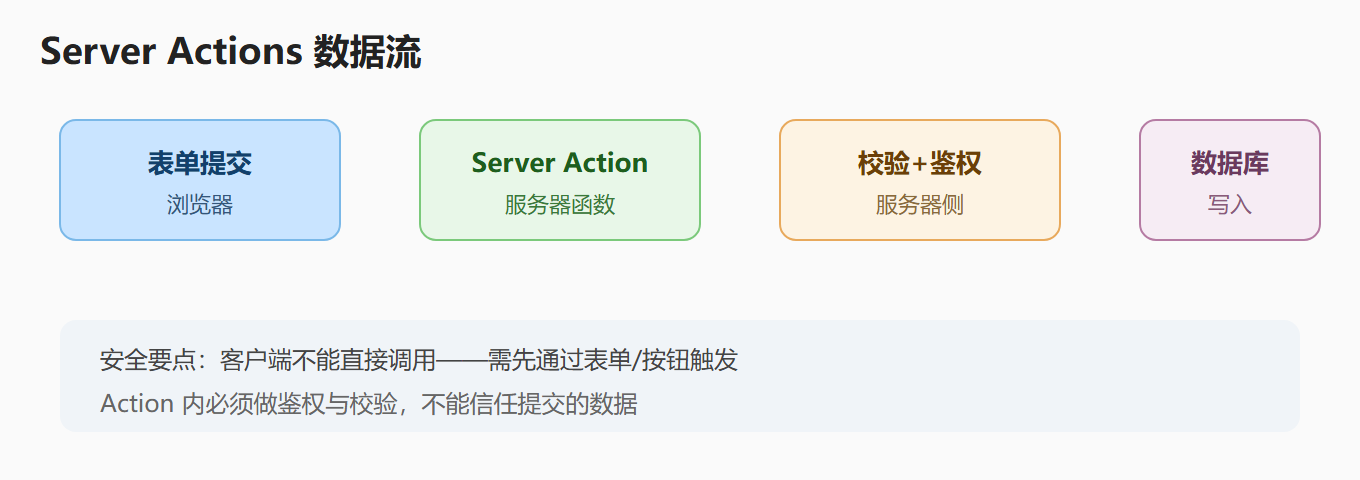
安全注意事项:
- 每个 Action 都要鉴权:检查用户是否登录、是否有权限(第三章 3.2);
- 校验输入:Action 直接暴露给网络,不能信任任何字段;
- 错误处理:返回可序列化的错误对象(不能抛 Date/函数);
- 幂等考虑:重复提交场景(支付类)需要防重;
- 不能把密钥放返回对象:返回值也会序列化,注意不要返回数据库整行(可能含敏感字段)。
常见误区与排查
| 误区 | 现象 | 正解 |
|---|---|---|
| Action 忘加 "use server" | 报错"函数不能在客户端" | 文件顶部或内联声明 |
| 返回值含非序列化数据 | 报错 | 只返回 JSON 兼容数据 |
| 表单提交后页面不更新 | 静态缓存 | revalidatePath/redirect |
| Action 里没鉴权 | 任何人都能调 | 每个 Action 检查会话 |
| 客户端直接调用 Action | 限制较多 | 用表单/按钮触发,或 Server Actions 协议 |
动手演练:带校验的留言板
// app/actions/guestbook.ts "use server"; import { revalidatePath } from "next/cache"; export async function addMessage(formData: FormData) { const name = (formData.get("name") ?? "").toString().trim(); const text = (formData.get("text") ?? "").toString().trim(); if (!name || !text) return { error: "姓名与留言不能为空" }; if (text.length > 500) return { error: "留言过长" }; await db.message.create({ data: { name, text } }); revalidatePath("/guestbook"); return { success: true }; }
// app/guestbook/page.tsx import { addMessage } from "@/app/actions/guestbook"; export default async function GuestbookPage() { const messages = await db.message.findMany({ orderBy: { id: "desc" } }); return ( <div> <h1>留言板</h1> <form action={addMessage}> <input name="name" placeholder="昵称" required /> <textarea name="text" placeholder="留言" required /> <button>提交</button> </form> <ul> {messages.map((m) => ( <li key={m.id}> <strong>{m.name}</strong>: {m.text} </li> ))} </ul> </div> ); }
提交留言 → 服务器写入数据库 → revalidatePath 刷新列表 → 页面显示新留言——整个数据变更流程没有写一行 API 路由代码,这就是 Server Actions 的生产力。
重点提炼
- Server Action:在服务器执行的函数,通过 form action/formAction/直接调用触发。
- 声明方式:文件级 "use server" 或内联 "use server" 函数。
- 表单集成:
<form action={serverAction}>,无需客户端 JS。 - useActionState:管理表单状态(state/formAction/pending)。
- revalidatePath:Action 改数据后刷新缓存页面。
- 安全边界:每个 Action 必须鉴权 + 校验,返回 JSON 兼容数据。
- vs API 路由:页面交互用 Action,外部程序用 API 路由。
深入理解:Server Actions 与数据变更模式
完整的数据变更闭环
表单处理的模式总结
| 场景 | 推荐方式 |
|---|---|
| 简单表单(无错误展示) | <form action={serverAction}> |
| 需要错误/加载态 | useActionState |
| 复杂校验(Zod) | 客户端 RHF + 服务端 Action 双重校验 |
| 需要乐观更新 | useOptimistic(先显示结果,后台确认) |
乐观更新示例
"use client"; import { useOptimistic } from "react"; import { addMessage } from "@/app/actions/guestbook"; export function MessageForm() { const [optimisticMessages, addOptimistic] = useOptimistic( messages, (state, newMsg) => [...state, newMsg] ); async function onSubmit(formData: FormData) { addOptimistic({ name: formData.get("name"), text: "发送中..." }); await addMessage(formData); // 后台真正提交 } return <form action={onSubmit}>{/* ... */}</form>; }
乐观更新的价值:用户提交后"立即看到结果"(不用等服务器往返),体验接近原生应用——失败时再回滚提示。
安全边界再强调
Server Actions 是"直接暴露的网络接口":每个 Action 必须鉴权 + 校验,不能信任任何传入数据。写成习惯:Action 第一行 const session = await auth(),第二行判断权限——这是生产级 Action 的标准开头。
常见问题速答
问:Server Action 和 API 路由都能写数据,到底怎么选?
页面内的表单与数据变更用 Server Action(代码更少、类型安全、自动处理表单);需要被外部程序/移动端/Webhook 调用的接口用 API 路由。判断标准是"调用方是谁"。
问:Action 里能读取 cookies/headers 吗?
能,用 next/headers 的 cookies()/headers()。注意这些是"只读"的(读取当前请求的),设置 cookie 用 cookies().set。
问:useActionState 必须配 use client 吗?
必须。useActionState 是 React hook,只能在客户端组件用。Action 本身可以定义在服务器("use server" 文件),表单组件负责调用。
问:Action 返回值和 props 一样要可序列化吗?
一样。Action 的返回值会跨边界传输(服务器 → 客户端),必须 JSON 兼容。返回 { error: "..." } 这类纯对象最安全。
问:表单提交后怎么跳转/刷新?
Action 里用 redirect() 跳转,revalidatePath() 刷新数据。两者都可直接在 Action 内调用,无需客户端处理。
一句话总结
Server Actions 让"表单提交直达服务器函数"——鉴权、校验、写库、刷新一条龙,省掉 API 中转。安全纪律:每个 Action 第一行鉴权、校验所有输入、返回 JSON 兼容数据。与 API 路由的分工:页面交互用 Action,外部程序用 API。