19向量搜索与过滤查询
19 向量搜索与过滤查询
向量搜索是 Milvus 的核心功能。本节详细讲解各种搜索模式的用法、过滤表达式语法和搜索参数调优。
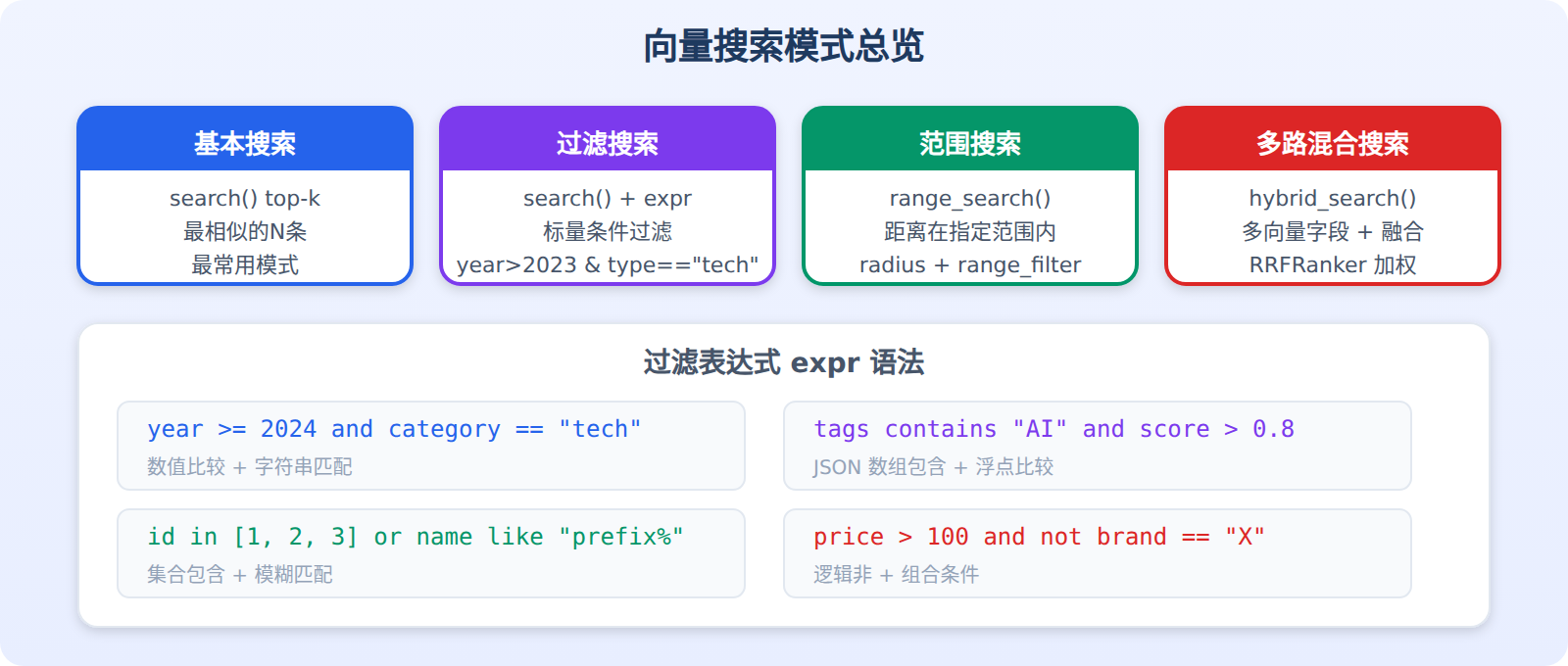
基本搜索
from pymilvus import Collection import numpy as np collection = Collection("knowledge_docs") collection.load() # 准备查询向量 query_vec = np.random.rand(768).astype(np.float32).tolist() # 搜索 results = collection.search( data=[query_vec], # 查询向量列表(可多个) anns_field="embedding", # 向量字段名 param={ "metric_type": "L2", # 距离度量 "params": {"nprobe": 16}, # 搜索参数 }, limit=10, # 返回结果数 output_fields=["title", "category", "publish_time"], # 返回的标量字段 )
搜索结果结构:
for result in results: # results 长度 = 查询向量数量 for hit in result: print(f"ID: {hit.id}") print(f"距离: {hit.distance:.6f}") print(f"标题: {hit.entity.get('title')}") print(f"分类: {hit.entity.get('category')}") print("---")
过滤表达式
过滤表达式是搜索时筛选数据的条件,语法类似 SQL WHERE 子句。
基础比较
# 数值比较 collection.search(data=[query_vec], ..., expr="publish_time > 1704067200") collection.search(data=[query_vec], ..., expr="publish_time >= 1704067200 and publish_time < 1706745600") # 字符串匹配 collection.search(data=[query_vec], ..., expr='category == "tech"') collection.search(data=[query_vec], ..., expr='category in ["tech", "finance"]') collection.search(data=[query_vec], ..., expr='title like "%AI%"')
复合逻辑
# AND/OR 组合 collection.search(data=[query_vec], ..., expr='category == "tech" and publish_time > 1704067200') # NOT collection.search(data=[query_vec], ..., expr='category != "archive"') # 嵌套 collection.search(data=[query_vec], ..., expr='(category == "tech" or category == "science") and publish_time > 1704067200')
JSON 字段过滤
# JSON 字段中的属性 collection.search(data=[query_vec], ..., expr='metadata["author"] == "张三"') collection.search(data=[query_vec], ..., expr='metadata["source"] in ["internal", "conference"]')
ARRAY 字段过滤
# 数组包含 collection.search(data=[query_vec], ..., expr='array_contains(tags, "AI")') collection.search(data=[query_vec], ..., expr='array_length(tags) > 2')
Null 值处理
# Milvus 2.4+ 支持 collection.search(data=[query_vec], ..., expr='author is not null') collection.search(data=[query_vec], ..., expr='author is null')
搜索模式
AnnSearch(近似搜索)
最基本的搜索模式,返回和查询向量最相似的 top-k 条:
results = collection.search( data=[query_vec], anns_field="embedding", param={"metric_type": "L2", "params": {"nprobe": 16}}, limit=10, )
Query(按主键查询)
根据主键获取实体数据,不做向量搜索:
results = collection.query( expr="id in [1, 2, 3, 4, 5]", output_fields=["title", "content", "embedding"], )
Search + Grouping
搜索后按指定字段分组,每组只返回最相似的 top-k 条。适合避免搜索结果被同一类目刷屏:
results = collection.search( data=[query_vec], anns_field="embedding", param={"metric_type": "L2", "params": {"nprobe": 16}}, limit=100, group_by_field="category", # 按 category 分组 group_size=3, # 每组最多 3 条 strict_group_size=True, # 组内不足 3 条时不填充 output_fields=["title", "category"], ) # 结果:每个 category 最多 3 条最相似的文档
Range Search(范围搜索)
搜索距离在指定范围内的向量:
results = collection.search( data=[query_vec], anns_field="embedding", param={ "metric_type": "L2", "params": { "nprobe": 16, "radius": 1.0, # 最大距离 "range_filter": 0.5, # 最小距离(可选) }, }, limit=100, output_fields=["title"], )
Iterator Search(迭代搜索)
对超大结果集分批获取:
from pymilvus import Collection results = collection.search( data=[query_vec], anns_field="embedding", param={"metric_type": "L2", "params": {"nprobe": 16}}, limit=-1, # -1 表示不限数量 iterator=True, batch_size=100, # 每批返回 100 条 ) for batch in results: for hit in batch: print(f"ID: {hit.id}, distance: {hit.distance:.4f}")
Hybrid Search(多向量搜索)
同时搜索多个向量字段,用排序算法融合结果:
from pymilvus import AnnSearchRequest, RRFRanker reqs = [ AnnSearchRequest( data=[text_vec], anns_field="text_embedding", param={"metric_type": "L2", "params": {"nprobe": 16}}, limit=20, ), AnnSearchRequest( data=[image_vec], anns_field="image_embedding", param={"metric_type": "IP", "params": {"ef": 100}}, limit=20, ), ] results = collection.hybrid_search( reqs=reqs, ranker=RRFRanker(k=60), # RRF 融合参数 limit=10, output_fields=["title"], )
搜索参数调优
HNSW 搜索参数
param = { "metric_type": "L2", "params": { "ef": 100, # 搜索宽度 }, }
| ef 值 | 搜索速度 | 召回率 |
|---|---|---|
| 10-20 | 非常快 | 低 (~70%) |
| 50-100 | 快 | 中 (~90%) |
| 200-500 | 中 | 高 (~95%+) |
| 1000+ | 慢 | 极高 (~99%) |
IVF 搜索参数
param = { "metric_type": "L2", "params": { "nprobe": 32, # 探测的聚类数 }, }
| nprobe / nlist | 搜索速度 | 召回率 |
|---|---|---|
| 0.1% | 非常快 | 低 |
| 1-5% | 快 | 中 |
| 10-20% | 中 | 高 |
| 50%+ | 慢 | 极高 |
搜索性能优化清单
- ✅ 确保 Collection 已
load()到内存 - ✅ 使用
partition_names限定搜索范围 - ✅ 设置合理的
limit,不要返回过多结果 - ✅ 只请求需要的
output_fields - ✅ 过滤表达式用等值条件优先(效率最高)
- ✅ HNSW 索引调
ef,IVF 索引调nprobe - ✅ 多个查询向量批量发送(一次请求多个 query)
- ❌ 避免在搜索中使用复杂的 OR 逻辑和模糊匹配
小结
向量搜索的核心是选择合适的搜索模式和调对参数。基本搜索用 search(),主键查询用 query(),分组搜索用 group_by_field,大结果集用迭代搜索,多模态用混合搜索。过滤表达式的性能取决于条件选择性和索引类型,等值过滤效率最高。
评论区
(0)
U