20API速查与常见问题
20 API 速查与常见问题
本节提供 Milvus 常用 API 的速查表,并汇总开发过程中最常见的坑和解决方法。
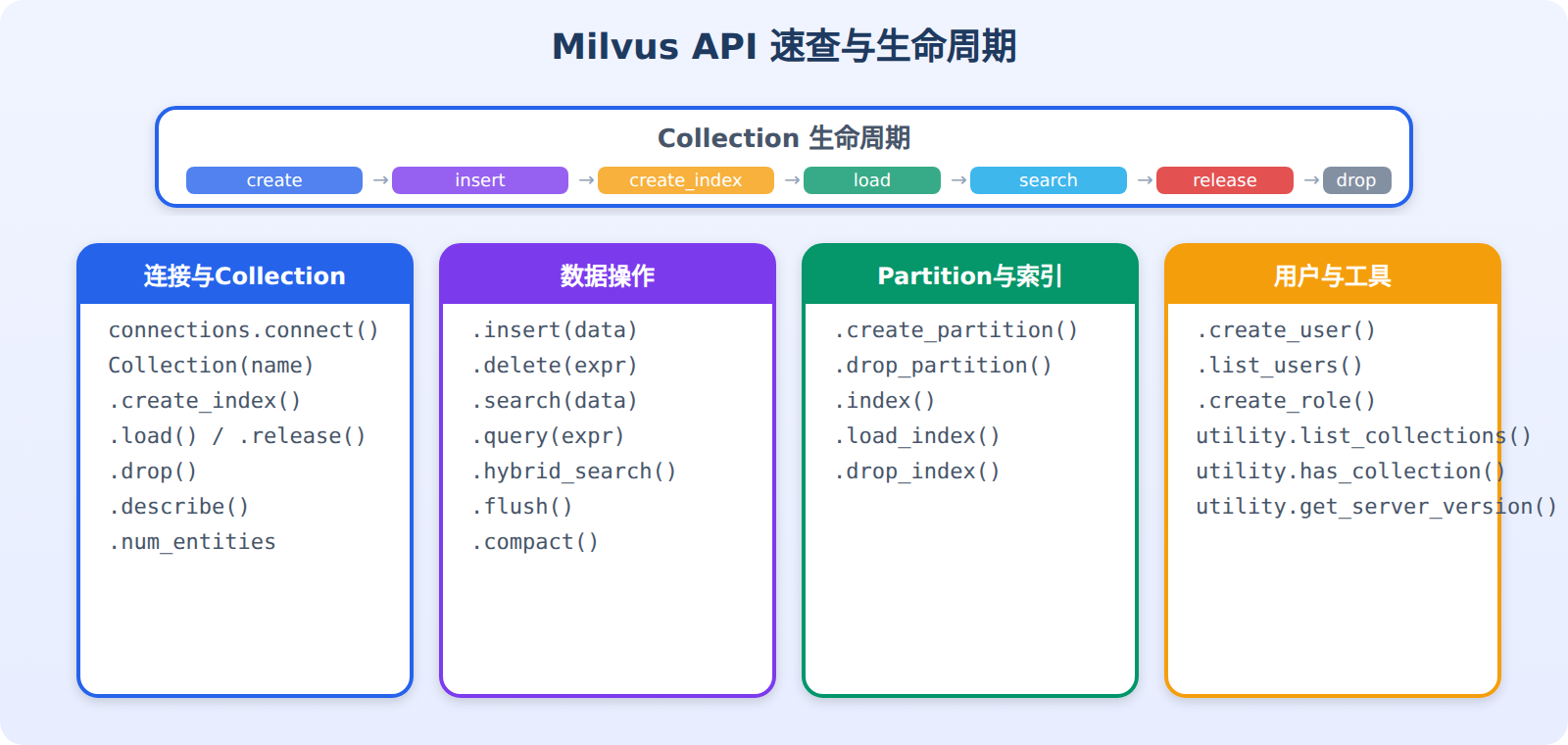
API 速查
连接管理
from pymilvus import connections, utility # 连接 connections.connect(host="localhost", port="19530", user="root", password="Milvus") # 断开 connections.disconnect("default") # 查看版本 utility.get_server_version() # 查看所有连接 connections.list_connections()
数据库操作
from pymilvus import db db.create_database("my_app") db.using_database("my_app") db.list_database() db.drop_database("my_app")
Collection 操作
from pymilvus import Collection, utility # 创建 & 获取 c = Collection(name="docs", schema=schema) c = Collection("docs") # 获取已有 # 信息 c.describe() c.num_entities utility.list_collections() utility.has_collection("docs") # 索引 c.create_index("embedding", index_params) c.drop_index("embedding") c.index() # 加载/释放 c.load() c.load(partition_names=["p1"], replica_number=2) c.release() # 删除 utility.drop_collection("docs")
Partition 操作
c.create_partition("p1") c.drop_partition("p1") c.has_partition("p1") c.list_partitions() c.load(partition_names=["p1"])
数据操作
# 插入 result = c.insert(data) result.insert_count result.primary_keys # 删除 c.delete(expr='id in [1, 2, 3]') c.delete(expr='category == "archive"') # 搜索 results = c.search( data=[vec], anns_field="embedding", param={"metric_type": "L2", "params": {"nprobe": 16}}, limit=10, expr='category == "tech"', output_fields=["title"], ) # 查询 results = c.query( expr="id in [1, 2, 3]", output_fields=["title", "embedding"], ) # 刷新 c.flush()
索引操作
index_params = { "index_type": "HNSW", "params": {"M": 32, "efConstruction": 256}, "metric_type": "L2", } c.create_index("embedding", index_params) # 查看索引 index = c.index() print(index.params)
常见错误排查
1. CollectionNotLoaded
<Exception>: Collection docs is not loaded
原因:Collection 未加载到内存。
解决:
collection.load() # 等待加载完成 collection.wait_for_loading_complete()
2. IndexNotExist
<Exception>: index not found
原因:未创建索引或索引被删除后未重建。
解决:
collection.create_index("embedding", index_params) # 重新加载(索引变更后需要 release + load) collection.release() collection.load()
3. DimensionMismatch
<Exception>: dimension mismatch, expected 768 but got 512
原因:插入的向量维度与 Schema 定义不一致。
解决:检查 Embedding 模型的输出维度,确保和 Schema 的 dim 一致。
4. Timeout
<Exception>: request timeout
原因:操作耗时超过超时限制。
解决:
# 增加超时时间 collection.search(..., timeout=60.0) # 或检查集群状态(是否资源不足)
5. CannotCreateCollection
<Exception>: collection already exists
原因:重复创建同名 Collection。
解决:
if not utility.has_collection("docs"): Collection(name="docs", schema=schema)
6. Data Size Exceeds Limit
<Exception>: data size exceeds limit
原因:单次 insert 的数据量超过限制(默认 16MB per message)。
解决:减小批量大小,分多批插入。
7. Flush Failed
<Exception>: flush failed
原因:Growing Segment 数据量不足触发 flush,或系统资源不足。
解决:检查 DataNode 日志,确认对象存储和消息队列正常。
过滤表达式语法速查
# 数值比较 "age > 18" "price >= 100 and price <= 500" "score != 0" # 字符串 'name == "Alice"' 'name in ["Alice", "Bob"]' 'title like "%AI%"' # 模糊匹配 'title prefix "AI"' # 前缀匹配 # 布尔 'is_deleted == true' 'is_active == false' # 逻辑组合 "(A or B) and C" "not (category == 'archive')" # 数组 'array_contains(tags, "AI")' 'array_length(tags) >= 2' # JSON 'metadata["author"] == "张三"' 'metadata["views"] > 1000' # Null(2.4+) 'author is null' 'author is not null'
pymilvus 和 ORM API 对照
| 操作 | pymilvus 原生 API | MilvusClient ORM |
|---|---|---|
| 连接 | connections.connect() |
MilvusClient(uri=...) |
| 创建 Collection | Collection(schema=schema) |
create_collection(name, dim) |
| 插入 | collection.insert(data) |
insert(collection, data) |
| 搜索 | collection.search(...) |
search(collection, ...) |
| 查询 | collection.query(...) |
query(collection, ...) |
| 删除 | collection.delete(...) |
delete(collection, ...) |
ORM API 更简洁但不支持所有高级功能。复杂场景建议用原生 API。
8. PrimaryKeyConflict
<Exception>: primary key conflict
原因:非 auto_id 的主键重复插入。
解决:确认主键生成逻辑,或用 upsert 替代 insert。
开发中的实用规范
- 主键优先使用 INT64 auto_id,业务键单独用 VARCHAR 字段存储并建索引
- 每个 Collection 都要建索引后才能搜索,索引参数创建后不可修改,只能重建
- 搜索与查询分开使用:相似度检索用 search,精确读取用 query
- 批量删除要构造好表达式,避免误删全表数据
- 写入后验证用 flush 或检查 num_entities
这套规范能规避大部分线上事故,建议团队把它写进代码评审清单。遇到报错时,先核对服务端版本与客户端版本是否匹配,再按本节列举的错误类型逐一排查,大部分问题都能快速定位。
小结
本节提供了 Milvus Python SDK 的常用 API 速查表和常见错误排查方法。开发中最常遇到的错误是:Collection 未加载、索引缺失、维度不匹配、超时。过滤表达式的语法类似 SQL WHERE,但注意 Milvus 特有的数组、JSON、null 语法。
评论区
(0)
U