使用IoT设备计数库存-WioTerminal
文档摘要
使用IoT设备计数库存 - Wio Terminal 预测及其边界框的组合可以用来在图像中计数库存。 计数库存 带有每个罐头周围边框的4个番茄酱罐 在上面显示的图像中,边界框之间有轻微的重叠。如果这种重叠更大,那么边界框可能会指示同一个物体。为了正确地计数对象,你需要忽略具有显著重叠的边界框。 任务 - 忽略重叠计数库存 如果尚未打开,请打开你的 项目。 在 函数上方添加以下代码: 这定义了在边界框被认为是同一对象之前允许的最大重叠百分比。0.20定义了一个20%的重叠。
使用IoT设备计数库存 - Wio Terminal
预测及其边界框的组合可以用来在图像中计数库存。
计数库存
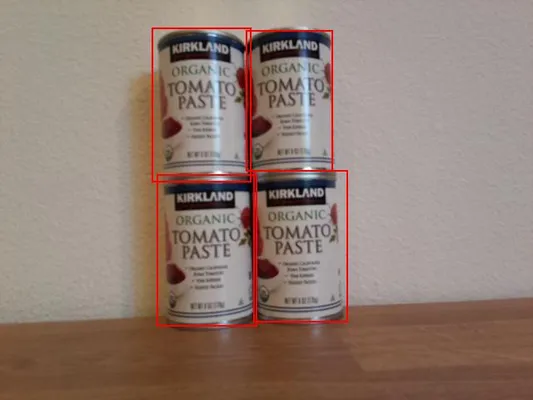
在上面显示的图像中,边界框之间有轻微的重叠。如果这种重叠更大,那么边界框可能会指示同一个物体。为了正确地计数对象,你需要忽略具有显著重叠的边界框。
任务 - 忽略重叠计数库存
-
如果尚未打开,请打开你的
stock-counter项目。 -
在
processPredictions函数上方添加以下代码:const float overlap_threshold = 0.20f;这定义了在边界框被认为是同一对象之前允许的最大重叠百分比。0.20定义了一个20%的重叠。
-
在此之下,也在
processPredictions函数上方,添加以下代码以计算两个矩形之间的重叠:struct Point { float x, y; }; struct Rect { Point topLeft, bottomRight; }; float area(Rect rect) { return abs(rect.bottomRight.x - rect.topLeft.x) * abs(rect.bottomRight.y - rect.topLeft.y); } float overlappingArea(Rect rect1, Rect rect2) { float left = max(rect1.topLeft.x, rect2.topLeft.x); float right = min(rect1.bottomRight.x, rect2.bottomRight.x); float top = max(rect1.topLeft.y, rect2.topLeft.y); float bottom = min(rect1.bottomRight.y, rect2.bottomRight.y); if ( right > left && bottom > top ) { return (right-left)*(bottom-top); } return 0.0f; }此代码定义了一个
Pointstruct to store points on the image, and aRectstruct to define a rectangle using a top left and bottom right coordinate. It then defines anareafunction that calculates the area of a rectangle from a top left and bottom right coordinate.Next it defines a
overlappingAreafunction that calculates the overlapping area of 2 rectangles. If they don't overlap, it returns 0. -
Below the
overlappingAreafunction, declare a function to convert a bounding box to aRect:Rect rectFromBoundingBox(JsonVariant prediction) { JsonObject bounding_box = prediction["boundingBox"].as<JsonObject>(); float left = bounding_box["left"].as<float>(); float top = bounding_box["top"].as<float>(); float width = bounding_box["width"].as<float>(); float height = bounding_box["height"].as<float>(); Point topLeft = {left, top}; Point bottomRight = {left + width, top + height}; return {topLeft, bottomRight}; }它接受来自目标检测器的预测,提取边界框并使用边界框上的值来定义一个矩形。右侧通过左边加上宽度计算得出。底部通过顶部加上高度计算得出。
-
需要将预测相互比较,如果两个预测之间的重叠超过阈值,则需要删除其中一个。重叠阈值是一个百分比,因此需要将其乘以最小边界框的大小,以检查重叠是否超过了给定百分比的边界框,而不是整个图像的给定百分比。首先删除
processPredictions函数的内容。 -
向空的
processPredictions函数添加以下内容:std::vector<JsonVariant> passed_predictions; for (int i = 0; i < predictions.size(); ++i) { Rect prediction_1_rect = rectFromBoundingBox(predictions[i]); float prediction_1_area = area(prediction_1_rect); bool passed = true; for (int j = i + 1; j < predictions.size(); ++j) { Rect prediction_2_rect = rectFromBoundingBox(predictions[j]); float prediction_2_area = area(prediction_2_rect); float overlap = overlappingArea(prediction_1_rect, prediction_2_rect); float smallest_area = min(prediction_1_area, prediction_2_area); if (overlap > (overlap_threshold * smallest_area)) { passed = false; break; } } if (passed) { passed_predictions.push_back(predictions[i]); } }这段代码声明了一个向量来存储不重叠的预测,并遍历所有预测,创建一个
Rectfrom the bounding box.Next this code loops through the remaining predictions, starting at the one after the current prediction. This stops predictions being compared more than once - once 1 and 2 have been compared, there's no need to compare 2 with 1, only with 3, 4, etc.
For each pair of predictions the overlapping area is calculated. This is then compared to the area of the smallest bounding box - if the overlap exceeds the threshold percentage of the smallest bounding box, the prediction is marked as not passed. If after comparing all the overlap, the prediction passes the checks it is added to the
passed_predictions集合。这是一种非常简单的方法来移除重叠,只是删除重叠对中的第一个。对于生产代码,你可能希望在这里加入更多的逻辑,例如考虑多个对象之间的重叠,或者如果一个边界框包含另一个边界框。
-
在这之后,添加以下代码以将通过的预测详情发送到串行监视器:
for(JsonVariant prediction : passed_predictions) { String boundingBox = prediction["boundingBox"].as<String>(); String tag = prediction["tagName"].as<String>(); float probability = prediction["probability"].as<float>(); char buff[32]; sprintf(buff, "%s:\t%.2f%%\t%s", tag.c_str(), probability * 100.0, boundingBox.c_str()); Serial.println(buff); }这段代码遍历通过的预测并将它们的详细信息打印到串行监视器上。
-
在这下面,添加代码以将计数项目的数量打印到串行监视器上:
Serial.print("Counted "); Serial.print(passed_predictions.size()); Serial.println(" stock items.");然后可以将这些数据发送到IoT服务以提醒库存水平低的情况。
-
上传并运行你的代码。将摄像头对准货架上的物品并按下C按钮。尝试调整
overlap_threshold值以观察被忽略的预测。Connecting to WiFi.. Connected! Image captured Image read to buffer with length 17416 tomato paste: 35.84% {"left":0.395631,"top":0.215897,"width":0.180768,"height":0.359364} tomato paste: 35.87% {"left":0.378554,"top":0.583012,"width":0.14824,"height":0.359382} tomato paste: 34.11% {"left":0.699024,"top":0.592617,"width":0.124411,"height":0.350456} tomato paste: 35.16% {"left":0.513006,"top":0.647853,"width":0.187472,"height":0.325817} Counted 4 stock items.
你可以在这个代码计数/Wio Terminal文件夹中找到这段代码。
你的库存计数程序成功了!
声明:
本文件灏天文库团队进行了翻译。尽管我们力求准确,但请注意,翻译可能包含错误或不准确之处。原文档以其原始语言为准。我们不对因使用此翻译而产生的任何误解或误译负责。