18.3解析骨骼动画
文档摘要
## 18.3 解析骨骼动画 上一节从Blender中导出骨骼动画数据到自定义文件,这一节解析这个自定义文件,并播放骨骼动画。 解析自定义文件,就是加载进内存,并且按照上一节设计的文件格式,读取并存储到不同的变量。 例如读取骨骼数量保存到变量 ,读取关键帧数据保存到变量 中。 播放骨骼动画,就是获取一帧的数据,计算出这一帧骨骼所在的位置。 每一帧都有新的位置变化,一秒钟播放24帧,就形成了动画。 下面来看具体实现吧。 读取骨骼动画文件 新建类 ,创建以下成员变量存储骨骼动画数据, 在 中读取文件到内存,并按照文件格式进行解析,读取数据存储到成员变量中,为下一步计算骨骼位置坐准备。 这其实就是上一节 的逆过程。
18.3 解析骨骼动画
CLion项目文件位于 samples\skeleton_animation\load_skeleton_animation
上一节从Blender中导出骨骼动画数据到自定义文件,这一节解析这个自定义文件,并播放骨骼动画。
解析自定义文件,就是加载进内存,并且按照上一节设计的文件格式,读取并存储到不同的变量。
例如读取骨骼数量保存到变量bone_num,读取关键帧数据保存到变量all_frame_data中。
播放骨骼动画,就是获取一帧的数据,计算出这一帧骨骼所在的位置。
每一帧都有新的位置变化,一秒钟播放24帧,就形成了动画。
下面来看具体实现吧。
1. 读取骨骼动画文件
新建类AnimationClip,创建以下成员变量存储骨骼动画数据,
//file:source/renderer/animation_clip.h line:43 private: /// 所有骨骼名字 std::vector<std::string> bone_names_; /// 骨骼的子节点 std::vector<std::vector<unsigned short>> bone_children_vector_; /// 骨骼T-pose std::vector<glm::mat4> bone_t_pose_vector_; /// 持续时间 float duration_=0.0f; /// 总帧数 unsigned short frame_count_=0; /// 每一帧每一个骨骼的位移矩阵 std::vector<std::vector<glm::mat4>> bone_matrix_frames_vector_; /// 骨骼动画开始播放时间 float start_time_=0.0f; /// 骨骼动画是否在播放 bool is_playing_=false; /// 当前帧 unsigned short current_frame_=-1;
在void AnimationClip::LoadFromFile(const char *file_path)中读取文件到内存,并按照文件格式进行解析,读取数据存储到成员变量中,为下一步计算骨骼位置坐准备。
//file:source/renderer/animation_clip.cpp line:27 /// 加载动画片段 /// \param file_path void AnimationClip::LoadFromFile(const char *file_path) { //读取文件头 ifstream input_file_stream(Application::data_path()+file_path,ios::in | ios::binary); if(!input_file_stream.is_open()) { DEBUG_LOG_ERROR("AnimationClip::LoadFromFile: open file failed,file_path:{}",file_path); return; } char file_head[14]; input_file_stream.read(file_head,13); file_head[13]='\0'; if(strcmp(file_head,SKELETON_ANIMATION_HEAD) != 0) { DEBUG_LOG_ERROR("AnimationClip::LoadFromFile: file head error,file_head:{},the right is:{}",file_head,SKELETON_ANIMATION_HEAD); return; } //读取骨骼数量 unsigned short bone_count=0; input_file_stream.read(reinterpret_cast<char *>(&bone_count), sizeof(unsigned short)); //读取骨骼名字数组 for(unsigned short i=0;i<bone_count;i++) { //读取骨骼名字长度 unsigned short bone_name_size=0; input_file_stream.read(reinterpret_cast<char *>(&bone_name_size), sizeof(unsigned short)); char* bone_name=new char[bone_name_size+1]; input_file_stream.read(bone_name,bone_name_size); bone_name[bone_name_size]='\0'; bone_names_.push_back(bone_name); delete[] bone_name; } //读取骨骼子节点 for(unsigned short bone_index=0; bone_index < bone_count; bone_index++) { //读取骨骼子节点数量 unsigned short child_count=0; input_file_stream.read(reinterpret_cast<char *>(&child_count), sizeof(unsigned short)); //读取骨骼子节点名字,在名字数组的序号。 std::vector<unsigned short> child_indexes; for(unsigned short j=0;j<child_count;j++) { unsigned short child_index=0; input_file_stream.read(reinterpret_cast<char *>(&child_index), sizeof(unsigned short)); child_indexes.push_back(child_index); } bone_children_vector_.push_back(child_indexes); } //读取骨骼T-pose for(unsigned short bone_index=0; bone_index < bone_count; bone_index++) { //读取骨骼T-pose glm::mat4 bone_t_pose; input_file_stream.read(reinterpret_cast<char *>(&bone_t_pose), sizeof(float) * 16); bone_t_pose_vector_.push_back(bone_t_pose); } //读取帧数 input_file_stream.read(reinterpret_cast<char *>(&frame_count_), sizeof(unsigned short)); //读取骨骼动画 for (int frame_index = 0; frame_index < frame_count_; frame_index++) { //读取一帧的骨骼矩阵 std::vector<glm::mat4> bone_matrices; for (unsigned short bone_index = 0; bone_index < 2; bone_index++) { glm::mat4 bone_matrix; input_file_stream.read(reinterpret_cast<char *>(&bone_matrix), sizeof(float) * 16); bone_matrices.push_back(bone_matrix); } bone_matrix_frames_vector_.push_back(bone_matrices); } input_file_stream.close(); Bake(); }
这其实就是上一节18.2 Blender导出骨骼动画的逆过程。
2. 骨骼动画刷帧计算
骨骼动画的本质就是帧动画,和Unity的Animation是一样的。
之所以是动画,是因为每一帧都修改了骨骼的位置。
在引擎中,要让骨骼动起来,就要在每一帧都计算出骨骼的正确位置。
即根据读取的T-Pos矩阵 以及 当前帧最新的offset矩阵,计算出当前位置矩阵。
因为父骨骼的位移会影响到子骨骼,所以需要用递归来将父骨骼矩阵传递下去。
具体实现如下:
//file:source/renderer/animation_clip.cpp line:97 /// 预计算骨骼矩阵 void AnimationClip::Bake() { for (int i = 0; i < frame_count_; ++i) { DEBUG_LOG_INFO("AnimationClip::Bake: frame_index:{}",i); //计算当前帧的骨骼矩阵 std::vector<glm::mat4>& current_frame_bone_matrices=bone_matrix_frames_vector_[i]; CalculateBoneMatrix(current_frame_bone_matrices,0,glm::mat4(1.0f)); } } /// 递归计算骨骼矩阵,从根节点开始。Blender导出的时候要确保先导出父节点。 /// \param bone_name /// \param parent_matrix /// \param bone_matrix void AnimationClip::CalculateBoneMatrix(std::vector<glm::mat4>& current_frame_bone_matrices,unsigned short bone_index, const glm::mat4 &parent_matrix) { glm::mat4 bone_matrix=current_frame_bone_matrices[bone_index]; glm::mat4 bone_t_pos_matrix=bone_t_pose_vector_[bone_index]; glm::mat4 bone_matrix_with_parent=parent_matrix*bone_t_pos_matrix*bone_matrix; DEBUG_LOG_INFO("{} bone_matrix:{}",bone_names_[bone_index],glm::to_string_beauty(bone_matrix_with_parent)); current_frame_bone_matrices[bone_index]=bone_matrix_with_parent; std::vector<unsigned short> child_indexes=bone_children_vector_[bone_index]; for(unsigned short child_index:child_indexes) { CalculateBoneMatrix(current_frame_bone_matrices,child_index,bone_matrix_with_parent); } }
3. 测试
工程已经转向Lua了,所以后续所有新增类都要注册到Lua。
//file:source/lua_binding/lua_binding.cpp line:476 sol_state_.new_usertype<AnimationClip>("AnimationClip",sol::call_constructor,sol::constructors<AnimationClip()>(), "LoadFromFile", &AnimationClip::LoadFromFile, "duration", &AnimationClip::duration, "Play", &AnimationClip::Play, "Stop", &AnimationClip::Stop, "Update", &AnimationClip::Update );
后续章节我就不再提这个了。
修改login_scene.lua,在Awake中加载解析骨骼动画文件,然后在Update中计算帧数据。
--file:example/login_scene.lua line:14 function LoginScene:Awake() print("LoginScene Awake") LoginScene.super.Awake(self) self.animation_clip_=AnimationClip.new() self.animation_clip_:LoadFromFile("animation/export.skeleton_anim") self.animation_clip_:Play() end ...... ...... function LoginScene:Update() --print("LoginScene Update") LoginScene.super.Update(self) self.animation_clip_:Update() end
在Blender中我导出了[1,40]范围的帧数据,[1-20]变化,[21,40]还原,第20帧状态如下:
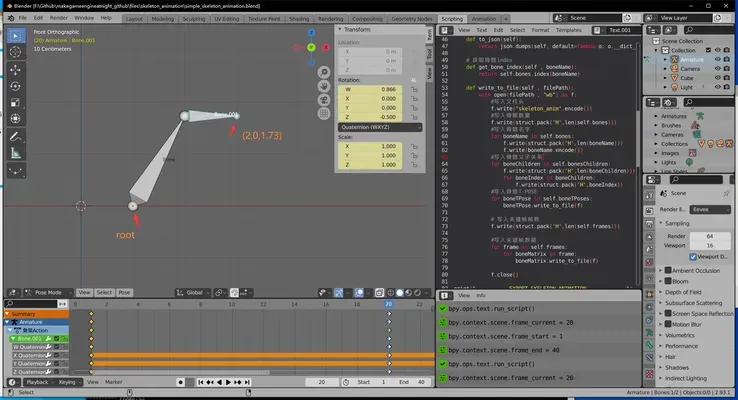
以第20帧来验证代码计算数据是否正确。
运行工程,log会输出每一帧每个骨骼最新的矩阵,查看第20帧的Log:
[source animation_clip.cpp] [function AnimationClip::Bake] [line 99] [info] AnimationClip::Bake: frame_index:19 [source animation_clip.cpp] [function AnimationClip::CalculateBoneMatrix] [line 111] [info] Bone bone_matrix:mat4x4: (0.866025, -0.500000, 0.000000, 0.000000), (0.500000, 0.866025, -0.000000, 0.000000), (0.000000, 0.000000, 1.000000, 0.000000), (0.000000, 0.000000, 0.000000, 1.000000) [source animation_clip.cpp] [function AnimationClip::CalculateBoneMatrix] [line 111] [info] Bone.001 bone_matrix:mat4x4: (0.000000, -1.000000, 0.000000, 0.000000), (1.000000, 0.000000, -0.000000, 0.000000), (0.000000, 0.000000, 1.000000, 0.000000), (1.000000, 1.732051, -0.000000, 1.000000)
所谓的骨骼矩阵,指的是骨骼的首端关节点矩阵。
拿Bone.001首端矩阵,乘以Bone.001末端的相对位移,计算得到Bone.001末端在第20帧的坐标,如下:
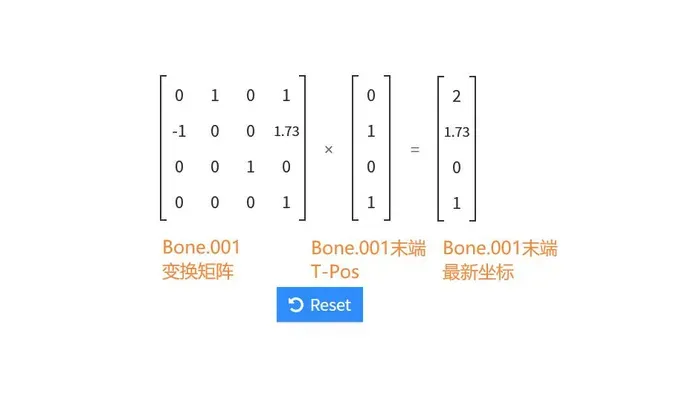
计算得到结果与Blender中一致,解析骨骼动画成功。
4. 怎么没有渲染出骨骼?
问:骨骼动画解析成功了,但是却没有渲染出来骨骼。难道骨骼动画就是这些东西?
你是对的,骨骼动画就是这些东西,本质就是父子之间的相对变换,是纯数据。
问:游戏中的骨骼动画不是会渲染出人物动画吗?
我们口头说的游戏中的骨骼动画,叫骨骼蒙皮动画。
骨骼动画代表动画数据。
蒙皮就是Mesh,每个顶点与一个骨骼绑定,当骨骼变换时,带动顶点变化,这样就有了每帧变化的Mesh,渲染形成动画。
下一章就介绍骨骼蒙皮动画。
5. 其他
有一些东西需要注意:
-
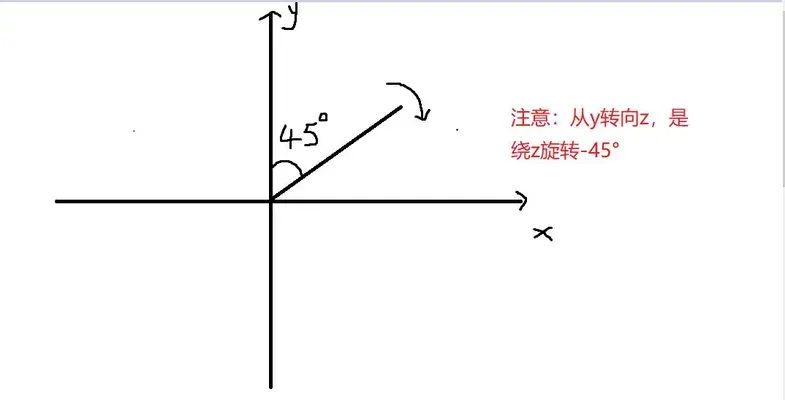
绕Z轴旋转,从Y转向X,角度是负数。
-
Blender是行主序,和数学上的表现一致,可以直接用作代数运算。
-
GLM是列主序,做运算的时候记得转换。
一个矩阵乘法动画演示的网站:http://matrixmultiplication.xyz/