22.4连续碰撞检测
文档摘要
## 22.4 连续碰撞检测 在枪战类游戏会遇到一个问题,子弹穿透。 子弹速度极快,当子弹飞向敌人,会发现physx判定为没有碰撞发生。 以上一小节的项目,将速度乘以10,测试发现小球不再被墙体反弹,而是直接穿过去。 那为什么会出现这种问题? 我们知道游戏引擎其实就是一个while循环,每一次循环里,先在 函数里处理游戏逻辑,然后在 函数去处理渲染任务。 Physx作为物理模块集成到引擎后,也要遵守这个规则,将处理Physx逻辑放在 函数里面。 FixUpdate() 函数是固定速率的。 这个固定速率是说一段时间内保证调用固定次数,例如一秒钟保证调用60次,不是说每一次调用间隔固定时间。 如果Update()、Render() 耗时很长,那么这一帧就多调用几次FixUpdate()。
22.4 连续碰撞检测
CLion项目文件位于 samples\physx\physx_ccd
在枪战类游戏会遇到一个问题,子弹穿透。
子弹速度极快,当子弹飞向敌人,会发现physx判定为没有碰撞发生。
以上一小节的项目,将速度乘以10,测试发现小球不再被墙体反弹,而是直接穿过去。
//~zh 创建小球,并添加到场景中 //~en Create ball,add to scene. void CreateBall(){ //~en Create RigidBody,pos is (10,0,0) //~zh 创建刚体,坐标是 (10,0,0) PxRigidDynamic* body = gPhysics->createRigidDynamic(PxTransform(PxVec3(10, 5, 0))); //body->setLinearVelocity(PxVec3(-14.0f, 0.0f, 0.0f)); body->setLinearVelocity(PxVec3(-140.0f, 0.0f, 0.0f));//high-speed ...... }

那为什么会出现这种问题?
我们知道游戏引擎其实就是一个while循环,每一次循环里,先在Update()函数里处理游戏逻辑,然后在Render()函数去处理渲染任务。
Physx作为物理模块集成到引擎后,也要遵守这个规则,将处理Physx逻辑放在FixUpdate()函数里面。
FixUpdate() 函数是固定速率的。
这个固定速率是说一段时间内保证调用固定次数,例如一秒钟保证调用60次,不是说每一次调用间隔固定时间。
如果Update()、Render() 耗时很长,那么这一帧就多调用几次FixUpdate()。
Update()、Render()、FixUpdate()组成了游戏的一帧。
按30帧的渲染帧率,每一帧之间间隔了0.033秒。
以100米/s的子弹速度,前后两帧子弹位移了3.3米。
前一帧子弹在敌人前面,子弹与敌人碰撞盒子没有相交,判定没有碰撞。
后一帧子弹飞行了3.3米,又到了敌人后面,子弹与敌人的碰撞盒子又没有相交,还是判定没有碰撞。
常用的解决办法是,从子弹当前位置向上一个位置打射线,检测射线是否打到了敌人的碰撞盒子。
Physx也提供了解决方案 -- 连续碰撞检测(Continuous Collision Detection,简称CCD)。
1. 启用CCD
启用CCD分为2步,对场景启用CCD,对高速运动物体启用CCD。下面分别来看。
1. 对场景启用CCD
//file:example/main.cpp line:43 //~zh 设置在碰撞发生时,Physx需要做的事情 //~en Set the actions when collision occurs,Physx needs to do. static PxFilterFlags SimulationFilterShader(PxFilterObjectAttributes attributes0, PxFilterData filterData0,PxFilterObjectAttributes attributes1, PxFilterData filterData1,PxPairFlags& pairFlags, const void* constantBlock, PxU32 constantBlockSize) { //~zh eNOTIFY_TOUCH_FOUND:当碰撞发生时处理回调。 eNOTIFY_TOUCH_LOST:当碰撞结束时处理回调。 //~en eNOTIFY_TOUCH_FOUND:When collision occurs,process callback. eNOTIFY_TOUCH_LOST:When collision ends,process callback. pairFlags = PxPairFlag::eCONTACT_DEFAULT | PxPairFlag::eNOTIFY_TOUCH_FOUND | PxPairFlag::eNOTIFY_TOUCH_LOST; if(gEnableCCD){ //~zh 场景启用CCD后,还需要指定碰撞时使用CCD,并且处理回调。 //~en When the scene is enabled CCD, you need to specify the collision to use CCD and handle the callback. pairFlags |= PxPairFlag::eDETECT_CCD_CONTACT|PxPairFlag::eNOTIFY_TOUCH_CCD; } return PxFilterFlags(); } //~en Create Scene //~zh 创建Scene void CreateScene(){ ...... if(gEnableCCD){ //~zh 启用CCD //~en Enable CCD sceneDesc.flags |= PxSceneFlag::eENABLE_CCD; } ...... }
对场景启用CCD后,还需要在 SimulationFilterShader 中指定碰撞时使用CCD,并且处理回调。
2. 对高速运动小球启用CCD
//file:example/main.cpp line:114 //~zh 创建小球,并添加到场景中 //~en Create ball,add to scene. void CreateBall(){ //~en Create RigidBody,pos is (10,0,0) //~zh 创建刚体,坐标是 (10,0,0) PxRigidDynamic* body = gPhysics->createRigidDynamic(PxTransform(PxVec3(10, 5, 0))); body->setLinearVelocity(PxVec3(-140.0f, 0.0f, 0.0f)); if(gEnableCCD){ //~en enable continuous collision detection due to high-speed motion. //~zh 对高速运动,开启连续碰撞检测。 body->setRigidBodyFlag(PxRigidBodyFlag::eENABLE_CCD, true); } ...... }
2. 在回调中检测Flag
在 SimulationFilterShader 中指定了 PxPairFlag,表示需要处理进入碰撞、解除碰撞的回调。
在回调中,将 event 与指定的Flag对比,来区分进入碰撞、解除碰撞。
//file:example/simulation_event_callback.h line:46 //~en SimulationEventCallback is a PxSimulationEventCallback that is used to receive events from the PhysX SDK. //~zh SimulationEventCallback 是一个用于从 PhysX SDK 接收事件的 PxSimulationEventCallback。 class SimulationEventCallback: public PxSimulationEventCallback { public: ...... void onContact(const PxContactPairHeader& pairHeader, const PxContactPair* pairs, PxU32 count) override { printf("onContact: %d pairs\n", count); while(count--) { const PxContactPair& current = *pairs++; if(current.events & (PxPairFlag::eNOTIFY_TOUCH_FOUND|PxPairFlag::eNOTIFY_TOUCH_CCD)) { printf("onContact Shape is entering volume\n"); } if(current.events & PxPairFlag::eNOTIFY_TOUCH_LOST) { printf("onContact Shape is leaving volume\n"); } ...... } } };
3. 测试CCD
启用CCD。
//file:example/main.cpp line:20 //~en is high-speed motion enabled. //~zh 高速运动是否启用。 bool gEnableCCD = true;
开启PVD,运行项目测试。

可以看到小球高速撞向墙壁,并且被反弹。
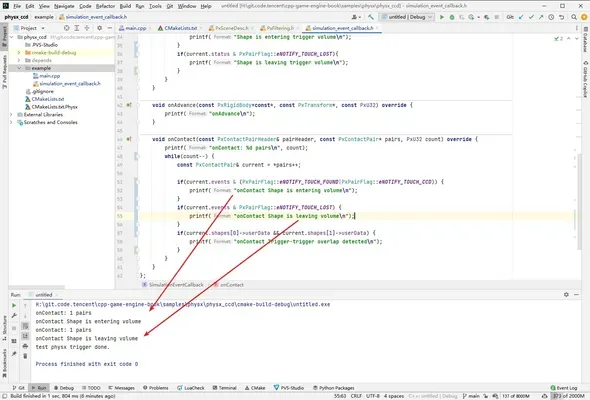
也输出了进入碰撞、解除碰撞的Log。
4. CCD Trigger
CLion项目文件位于 samples\physx\physx_ccd_trigger
上面连续碰撞检测可以了,那Trigger该怎么弄呢?
下面代码直接给墙壁指定为 PxShapeFlag::eTRIGGER_SHAPE 是不行的:
PxShape* shape = gPhysics->createShape(PxBoxGeometry(halfExtent), *wallMaterial,false,PxShapeFlag::eVISUALIZATION | PxShapeFlag::eTRIGGER_SHAPE);
因为CCD不支持Trigger。
我想了一下,Trigger其实也是走的碰撞检测逻辑,只不过碰撞检测完之后,没有去执行碰撞这个行为。
Shape对象可以附带一些信息,在墙的Shape附带信息里面设置一个1,就可以表示这是Trigger。
//file:example/main.cpp line:98 //~en Create wall,add to scene. //~zh 创建墙,并添加到场景中 void CreateWall(){ ...... //~en Create wall shape. //~zh 创建墙体形状 const PxVec3 halfExtent(0.1f, 10.0f, 10.0f); PxShape* shape = gPhysics->createShape(PxBoxGeometry(halfExtent), *wallMaterial); //~zh 设置附加数据为1,表示当前Shape是Trigger //~en set shape's user data 1, it is a trigger. shape->setSimulationFilterData(PxFilterData(1,0,0,0)); ...... }
然后我只要在 SimulationFilterShader 中,指定不执行碰撞行为就可以了。
//file:example/main.cpp line:44 //~zh 设置在碰撞发生时,Physx需要做的事情 //~en Set the actions when collision occurs,Physx needs to do. static PxFilterFlags SimulationFilterShader(PxFilterObjectAttributes attributes0, PxFilterData filterData0,PxFilterObjectAttributes attributes1, PxFilterData filterData1,PxPairFlags& pairFlags, const void* constantBlock, PxU32 constantBlockSize) { //~zh eNOTIFY_TOUCH_FOUND:当碰撞发生时处理回调。 eNOTIFY_TOUCH_LOST:当碰撞结束时处理回调。 //~en eNOTIFY_TOUCH_FOUND:When collision occurs,process callback. eNOTIFY_TOUCH_LOST:When collision ends,process callback. pairFlags = PxPairFlag::eSOLVE_CONTACT | PxPairFlag::eDETECT_DISCRETE_CONTACT | PxPairFlag::eNOTIFY_TOUCH_FOUND | PxPairFlag::eNOTIFY_TOUCH_LOST; //~zh Trigger的意思就是不处理物理碰撞,只是触发一个回调函数。 //~en Trigger means that the physical collision is not processed,only a callback function is triggered. bool isTrigger=filterData0.word0==1 || filterData1.word0==1; if(isTrigger) { pairFlags = pairFlags ^ PxPairFlag::eSOLVE_CONTACT; } ...... }
然后在回调里面也对附加数据进行判断,来判定是不是Trigger,来输出不同的Log。
//file:example/simulation_event_callback.h line:46 //~en SimulationEventCallback is a PxSimulationEventCallback that is used to receive events from the PhysX SDK. //~zh SimulationEventCallback 是一个用于从 PhysX SDK 接收事件的 PxSimulationEventCallback。 class SimulationEventCallback: public PxSimulationEventCallback { public: ...... void onContact(const PxContactPairHeader& pairHeader, const PxContactPair* pairs, PxU32 count) override { printf("onContact: %d pairs\n", count); while(count--) { const PxContactPair& current = *pairs++; //~zh 判断Shape附加数据为1表示Trigger。 //~en If the shape's user data is 1, it is a trigger. if(current.shapes[0]->getSimulationFilterData().word0 & 0x1) { printf("Shape 0 is a trigger\n"); } if(current.shapes[1]->getSimulationFilterData().word0 & 0x1) { printf("Shape 1 is a trigger\n"); } if(current.events & (PxPairFlag::eNOTIFY_TOUCH_FOUND|PxPairFlag::eNOTIFY_TOUCH_CCD)) { printf("onContact Shape is entering volume\n"); } if(current.events & (PxPairFlag::eNOTIFY_TOUCH_LOST)) { printf("onContact Shape is leaving volume\n"); } } } };
运行项目测试,输出了Trigger的Log。
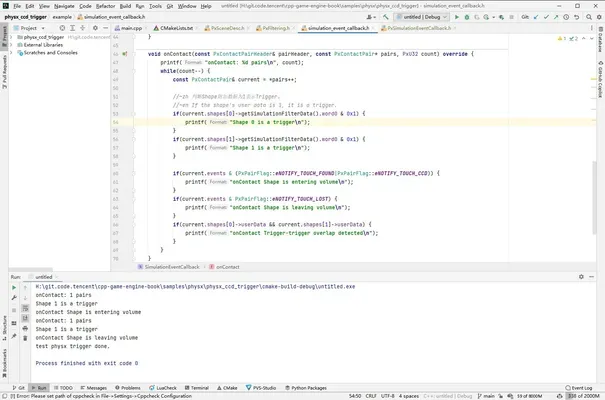
在PVD中看到小球穿墙而过。
