4.1 Web 图像处理
4.1 Web 图像处理
本节摘要:Web 场景的图片处理围绕"上传→校验→转码→多尺寸输出"展开。本节用 FastAPI 示例演示图片上传处理,讲清格式白名单校验、EXIF 方向修复、响应式多尺寸生成、内存与安全的实践,打造一个可上线的图片处理服务。
本节导读
阅读完本节,你应当能够:
- 用 FastAPI + Pillow 处理图片上传
- 做格式白名单与大小校验
- 修复手机照片的 EXIF 旋转问题
- 生成响应式多尺寸图片
- 避免 Web 图片服务的常见安全坑
问题与直觉:Web 图片服务的"三件事"
用户上传一张图,服务端要做三件事:验证(是不是图片?格式对吗?)、处理(转码、缩略)、输出(多尺寸给前端)。Pillow 负责"处理",FastAPI(或 Flask)负责"接进来送出去"。
from fastapi import FastAPI, UploadFile from PIL import Image, ImageOps import io app = FastAPI() @app.post("/upload") async def upload(file: UploadFile): # 1. 读入内存 data = await file.read() img = Image.open(io.BytesIO(data)) # 2. 处理(示例:生成缩略图) thumb = ImageOps.fit(img, (300, 300)) # 3. 输出 buf = io.BytesIO() thumb.save(buf, format="JPEG", quality=85) return buf.getvalue()
关键点:全程在内存操作(io.BytesIO),不落盘——Web 服务对 IO 敏感,内存处理比临时文件快且安全。
核心原理:Web 处理四步走
1. 校验——先验证再处理
ALLOWED = {"JPEG", "PNG", "WEBP", "GIF"} def validate(img, max_size_mb=10): # 格式白名单 if img.format not in ALLOWED: raise ValueError(f"不支持的格式: {img.format}") # 尺寸上限(防"解压炸弹") if img.width * img.height > 5000 * 5000: raise ValueError("图片尺寸过大") return img
⚠️ 常见坑:"解压炸弹"(decompression bomb)攻击。攻击者上传一个几十 KB 的文件,解压出来却是 50000x50000 的巨图,瞬间吃光内存。Web 服务必须校验尺寸上限,不能只看文件大小。
2. 方向修复——手机照片的隐藏问题
def fix_orientation(img): # 手机照片的 EXIF 里有方向标记,ImageOps.exif_transpose 自动修正 img = ImageOps.exif_transpose(img) return img
手机竖拍照片经常"横着"——因为相机把方向写进 EXIF 而非旋转像素。exif_transpose 读取方向标记并旋转像素,一行解决"照片方向不对"这个 Web 高频问题。
3. 多尺寸生成——响应式图片
def make_responsive(img): sizes = [(100, 100), (300, 300), (800, 800), (1600, 1600)] urls = {} for w, h in sizes: thumb = ImageOps.fit(img, (w, h)) buf = io.BytesIO() thumb.save(buf, format="WEBP", quality=85) urls[f"{w}x{h}"] = buf.getvalue() return urls
响应式图片(srcset)是现代前端标配:同一张图输出 100/300/800/1600 多尺寸,按设备加载对应尺寸,省流量提速度。
4. 输出格式策略
def output(img, webp_supported=True): buf = io.BytesIO() if webp_supported: img.convert("RGB").save(buf, format="WEBP", quality=85) else: img.convert("RGB").save(buf, format="JPEG", quality=85) return buf.getvalue()
WebP 优先、JPG fallback 是标准策略。转 RGB 是为了兼容(WebP/JPG 不支持某些模式)。
工程实践要点:完整服务示例
from fastapi import FastAPI, UploadFile from PIL import Image, ImageOps import io app = FastAPI() @app.post("/process") async def process(file: UploadFile): data = await file.read() if len(data) > 10 * 1024 * 1024: return {"error": "文件超过 10MB"} img = Image.open(io.BytesIO(data)) img = fix_orientation(img) # 校验 if img.format not in {"JPEG", "PNG", "WEBP"}: return {"error": "仅支持 JPG/PNG/WebP"} if img.width * img.height > 5000 * 5000: return {"error": "图片尺寸过大"} # 生成响应式尺寸 results = {} for w, h in [(100, 100), (300, 300), (1200, 1200)]: thumb = ImageOps.fit(img, (w, h)) buf = io.BytesIO() thumb.convert("RGB").save(buf, format="WEBP", quality=85) results[f"{w}x{h}"] = len(buf.getvalue()) return {"ok": True, "sizes": results}
这个服务把四步串成完整闭环:读取→转方向→校验→多尺寸输出。真实部署时,图片存到对象存储(OSS/S3)、返回 URL 而非二进制。
💡 关键直觉:Web 图片服务的核心是"限流+限尺寸+限格式"。把这三个"限"做到位,服务就不会被恶意上传打垮。功能其次,安全与稳定第一。
动手实验:本地跑通图片服务
# 在本地测试图片处理函数(不依赖 Web 框架) from PIL import Image, ImageOps import io with open("photo.jpg", "rb") as f: data = f.read() img = Image.open(io.BytesIO(data)) img = ImageOps.exif_transpose(img) # 修复方向 print(f"方向修复后: {img.size}") for w, h in [(100,100), (300,300)]: thumb = ImageOps.fit(img, (w, h)) buf = io.BytesIO() thumb.convert("RGB").save(buf, format="WEBP", quality=85) print(f"{w}x{h}: {len(buf.getvalue())//1024} KB")
这个"离线的 Web 处理模拟"能让你在无服务器环境验证逻辑,再套上 FastAPI 框架即可上线。
进阶:图片处理的其他 Web 场景
场景一:图片裁剪接口(前端传坐标)
def crop_by_coords(data, left, top, right, bottom): img = Image.open(io.BytesIO(data)) img = ImageOps.exif_transpose(img) w, h = img.size left = max(0, min(left, w)) right = max(left, min(right, w)) top = max(0, min(top, h)) bottom = max(top, min(bottom, h)) cropped = img.crop((left, top, right, bottom)) buf = io.BytesIO() cropped.convert("RGB").save(buf, format="WEBP", quality=90) return buf.getvalue()
前端裁剪 + 后端执行是头像/封面编辑的标准模式。坐标必须校验范围,否则恶意请求可导致异常或越界。
场景二:图片代理/水印服务
from PIL import ImageDraw, ImageFont def watermark_service(data, text="© Site", pos="br"): img = Image.open(io.BytesIO(data)).convert("RGBA") overlay = Image.new("RGBA", img.size, (0, 0, 0, 0)) draw = ImageDraw.Draw(overlay) font = ImageFont.truetype("C:/Windows/Fonts/msyh.ttc", 40) w, h = img.size bbox = draw.textbbox((0, 0), text, font=font) tw, th = bbox[2]-bbox[0], bbox[3]-bbox[1] x = {"tl": 20, "tr": w-tw-20, "bl": 20, "br": w-tw-20}[pos] y = {"tl": 20, "tr": 20, "bl": h-th-20, "br": h-th-20}[pos] draw.text((x, y), text, fill=(255, 255, 255, 150), font=font) out = Image.alpha_composite(img, overlay).convert("RGB") buf = io.BytesIO() out.save(buf, format="JPEG", quality=90) return buf.getvalue()
动态水印是很多平台的增值功能——按请求参数加不同水印文字与位置,Pillow 全程内存处理即可。
安全加固清单
Web 图片服务的安全不止"校验格式",还有几层:
| 威胁 | 防御 |
|---|---|
| 解压炸弹(超小文件爆巨图) | 校验宽高上限 |
| 恶意格式(伪装扩展名) | 用 content-type + 实际解析双重校验 |
| 无限并发拖垮服务 | 限流、限并发、任务队列 |
| 资源耗尽(大图频繁处理) | 缓存结果、限制处理尺寸 |
| 路径穿越 | 输出文件名服务端生成 |
MAX_BYTES = 10 * 1024 * 1024 MAX_PIXELS = 5000 * 5000 def validate_upload(data): if len(data) > MAX_BYTES: raise ValueError("文件过大") with Image.open(io.BytesIO(data)) as img: if img.width * img.height > MAX_PIXELS: raise ValueError("像素数超限") img.load() # 触发真实解码,验证"确实是图" return True
💡 关键直觉:
img.load()是校验的"杀手锏"——open 只读头信息,load 才真正解码。恶意文件可能在头信息正常但解码时异常,load 能提前暴露问题。
FAQ:Web 图像处理高频问题
问:为什么 Web 图片服务要全程内存处理?
磁盘 IO 慢、临时文件管理复杂、多进程并发时文件冲突——内存(BytesIO)更快更安全。
问:多尺寸图片要在请求时算还是提前生成?
提前生成(上传时就生成所有尺寸)响应更快,但占存储;请求时动态生成省存储但慢。高频尺寸提前生成、低频尺寸动态算是平衡策略。
问:怎么限制图片处理超时?
Web 框架配合超时中间件;或把处理放进消息队列(Celery)异步执行。
问:图片存哪里?
存对象存储(OSS/S3)+ CDN 分发,数据库只存 URL。图片二进制直接存数据库是大忌。
动手演练:图片处理的任务队列
高并发场景,图片处理不能全在请求线程里做——用任务队列异步化:
from dataclasses import dataclass import queue, threading @dataclass class ImageTask: src: str dst: str action: str params: dict task_queue = queue.Queue() def worker(): while True: task = task_queue.get() try: with open(task.src, "rb") as f: data = f.read() result = process_image(data, task.action, task.params) with open(task.dst, "wb") as f: f.write(result) print(f"完成: {task.src}") except Exception as e: print(f"失败: {task.src}: {e}") finally: task_queue.task_done() for _ in range(3): threading.Thread(target=worker, daemon=True).start() task_queue.put(ImageTask("a.jpg", "out/a.webp", "resize", {"width": 800, "height": 800}))
任务队列的价值:请求接口"秒回"(只入队),处理在后台异步完成——用户不等待、服务器不阻塞。
动手演练:图片 CDN 缓存策略
Web 图片服务的高频工程问题——"缓存策略":
import os, hashlib def cache_key(src_bytes, params): """生成缓存键:内容哈希 + 处理参数""" content_hash = hashlib.md5(src_bytes).hexdigest()[:12] param_str = "|".join(f"{k}={v}" for k, v in sorted(params.items())) param_hash = hashlib.md5(param_str.encode()).hexdigest()[:8] return f"{content_hash}_{param_hash}" def cache_control(path, max_age=86400): headers = { "Cache-Control": f"public, max-age={max_age}", "ETag": hashlib.md5(path.encode()).hexdigest()[:16], } return headers with open("photo.jpg", "rb") as f: data = f.read() key = cache_key(data, {"w": 300, "q": 85}) print(f"缓存键: {key}")
缓存三要素:缓存键(内容哈希+参数)、缓存头(max-age/ETag)、失效机制。Web 图片 90% 的流量是重复请求——缓存做对了,服务器压力降一个数量级。
Web 图像处理的常见误区
| 误区 | 正确认知 |
|---|---|
| "图片处理放请求线程" | 长任务要异步/队列 |
| "校验扩展名就够" | 内容校验(load)才可靠 |
| "缓存是后端的事" | CDN/浏览器缓存也是缓存 |
| "多尺寸都要即时生成" | 高频预生成、低频动态算 |
| "WebP 全覆盖" | 老浏览器要 fallback |
误区根源:把"图片服务"当"单次处理"而非"系统设计"。Web 图片服务 = 校验 + 处理 + 缓存 + 分发的组合。
实战:完整图片上传处理接口
综合本节全部知识,实现一个"完整的上传处理接口":
from fastapi import FastAPI, UploadFile, File, HTTPException import hashlib app = FastAPI() @app.post("/upload/process") async def upload_process(file: UploadFile = File(...), size: int = 800, webp: bool = True): data = await file.read() # 1. 基础校验 if len(data) > 10 * 1024 * 1024: raise HTTPException(400, "文件超过 10MB") try: img = Image.open(io.BytesIO(data)) img.load() except Exception: raise HTTPException(400, "不是有效的图片文件") # 2. 方向修正 + 格式校验 img = ImageOps.exif_transpose(img) if img.format not in {"JPEG", "PNG", "WEBP"}: raise HTTPException(400, "仅支持 JPG/PNG/WebP") if img.width * img.height > 5000 * 5000: raise HTTPException(400, "图片尺寸过大") # 3. 统一处理 img = ImageOps.fit(img, (size, size)) buf = io.BytesIO() if webp: img.convert("RGB").save(buf, format="WEBP", quality=85) else: img.convert("RGB").save(buf, format="JPEG", quality=85) # 4. 返回 return { "ok": True, "size": img.size, "bytes": len(buf.getvalue()), "cache_key": hashlib.md5(buf.getvalue()).hexdigest()[:16], }
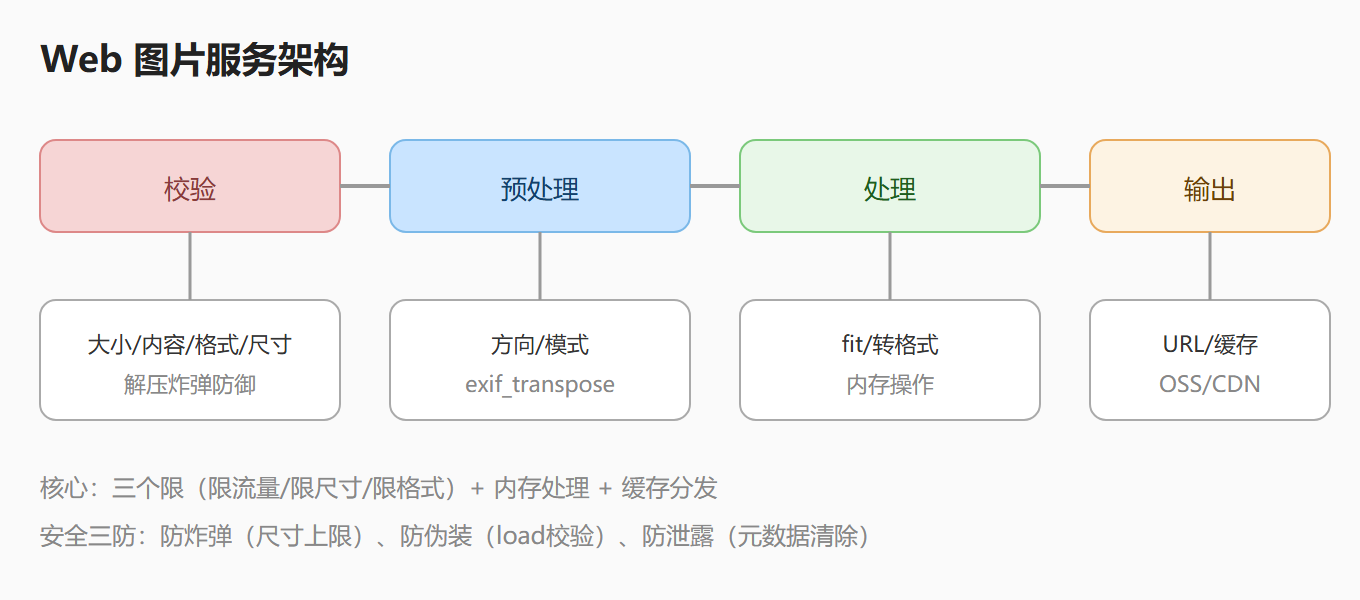
完整接口的四层:校验(大小/内容/格式/尺寸)→ 预处理(方向/模式)→ 处理(fit/转格式)→ 输出(内存/URL/缓存键)。"每一层都有防御"是接口健壮性的关键。
Web 图片处理的部署与运维
图片服务上线后,运维层面的关键点:
def capacity_estimate(avg_ms=10, instances=2): """估算容量:单次处理耗时 × 实例数""" per_sec_per_instance = 1000 / avg_ms total = per_sec_per_instance * instances daily = total * 86400 print(f"单实例: {per_sec_per_instance:.0f}张/s") print(f"{instances} 实例: {total:.0f}张/s = {daily/10000:.0f}万张/天") def health_check(): """健康检查:验证 Pillow 可用""" test = Image.new("RGB", (10, 10), "red") buf = io.BytesIO() test.save(buf, format="WEBP") return len(buf.getvalue()) > 0 print("健康检查:", "OK" if health_check() else "FAIL") capacity_estimate(avg_ms=8, instances=4)
运维三件事:容量规划(吞吐估算)、健康检查(服务可用性)、监控告警(失败率/延迟)。
实战:图片处理服务监控仪表
给图片服务加"监控仪表",实时掌握运行状态:
import time from collections import deque class ImageServiceMonitor: """图片服务监控:吞吐、延迟、错误率""" def __init__(self, window=100): self.times = deque(maxlen=window) self.errors = deque(maxlen=window) def record(self, duration_ms, ok=True): self.times.append(duration_ms) self.errors.append(0 if ok else 1) def report(self): if not self.times: return {} n = len(self.times) avg = sum(self.times) / n err_rate = sum(self.errors) / n * 100 return { "请求数": n, "平均耗时": f"{avg:.1f}ms", "错误率": f"{err_rate:.1f}%", "吞吐估算": f"{1000/max(avg,0.1):.0f}张/s", } monitor = ImageServiceMonitor() import random for _ in range(50): monitor.record(random.uniform(5, 25), ok=random.random() > 0.05) print(monitor.report())
监控仪表的价值:平均耗时(延迟)、错误率(质量)、吞吐估算(容量)——"实时可观测"是生产服务的生命线。
Web 图片服务的安全清单
把 Web 图片安全的所有要点汇总成清单,作为上线前检查:
SECURITY_CHECKLIST = { "上传校验": [ "文件大小上限(10MB)", "内容校验(load 触发解码)", "格式白名单(JPG/PNG/WebP)", "像素尺寸上限(5000x5000)", ], "处理防护": [ "内存处理(io.BytesIO)", "超时控制(异步/队列)", "错误隔离(try/except)", "限流限并发", ], "存储输出": [ "对象存储(OSS/S3)", "CDN 分发", "缓存策略(ETag/max-age)", "元数据清除(敏感信息)", ], } for category, items in SECURITY_CHECKLIST.items(): print(f"\n[{category}]") for item in items: print(f" ✓ {item}")
安全清单的价值:"上线前逐项打勾"是工程化的基本要求——不靠"记得"靠"清单"。
本节小结:Web 图像处理是"校验+处理+输出"的系统设计——三个限(限流量/限尺寸/限格式)、内存处理、缓存分发是核心。理解"每一层都有防御"与"可观测"原则,你就能构建生产级图片服务。
Web 图片处理的项目实战:图片压缩服务
把 Web 图片处理知识做成"图片压缩服务"——电商、社交、内容平台通用:
def compress_service(data, max_dim=1600, quality=80): """图片压缩服务:限宽 + 降质 + WebP""" img = Image.open(io.BytesIO(data)) img = ImageOps.exif_transpose(img) # 限宽 if img.width > max_dim: ratio = max_dim / img.width img = img.resize((max_dim, int(img.height * ratio)), Image.Resampling.LANCZOS) # WebP 压缩 buf = io.BytesIO() img.convert("RGB").save(buf, "WEBP", quality=quality, method=6) # 返回体积对比 return { "size": img.size, "compressed_kb": len(buf.getvalue()) // 1024, "data": buf.getvalue(), } with open("upload.jpg", "rb") as f: result = compress_service(f.read()) print(f"压缩后: {result['size']}, {result['compressed_kb']}KB")
压缩服务的价值:上传时自动压缩,存储与带宽成本大降——"图片压缩"是 Web 图片服务最基础也最高频的功能。这个服务结合了 4.1 的校验思路、exif 修正、限宽处理与 WebP 输出,是"四步走"流程的完整实战。
Web 图像处理的常见问题补充
问:图片服务需要做鉴权吗?
看场景。公开图库不需要;私密相册/付费内容需要。鉴权通常在网关层(token/签名),图片服务本身专注处理。
问:如何处理用户上传的"异常图片"?
四层防御:大小上限(文件)、内容校验(load 解码)、格式白名单、像素上限。异常图直接拒绝并记录日志。
问:WebP 兼容性怎么处理?
双格式策略:WebP + JPG fallback。前端 <picture> 标签自动选择,或后端按 Accept 头返回对应格式。
问:图片处理失败要重试吗?
区分错误类型:临时错误(网络/IO)可重试;永久错误(格式不支持/损坏)直接返回 4xx。**"可重试的错误才重试"**是排错原则。
Web 图片服务的完整架构
把 4.1 的所有知识组织成"完整架构图",作为服务设计的蓝图:
架构要点:
- 校验层:四个"限"(大小/内容/格式/像素)挡住恶意上传
- 处理层:内存处理 + 异步队列,不阻塞请求
- 存储层:对象存储 + 多尺寸预生成
- 分发层:CDN + 缓存(ETag/max-age)扛住高并发
"分层架构"是图片服务的标准设计——每层职责单一、可独立扩展。这个蓝图可以直接用于设计生产级图片服务,也是 4.1 知识的最终组织形态。
Web 图片服务的完整架构
把 4.1 的所有知识组织成"完整架构图",作为服务设计的蓝图:
客户端上传 → API 网关 → 校验层 → 处理层 → 存储层 → CDN → 展示 │ │ │ │ │ 大小/内容 exif/尺寸 OSS多尺寸 │ 格式/像素 格式转换 WebP+JPG
| 层 | 职责 | 要点 |
|---|---|---|
| 网关 | 路由/鉴权/限流 | 防滥用 |
| 校验 | 四个"限" | 防恶意上传 |
| 处理 | 内存处理+异步 | 不阻塞请求 |
| 存储 | 对象存储+多尺寸 | 预生成 |
| 分发 | CDN+缓存 | 扛高并发 |
图:Web 图片服务架构——校验到输出
要点速记
- Web 三件事:验证、处理、输出
- 全程内存操作:io.BytesIO 不落盘
- 解压炸弹防御:校验尺寸上限,防超小文件爆巨图
- exif_transpose:一行修复手机照片方向
- 响应式多尺寸:100/300/800/1600 按设备加载
- WebP 优先 JPG fallback:标准输出策略
- 接口驱动设计:action 参数扩展处理能力
- 任务队列:异步化,接口秒回
- 缓存策略:内容哈希键 + max-age + ETag
- 完整接口:校验→预处理→处理→输出
- 容量规划:吞吐估算与健康检查
- 监控仪表:耗时/错误率/吞吐可观测
- 安全清单:上传/处理/存储三层检查
- 坐标校验:前端裁剪参数必须范围检查
- load 触发解码:校验"确实是图"的杀手锏
- 存储策略:OSS/CDN 存图,DB 存 URL
- 核心是"三个限":限流量、限尺寸、限格式
单图在线服务搞定了,下一节面对"上万张图"——批量处理流水线与并行加速。