CI/CD自动化:自定义动画库的构建发布流水线
CI/CD自动化:自定义动画库的构建发布流水线
场景:维护自己的 Animate.css Fork
如果你的团队对 Animate.css 做了大量定制(自定义动画、修改默认时长、品牌化缓动曲线),你需要维护一个自己的"品牌动画库"。这涉及到构建、版本管理、自动发布。
项目结构
brand-animations/ ├── src/ │ ├── base/ │ │ └── _base.css # 基础类(fork from Animate.css) │ ├── animations/ │ │ ├── fading_entrances/ # 保留的 Animate.css 动画 │ │ ├── zoom_entrances/ │ │ └── custom/ # 自定义动画 │ │ ├── _springIn.css │ │ └── _blurReveal.css │ ├── utilities/ │ │ ├── _delays.css │ │ ├── _duration.css │ │ └── _repeat.css │ └── brand/ │ └── _variables.css # 品牌级 CSS 变量 ├── dist/ # 构建输出 ├── build.js # 构建脚本 ├── test/ │ └── visual.test.html # 视觉测试页面 ├── package.json └── .github/ └── workflows/ └── publish.yml # CI/CD 配置
构建脚本
// build.js const fs = require('fs'); const path = require('path'); const postcss = require('postcss'); const autoprefixer = require('autoprefixer'); const cssnano = require('cssnano'); async function build() { const srcDir = path.join(__dirname, 'src'); const distDir = path.join(__dirname, 'dist'); // 收集所有 CSS 文件 const files = []; function walk(dir) { fs.readdirSync(dir).forEach(function(name) { const fullPath = path.join(dir, name); if (fs.statSync(fullPath).isDirectory()) { walk(fullPath); } else if (name.endsWith('.css')) { files.push(fullPath); } }); } walk(srcDir); // 合并所有 CSS let combined = '/* Brand Animations - Auto Generated */\n'; files.forEach(function(file) { combined += '/* ' + path.relative(srcDir, file) + ' */\n'; combined += fs.readFileSync(file, 'utf-8') + '\n'; }); // PostCSS 处理:autoprefixer + 压缩 const result = await postcss([ autoprefixer({ overrideBrowserslist: ['> 0.5%', 'last 2 versions'] }), cssnano({ preset: 'default' }) ]).process(combined, { from: undefined }); // 输出 if (!fs.existsSync(distDir)) fs.mkdirSync(distDir, { recursive: true }); fs.writeFileSync(path.join(distDir, 'brand-animations.min.css'), result.css); fs.writeFileSync(path.join(distDir, 'brand-animations.css'), combined); console.log('构建完成:'); console.log(' 未压缩:', (Buffer.byteLength(combined) / 1024).toFixed(1) + ' KB'); console.log(' 压缩后:', (Buffer.byteLength(result.css) / 1024).toFixed(1) + ' KB'); } build().catch(console.error);
视觉测试页面
每次构建后自动生成一个视觉测试页面,包含所有动画的预览:
// scripts/generate-test-page.js const fs = require('fs'); function generateTestPage() { let html = `<!DOCTYPE html> <html><head> <title>Brand Animations Test</title> <link rel="stylesheet" href="dist/brand-animations.min.css"> <style> body { font-family: system-ui; padding: 20px; max-width: 900px; margin: auto; } .grid { display: grid; grid-template-columns: repeat(3, 1fr); gap: 20px; margin-top: 20px; } .item { border: 1px solid #ddd; border-radius: 8px; padding: 20px; text-align: center; cursor: pointer; min-height: 100px; display: flex; align-items: center; justify-content: center; } .item:hover .inner { opacity: 0; } .inner { transition: opacity 0.3s; } </style> </head><body> <h1>Brand Animations 视觉测试</h1> <p>点击任意方块播放动画</p> <div class="grid">\n`; const animations = [ 'fadeIn', 'fadeInUp', 'fadeInDown', 'fadeInLeft', 'fadeInRight', 'zoomIn', 'zoomInUp', 'bounceIn', 'springIn', 'blurReveal', 'fadeOut', 'fadeOutUp', 'zoomOut', 'pulse', 'shakeX', 'bounce', 'swing' ]; animations.forEach(function(name) { html += ` <div class="item" onclick="replay(this, '${name}')"> <div class="inner animate__animated animate__${name}">${name}</div> </div>\n`; }); html += ` </div> <script> function replay(el, name) { var inner = el.querySelector('.inner'); inner.classList.remove('animate__animated', 'animate__' + name); void inner.offsetWidth; inner.classList.add('animate__animated', 'animate__' + name); } </script></body></html>`; fs.writeFileSync('test/visual.test.html', html); } generateTestPage();
GitHub Actions CI/CD
# .github/workflows/publish.yml name: Build & Publish on: push: branches: [main] tags: ['v*'] jobs: build: runs-on: ubuntu-latest steps: - uses: actions/checkout@v4 - uses: actions/setup-node@v4 with: node-version: '20' cache: 'npm' - run: npm ci - run: node build.js - run: node scripts/generate-test-page.js # 构建产物上传(用于部署测试页面) - uses: actions/upload-artifact@v4 with: name: dist path: dist/ # 部署测试页面到 GitHub Pages - uses: peaceiris/actions-gh-pages@v3 if: github.ref == 'refs/heads/main' with: github_token: ${{ secrets.GITHUB_TOKEN }} publish_dir: ./test # 发布到 npm(仅 tag 触发) - run: npm publish if: startsWith(github.ref, 'refs/tags/v') env: NODE_AUTH_TOKEN: ${{ secrets.NPM_TOKEN }}
版本管理策略
使用语义化版本(Semantic Versioning):
- PATCH(1.0.x):修复动画时序、缓动曲线的小调整
- MINOR(1.x.0):新增动画、新增工具类
- MAJOR(x.0.0):不兼容的 API 变更(如类名重命名、CSS 变量名变更)
发布流程:
# 1. 开发完成后,更新 package.json 版本号 npm version patch -m "fix: adjust springIn overshoot from 1.05 to 1.08" # 2. 推送 tag git push --follow-tags # 3. GitHub Actions 自动构建、测试、发布 # 4. 团队成员更新依赖:npm update brand-animations

发布检查清单与回滚
在触发 npm 发布前,建议在流水线里追加两道检查:一是用视觉回归工具(如 Playwright 截图对比)在测试页面上录制动画首帧与末帧,防止自定义动画在低端机型上表现异常;二是检查生成的产物体积,如果压缩后大小超过设定阈值(比如 15KB),直接让构建失败,避免库悄悄膨胀。
发布之后的回滚同样要自动化。npm 包一旦发布 tag 就很难"撤销",更稳妥的做法是把发布动作与版本 tag 绑定:发现严重问题时先发一个修复版 PATCH,而不是回滚旧版本。同时在流水线里保留上一次构建产物(比如 GitHub Actions 的 artifact),万一主项目需要临时固定旧版本,可以快速回退依赖号。
一个容易忽略的点:CSS 动画库的破坏性变更往往不体现在构建错误里,而是体现在视觉差异上。因此主项目升级依赖后,应该把动画相关的视觉测试纳入 CI,任何截图差异都走人工确认流程,而不是依赖 npm update 静默升级。动画库的回归比普通工具库更难自动化,把"截图对比 + 体积阈值 + 关键帧存在性"三件事做扎实,就能覆盖大部分发布风险。
与主项目的集成
主项目通过 npm 引入品牌动画库:
// package.json { "dependencies": { "brand-animations": "^1.2.0" } }
// main.js import 'brand-animations/dist/brand-animations.min.css';
当品牌动画库发布新版本后,主项目通过 npm update 获取更新。如果主项目使用 Dependabot 或 Renovate,可以自动创建更新 PR。
自动化测试
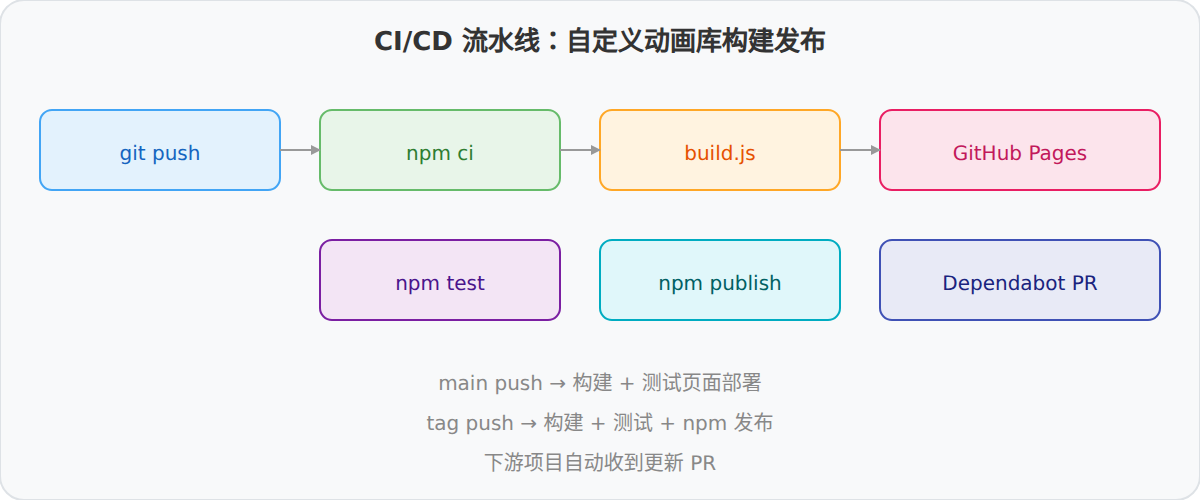
CSS 动画的自动化测试比较困难——主要依赖视觉验证。可以做一些基础检查:
// test/build.test.js const fs = require('fs'); // 检查构建产物是否存在 test('dist files exist', function() { expect(fs.existsSync('dist/brand-animations.min.css')).toBe(true); expect(fs.existsSync('dist/brand-animations.css')).toBe(true); }); // 检查体积不超过阈值 test('minified size under 10KB', function() { var size = fs.statSync('dist/brand-animations.min.css').size; expect(size).toBeLessThan(10 * 1024); }); // 检查包含必需的 @keyframes test('contains required keyframes', function() { var css = fs.readFileSync('dist/brand-animations.css', 'utf-8'); expect(css).toContain('@keyframes fadeIn'); expect(css).toContain('@keyframes zoomIn'); expect(css).toContain('animate__animated'); });
这些测试不验证视觉效果,但能确保构建流程没有明显错误。