- 文集信息
- 目录大纲
- 最新文档
- 知识宇宙
文集详情
文集导读



-lightgrey)




世界上最小的向量索引。用LEANN实现RAG一切!
LEANN是一个创新的向量数据库,让个人AI变得触手可及。将你的笔记本电脑变成一个强大的RAG系统,能够索引和搜索数百万份文档,同时比传统方案节省97%的存储空间,且不会损失准确性。
LEANN通过基于图的有选择性重新计算与高阶保留剪枝技术实现这一目标,按需计算嵌入向量,而不是全部存储。插图图→ | 论文→
准备好实现RAG一切了吗? 将你的笔记本电脑变成一个个人AI助手,它可以语义搜索你的**文件系统、邮件、浏览器历史、聊天记录(微信、iMessage)、代理记忆(ChatGPT、Claude)、实时数据(Slack、Twitter)、代码库*** 或外部知识库——所有这些都放在你的笔记本上,零云端成本,完全隐私保护。
* Claude Code仅支持基本的grep风格关键词搜索。LEANN是完全兼容Claude Code的即插即用语义搜索MCP服务,无需改变你的工作流程即可解锁智能检索功能。 立即查看简易设置→
为什么选择LEANN?

数字说明一切: 仅用6GB就能索引6,000万段文本,而传统方案需要201GB。从邮件到浏览器历史,一切都能装进你的笔记本电脑。查看不同应用的详细基准测试↓
隐私: 你的数据永远不会离开你的笔记本电脑。没有OpenAI,没有云端,没有“服务条款”。
轻量: 基于图的重新计算消除了繁重的嵌入存储,而智能图剪枝和CSR格式则最大限度地减少了图存储开销。始终更少的存储,更低的内存占用!
便携: 轻松在设备间转移你的整个知识库——甚至与他人共享,你的个人AI记忆随身携带。
可扩展性: 能够处理传统向量数据库会崩溃的混乱个人数据,轻松管理你不断增长的个性化数据和代理生成的记忆!
✨ 无精度损失: 使用97%更少的存储空间,保持与重量级方案相同的搜索质量。
安装
先决条件:安装uv
如果你还没有安装uv,请先安装uv。通常你可以用以下命令安装:
curl -LsSf https://astral.sh/uv/install.sh | sh
快速安装
克隆仓库以获取所有示例,并尝试各种惊艳的应用程序,
git clone https://github.com/yichuan-w/LEANN.git leann cd leann
然后从PyPI安装LEANN,立即运行:
uv venv source .venv/bin/activate uv pip install leann
从源码构建(推荐用于开发)
git clone https://github.com/yichuan-w/LEANN.git leann cd leann git submodule update --init --recursive
macOS:
注意:DiskANN要求MacOS 13.3或更高版本。
brew install libomp boost protobuf zeromq pkgconf uv sync --extra diskann
Linux(Ubuntu/Debian):
注意:在Ubuntu 20.04上,你可能需要编译更新的Abseil并固定Protobuf版本(例如v3.20.x)来构建DiskANN。请参阅问题#30获取逐步说明。
你可以手动安装Intel oneAPI MKL代替下面命令中的libmkl-full-dev for DiskANN. You can also use libopenblas-dev for building HNSW only, by removing --extra diskann。
sudo apt-get update && sudo apt-get install -y \ libomp-dev libboost-all-dev protobuf-compiler libzmq3-dev \ pkg-config libabsl-dev libaio-dev libprotobuf-dev \ libmkl-full-dev uv sync --extra diskann
Linux(Arch Linux):
sudo pacman -Syu && sudo pacman -S --needed base-devel cmake pkgconf git gcc \ boost boost-libs protobuf abseil-cpp libaio zeromq # For MKL in DiskANN sudo pacman -S --needed base-devel git git clone https://aur.archlinux.org/paru-bin.git cd paru-bin && makepkg -si paru -S intel-oneapi-mkl intel-oneapi-compiler source /opt/intel/oneapi/setvars.sh uv sync --extra diskann
Linux(RHEL / CentOS Stream / Oracle / Rocky / AlmaLinux):
请参阅问题#50了解更多信息。
sudo dnf groupinstall -y "Development Tools" sudo dnf install -y libomp-devel boost-devel protobuf-compiler protobuf-devel \ abseil-cpp-devel libaio-devel zeromq-devel pkgconf-pkg-config # For MKL in DiskANN sudo dnf install -y intel-oneapi-mkl intel-oneapi-mkl-devel \ intel-oneapi-openmp || sudo dnf install -y intel-oneapi-compiler source /opt/intel/oneapi/setvars.sh uv sync --extra diskann
快速开始
我们的声明式API让RAG像写配置文件一样简单。
查看demo.ipynb或
from leann import LeannBuilder, LeannSearcher, LeannChat from pathlib import Path INDEX_PATH = str(Path("./").resolve() / "demo.leann") # Build an index builder = LeannBuilder(backend_name="hnsw") builder.add_text("LEANN saves 97% storage compared to traditional vector databases.") builder.add_text("Tung Tung Tung Sahur called—they need their banana‑crocodile hybrid back") builder.build_index(INDEX_PATH) # Search searcher = LeannSearcher(INDEX_PATH) results = searcher.search("fantastical AI-generated creatures", top_k=1) # Chat with your data chat = LeannChat(INDEX_PATH, llm_config={"type": "hf", "model": "Qwen/Qwen3-0.6B"}) response = chat.ask("How much storage does LEANN save?", top_k=1)
RAG一切!
LEANN支持多种数据源的RAG,包括文档(.pdf, .txt, .md)、苹果邮件、谷歌搜索历史、微信、ChatGPT对话、Claude对话、iMessage对话,以及通过MCP(模型上下文协议)服务器从任何平台获取的实时数据——包括Slack、Twitter等。
生成模型设置
LLM后端
LEANN支持众多LLM提供商进行文本生成(HuggingFace、Ollama,以及任何兼容OpenAI的API)。
OpenAI API设置(默认)
将你的OpenAI API密钥设为环境变量:
export OPENAI_API_KEY="your-api-key-here"
确保使用--llm openai flag when using the CLI.
You can also specify the model name with --llm-model <model-name> flag.
️ Supported LLM & Embedding Providers (via OpenAI Compatibility)
Thanks to the widespread adoption of the OpenAI API format, LEANN is compatible out-of-the-box with a vast array of LLM and embedding providers. Simply set the OPENAI_BASE_URL and OPENAI_API_KEY环境变量连接到你首选的服务。
export OPENAI_API_KEY="xxx" export OPENAI_BASE_URL="http://localhost:1234/v1" # base url of the provider
要使用CLI界面的OpenAI兼容端点:
如果你用于文本生成,务必使用--llm openai flag and specify the model name with --llm-model <model-name> flag.
If you are using it for embedding, set the --embedding-mode openai flag and specify the model name with --embedding-model <MODEL>.
Below is a list of base URLs for common providers to get you started.
️ Local Inference Engines (Recommended for full privacy)
| Provider | Sample Base URL |
|---|---|
| Ollama | http://localhost:11434/v1 |
| LM Studio | http://localhost:1234/v1 |
| vLLM | http://localhost:8000/v1 |
| llama.cpp | http://localhost:8080/v1 |
| SGLang | http://localhost:30000/v1 |
| LiteLLM | http://localhost:4000 |
☁️ Cloud Providers
** A Note on Privacy:** Before choosing a cloud provider, carefully review their privacy and data retention policies. Depending on their terms, your data may be used for their own purposes, including but not limited to human reviews and model training, which can lead to serious consequences if not handled properly.
| Provider | Base URL |
|---|---|
| OpenAI | https://api.openai.com/v1 |
| OpenRouter | https://openrouter.ai/api/v1 |
| Gemini | https://generativelanguage.googleapis.com/v1beta/openai/ |
| x.AI (Grok) | https://api.x.ai/v1 |
| Groq AI | https://api.groq.com/openai/v1 |
| DeepSeek | https://api.deepseek.com/v1 |
| SiliconFlow | https://api.siliconflow.cn/v1 |
| Zhipu (BigModel) | https://open.bigmodel.cn/api/paas/v4/ |
| Mistral AI | https://api.mistral.ai/v1 |
如果你的提供商不在这个列表中,别担心!查看他们的文档寻找兼容OpenAI的端点——很可能它也兼容OpenAI!
Ollama设置(推荐用于完全隐私)
macOS:
# Pull a lightweight model (recommended for consumer hardware) ollama pull llama3.2:1b
Linux:
# Install Ollama curl -fsSL https://ollama.ai/install.sh | sh # Start Ollama service manually ollama serve & # Pull a lightweight model (recommended for consumer hardware) ollama pull llama3.2:1b
⭐ 灵活配置
LEANN提供灵活的参数,用于嵌入模型、搜索策略和数据处理,以满足你的特定需求。
需要配置最佳实践? 查看我们的配置指南获取详细的优化技巧、模型选择建议以及解决常见问题的方案,比如嵌入速度慢或搜索质量差。
点击展开:通用参数(适用于所有示例)
所有RAG示例都共享这些通用参数。交互模式在所有示例中可用——只需不带--query运行,即可启动连续问答会话,你可以提出多个问题。输入'quit'退出。
# Core Parameters (General preprocessing for all examples) --index-dir DIR # Directory to store the index (default: current directory) --query "YOUR QUESTION" # Single query mode. Omit for interactive chat (type 'quit' to exit), and now you can play with your index interactively --max-items N # Limit data preprocessing (default: -1, process all data) --force-rebuild # Force rebuild index even if it exists # Embedding Parameters --embedding-model MODEL # e.g., facebook/contriever, text-embedding-3-small, mlx-community/Qwen3-Embedding-0.6B-8bit or nomic-embed-text --embedding-mode MODE # sentence-transformers, openai, mlx, or ollama # LLM Parameters (Text generation models) --llm TYPE # LLM backend: openai, ollama, or hf (default: openai) --llm-model MODEL # Model name (default: gpt-4o) e.g., gpt-4o-mini, llama3.2:1b, Qwen/Qwen2.5-1.5B-Instruct --thinking-budget LEVEL # Thinking budget for reasoning models: low/medium/high (supported by o3, o3-mini, GPT-Oss:20b, and other reasoning models) # Search Parameters --top-k N # Number of results to retrieve (default: 20) --search-complexity N # Search complexity for graph traversal (default: 32) # Chunking Parameters --chunk-size N # Size of text chunks (default varies by source: 256 for most, 192 for WeChat) --chunk-overlap N # Overlap between chunks (default varies: 25-128 depending on source) # Index Building Parameters --backend-name NAME # Backend to use: hnsw or diskann (default: hnsw) --graph-degree N # Graph degree for index construction (default: 32) --build-complexity N # Build complexity for index construction (default: 64) --compact / --no-compact # Use compact storage (default: true). Must be `no-compact` for `no-recompute` build. --recompute / --no-recompute # Enable/disable embedding recomputation (default: enabled). Should not do a `no-recompute` search in a `recompute` build.
个人数据管理器:处理任意文档(.pdf, .txt, .md)!
Ask questions directly about your personal PDFs, documents, and any directory containing your files!
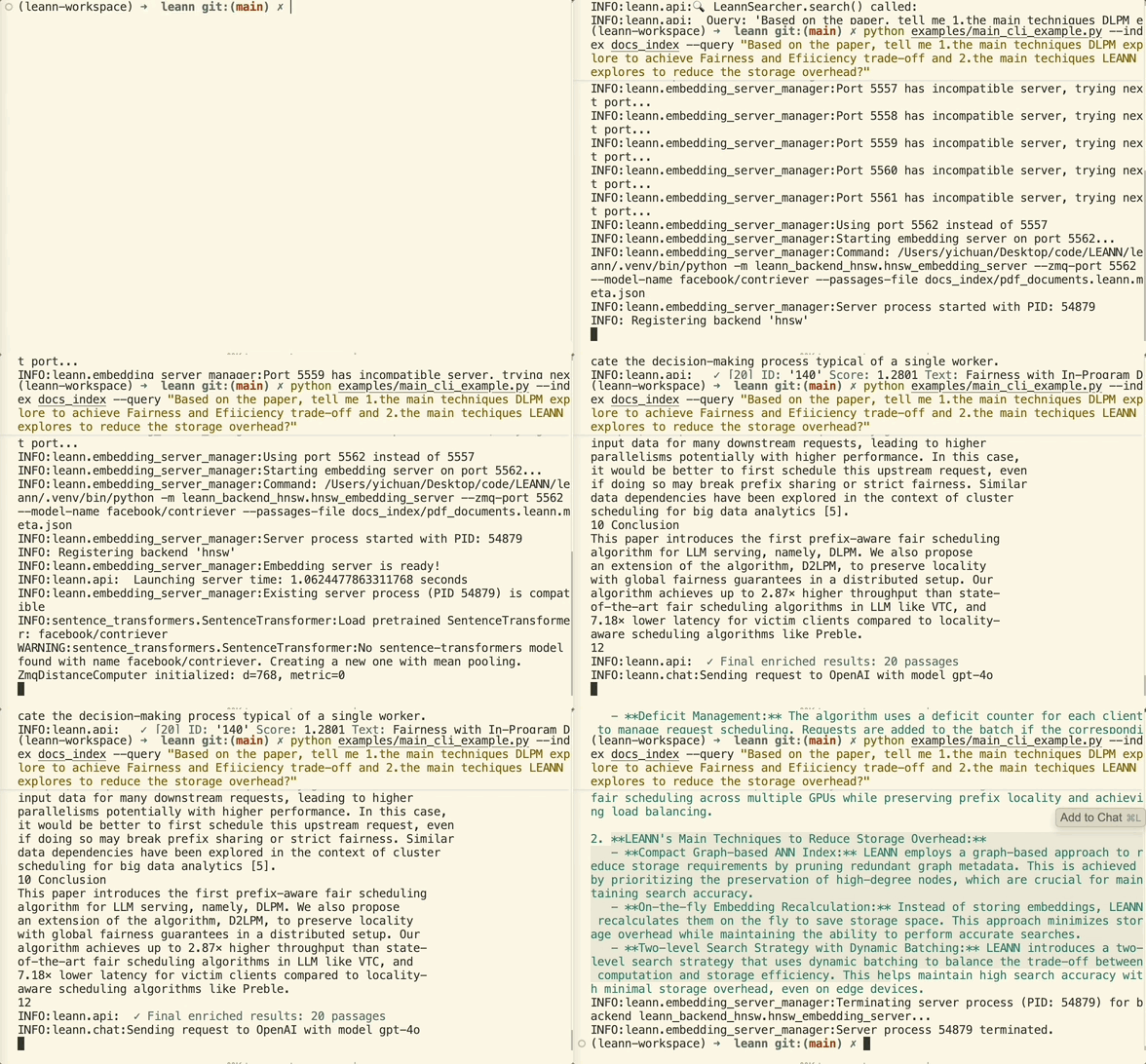
The example below asks a question about summarizing our paper (uses default data in data/,这是一个包含多种数据源的目录:两篇论文、《傲慢与偏见》以及一篇关于华为LLM的中文技术报告),这是这里最简单的示例:
source .venv/bin/activate # Don't forget to activate the virtual environment python -m apps.document_rag --query "What are the main techniques LEANN explores?"
点击展开:文档专用参数
参数
--data-dir DIR # Directory containing documents to process (default: data) --file-types .ext .ext # Filter by specific file types (optional - all LlamaIndex supported types if omitted)
示例命令
# Process all documents with larger chunks for academic papers python -m apps.document_rag --data-dir "~/Documents/Papers" --chunk-size 1024 # Filter only markdown and Python files with smaller chunks python -m apps.document_rag --data-dir "./docs" --chunk-size 256 --file-types .md .py # Enable AST-aware chunking for code files python -m apps.document_rag --enable-code-chunking --data-dir "./my_project" # Or use the specialized code RAG for better code understanding python -m apps.code_rag --repo-dir "./my_codebase" --query "How does authentication work?"
你的个人邮件秘书:在苹果邮件上实现RAG!
注意: 下面的示例目前仅支持macOS。Windows支持即将推出。
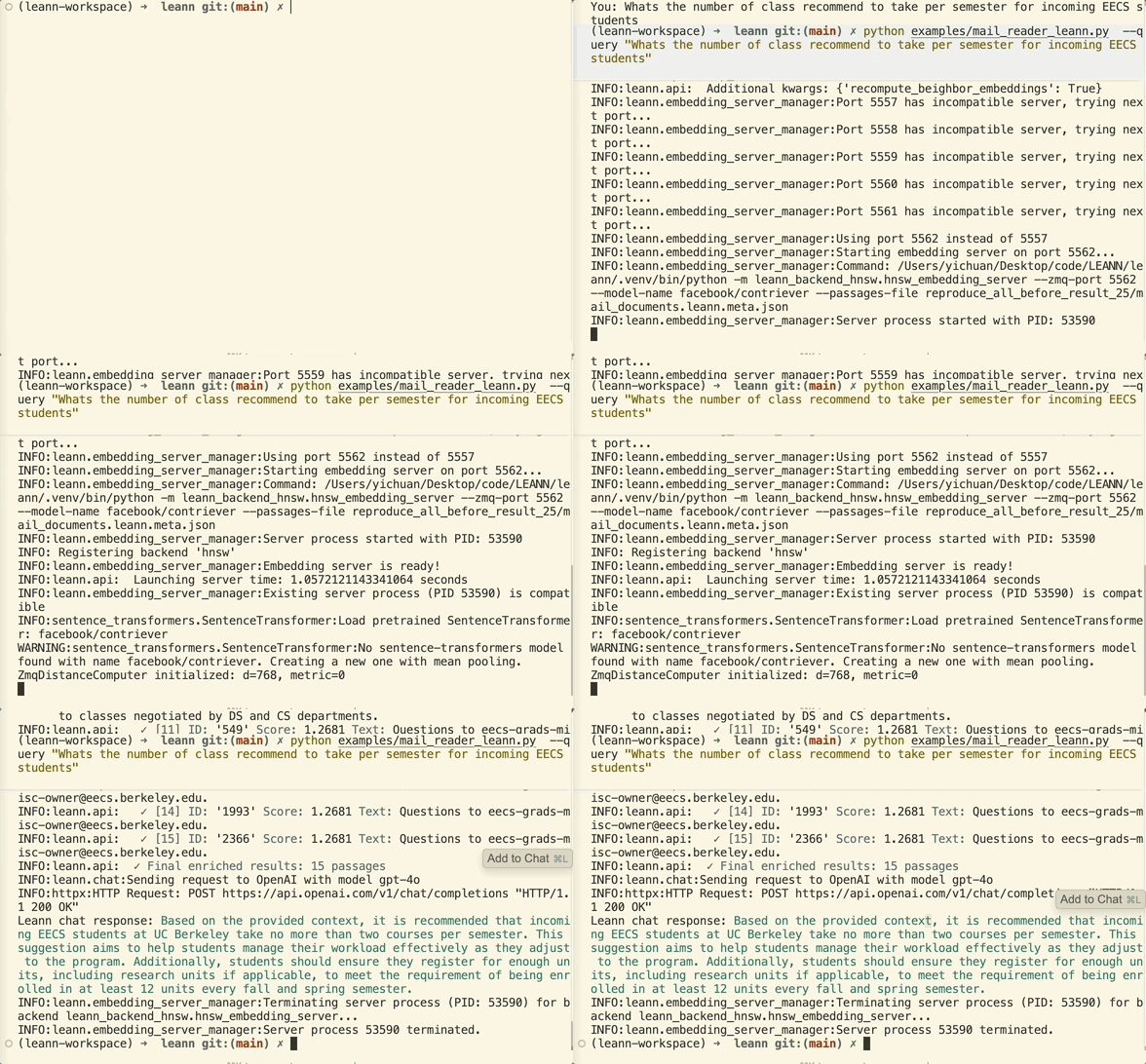
在运行下面的示例之前,你需要在系统偏好设置→隐私与安全→全磁盘访问中授予终端/VS Code完全磁盘访问权限。
python -m apps.email_rag --query "What's the food I ordered by DoorDash or Uber Eats mostly?"
78万封邮件片段→78MB存储。 终于,像搜索Google一样搜索你的邮件。
点击展开:邮件专用参数
参数
--mail-path PATH # Path to specific mail directory (auto-detects if omitted) --include-html # Include HTML content in processing (useful for newsletters)
示例命令
# Search work emails from a specific account python -m apps.email_rag --mail-path "~/Library/Mail/V10/WORK_ACCOUNT" # Find all receipts and order confirmations (includes HTML) python -m apps.email_rag --query "receipt order confirmation invoice" --include-html
点击展开:你可以尝试的查询示例
索引建立完成后,你可以提问:
- “找到我老板关于截止日期的邮件”
- “约翰对项目时间表说了什么?”
- “给我看看关于差旅费用的邮件”
网络时光机:搜索你的整个Chrome浏览器历史!
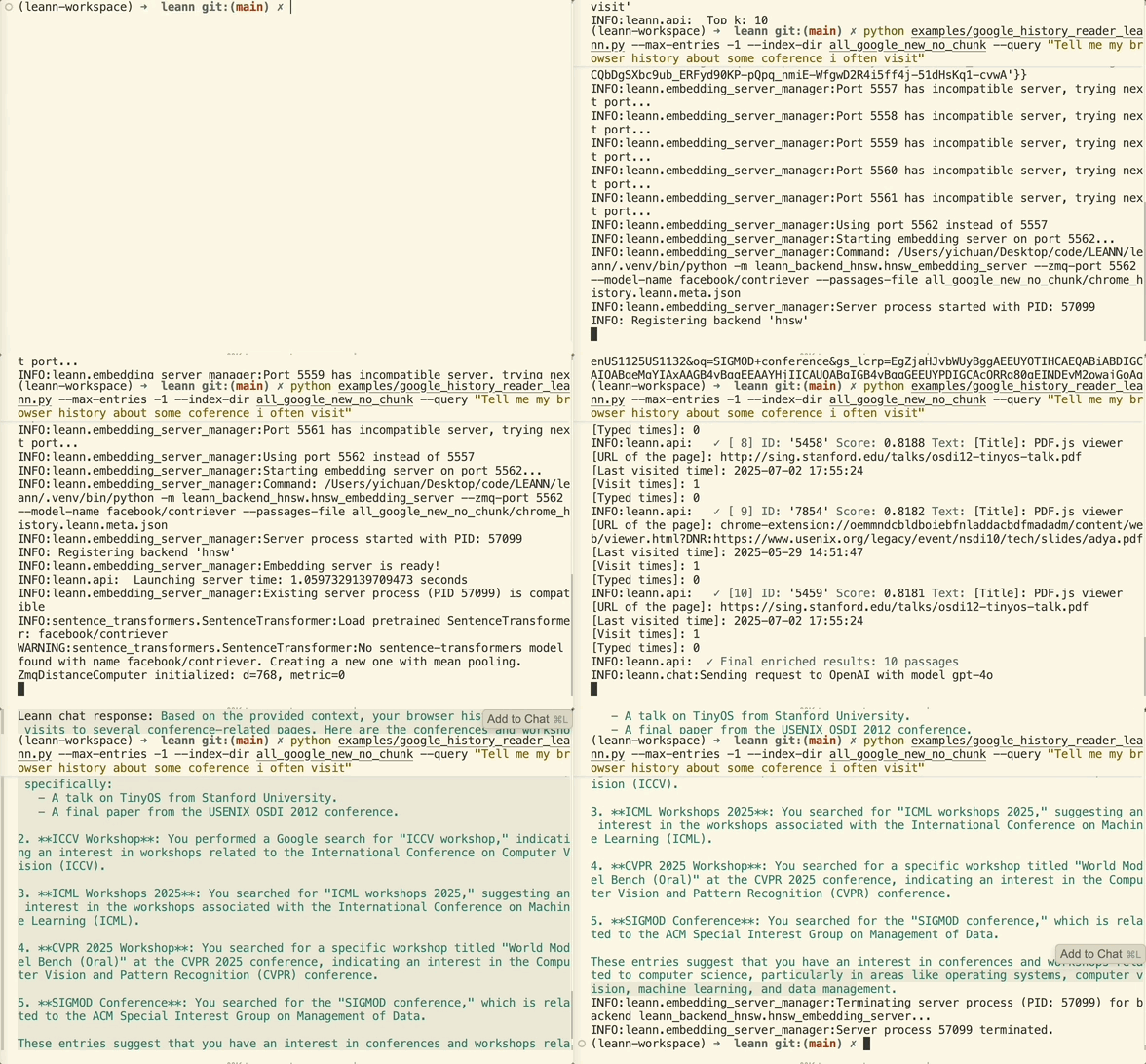
python -m apps.browser_rag --query "Tell me my browser history about machine learning?"
3.8万条浏览器记录→6MB存储。 你的浏览器历史成为你的个人搜索引擎。
点击展开:浏览器专用参数
参数
--chrome-profile PATH # Path to Chrome profile directory (auto-detects if omitted)
示例命令
# Search academic research from your browsing history python -m apps.browser_rag --query "arxiv papers machine learning transformer architecture" # Track competitor analysis across work profile python -m apps.browser_rag --chrome-profile "~/Library/Application Support/Google/Chrome/Work Profile" --max-items 5000
点击展开:如何找到你的Chrome配置文件
默认的Chrome配置文件路径针对典型的macOS设置进行了配置。如果你需要找到你的具体Chrome配置文件:
- 打开终端
- 运行:
ls ~/Library/Application\ Support/Google/Chrome/ - Look for folders like "Default", "Profile 1", "Profile 2", etc.
- Use the full path as your
--chrome-profileargument
Common Chrome profile locations:
- macOS:
~/Library/Application Support/Google/Chrome/Default - Linux:
~/.config/google-chrome/Default
点击展开:你可以尝试的查询示例
索引建立完成后,你可以提问:
- “我访问过哪些关于机器学习的网站?”
- “找到我关于编程的搜索历史”
- “我最近看了哪些YouTube视频?”
- “给我看看我访问过的关于旅行规划的网站”
微信侦探:解锁你的黄金回忆!
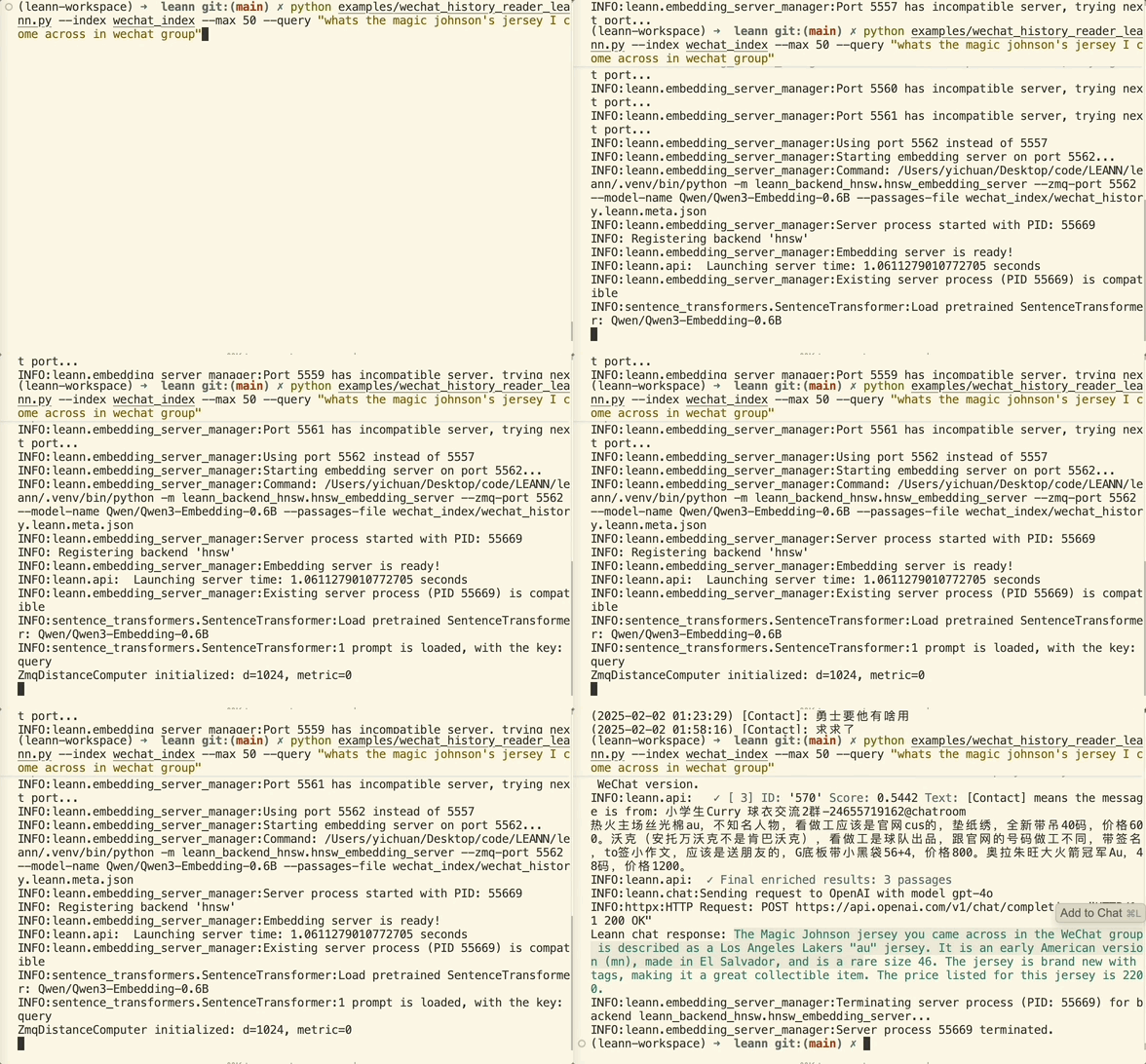
python -m apps.wechat_rag --query "Show me all group chats about weekend plans"
40万条消息→64MB存储 搜索多年来的聊天记录,支持任何语言。
点击展开:安装要求
首先,你需要安装微信导出工具,
brew install sunnyyoung/repo/wechattweak-cli
或者手动安装(如果你在Homebrew上有问题):
sudo packages/wechat-exporter/wechattweak-cli install
故障排除:
- 安装问题:查看WeChatTweak-CLI的问题页面
- 导出错误:如果遇到以下错误,尝试重启微信
Failed to export WeChat data. Please ensure WeChat is running and WeChatTweak is installed. Failed to find or export WeChat data. Exiting.
点击展开:微信专用参数
参数
--export-dir DIR # Directory to store exported WeChat data (default: wechat_export_direct) --force-export # Force re-export even if data exists
示例命令
# Search for travel plans discussed in group chats python -m apps.wechat_rag --query "travel plans" --max-items 10000 # Re-export and search recent chats (useful after new messages) python -m apps.wechat_rag --force-export --query "work schedule"
点击展开:你可以尝试的查询示例
索引建立完成后,你可以提问:
- “我想买魔术师约翰逊的球衣,给我一些对应聊天记录?”(中文:Show me chat records about buying Magic Johnson's jersey)
ChatGPT聊天记录:你的个人AI对话档案!
将你的ChatGPT对话转化为可搜索的知识库!搜索你所有关于编码、研究、头脑风暴等方面的ChatGPT讨论。
python -m apps.chatgpt_rag --export-path chatgpt_export.html --query "How do I create a list in Python?"
解锁你的AI对话历史。 再也不用担心错过ChatGPT讨论中的宝贵见解。
点击展开:如何导出ChatGPT数据
分步导出过程:
- 登录ChatGPT
- 点击右上角的个人头像
- 进入设置→数据控制
- **点击“导出”**下的“导出数据”
- 确认导出请求
- 从邮件链接下载ZIP文件(有效期24小时)
- 解压或直接使用LEANN
支持格式:
.htmlfiles from ChatGPT exports.zip归档文件来自ChatGPT- 包含多个导出文件的目录
点击展开:ChatGPT专用参数
参数
--export-path PATH # Path to ChatGPT export file (.html/.zip) or directory (default: ./chatgpt_export) --separate-messages # Process each message separately instead of concatenated conversations --chunk-size N # Text chunk size (default: 512) --chunk-overlap N # Overlap between chunks (default: 128)
示例命令
# Basic usage with HTML export python -m apps.chatgpt_rag --export-path conversations.html # Process ZIP archive from ChatGPT python -m apps.chatgpt_rag --export-path chatgpt_export.zip # Search with specific query python -m apps.chatgpt_rag --export-path chatgpt_data.html --query "Python programming help" # Process individual messages for fine-grained search python -m apps.chatgpt_rag --separate-messages --export-path chatgpt_export.html # Process directory containing multiple exports python -m apps.chatgpt_rag --export-path ./chatgpt_exports/ --max-items 1000
点击展开:你可以尝试的查询示例
ChatGPT对话索引完成后,你可以用以下查询搜索:
- “我问ChatGPT关于Python编程的什么?”
- “给我看看关于机器学习算法的对话”
- “找到关于Web开发框架的讨论”
- “ChatGPT给了我哪些编程建议?”
- “搜索关于调试技巧的对话”
- “找到ChatGPT的学习资源推荐”
Claude聊天记录:你的个人AI对话档案!
将你的Claude对话转化为可搜索的知识库!搜索你所有关于编码、研究、头脑风暴等方面的Claude讨论。
python -m apps.claude_rag --export-path claude_export.json --query "What did I ask about Python dictionaries?"
解锁你的AI对话历史。 再也不用担心错过Claude讨论中的宝贵见解。
点击展开:如何导出Claude数据
分步导出过程:
- 在浏览器中打开Claude
- 进入设置(查找齿轮图标或设置菜单)
- **在
- 在 developer.twitter.com 申请一个 Twitter 开发者账号
- 在 Twitter 开发者门户中创建一个新应用
- 生成具有“读取”权限的 API 密钥和访问令牌
- 如果需要访问书签,可能需要使用具有适当范围的 Twitter API v2
export TWITTER_API_KEY="your-api-key" export TWITTER_API_SECRET="your-api-secret" export TWITTER_ACCESS_TOKEN="your-access-token" export TWITTER_ACCESS_TOKEN_SECRET="your-access-token-secret"
- 使用
--test-connectionflag
Arguments:
--mcp-server: Command to start the Twitter MCP server--username: Filter bookmarks by username (optional)--max-bookmarks: Maximum bookmarks to fetch (default: 1000)--no-tweet-content: Exclude tweet content, only metadata--no-metadata测试连接:排除互动元数据
点击展开:您可以尝试的示例查询
Slack 查询:
- “团队讨论了项目截止日期的哪些内容?”
- “查找有关新功能发布的消息”
- “给我展示关于预算规划的对话”
- “开发团队频道里做出了哪些决定?”
Twitter 查询:
- “我上个月收藏了哪些人工智能文章?”
- “查找有关机器学习技术的推文”
- “给我展示收藏的关于创业建议的帖子”
- “我保存了哪些 Python 教程?”
想用常规 LEANN CLI 使用 MCP 数据吗? 您可以将 MCP 应用与 CLI 命令结合使用:
# Step 1: Use MCP app to fetch and index data python -m apps.slack_rag --mcp-server "slack-mcp-server" --workspace-name "my-team" # Step 2: The data is now indexed and available via CLI leann search slack_messages "project deadline" leann ask slack_messages "What decisions were made about the product launch?" # Same for Twitter bookmarks python -m apps.twitter_rag --mcp-server "twitter-mcp-server" leann search twitter_bookmarks "machine learning articles"
MCP 与手动导出的区别:
- MCP:实时数据,自动更新,需要搭建服务器
- 手动导出:一次性设置,离线可用,需要手动导出数据
添加新的 MCP 平台
想为其他平台添加支持吗?LEANN 的 MCP 集成旨在轻松扩展:
- 为您的平台找到或创建一个 MCP 服务器
- 按照
apps/slack_data/slack_mcp_reader.py - Create a RAG application following the pattern in
apps/slack_rag.py中的模式创建一个读取器类 - 测试并回馈社区!
值得探索的热门 MCP 服务器:
- GitHub 仓库和问题
- Discord 消息
- Notion 页面
- Google Drive 文档
- 以及 MCP 生态系统中的更多平台!
Claude Code 集成:变革您的开发工作流!
AST‑感知代码分块
LEANN 提供智能代码分块功能,可保留语义边界(函数、类、方法),适用于 Python、Java、C# 和 TypeScript,相比基于文本的分块,能更好地理解代码。
代码辅助的未来已来。 通过 LEANN 的原生 MCP 集成,为 Claude Code 变革您的开发工作流。索引您的整个代码库,并直接在 IDE 中获得智能代码辅助。
主要功能:
- 全项目范围内语义代码搜索,完全本地索引且轻量级
- AST 感知分块 保留代码结构(函数、类)
- 上下文感知辅助 用于调试和开发
- 零配置设置 自动检测语言
# Install LEANN globally for MCP integration uv tool install leann-core --with leann claude mcp add --scope user leann-server -- leann_mcp # Setup is automatic - just start using Claude Code!
试试我们的全代理管道,具备自动查询重写、语义搜索规划等功能:
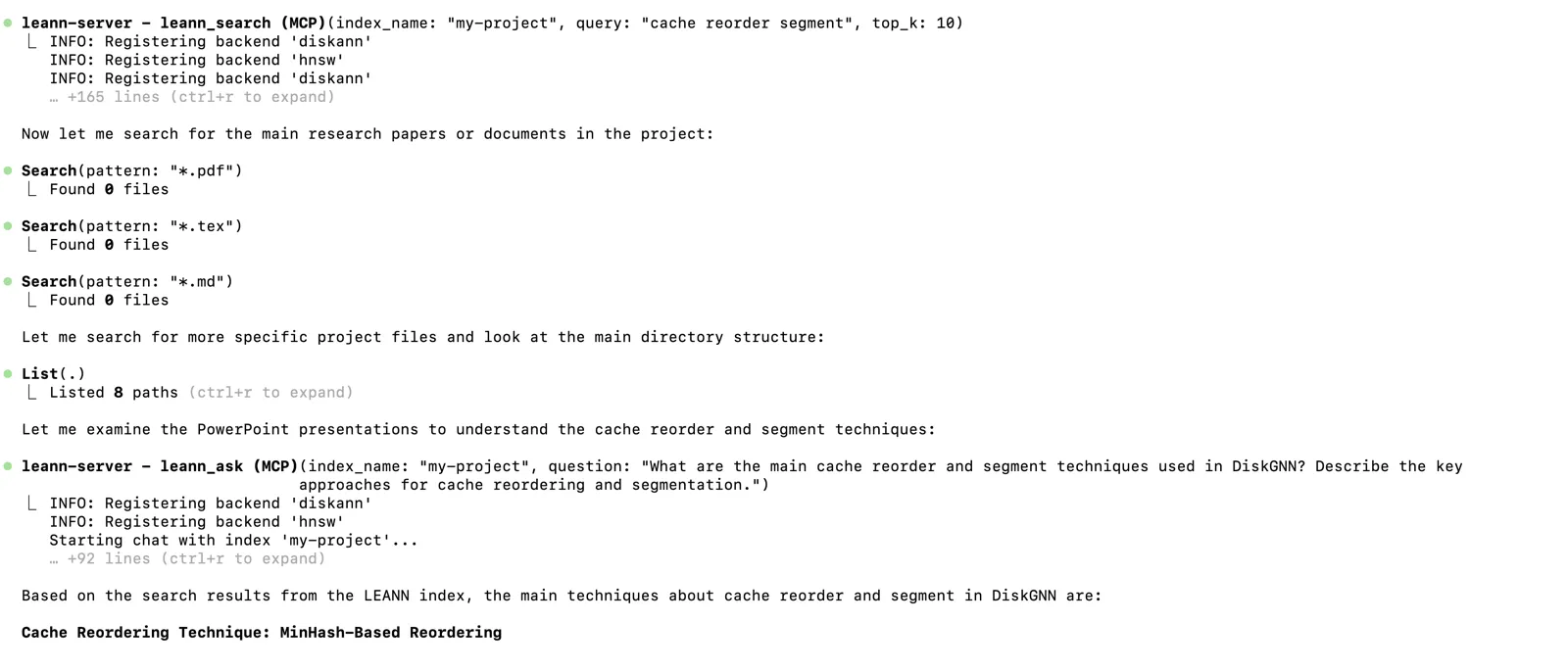
** 准备好为您的编码注入强大动力了吗?** 完整设置指南 →
命令行界面
LEANN 包含强大的 CLI,用于文档处理和搜索。非常适合快速索引文档和交互式聊天。
安装
如果您按照快速入门操作,虚拟环境中已经安装了 leann:
source .venv/bin/activate leann --help
要使其全局可用:
# Install the LEANN CLI globally using uv tool uv tool install leann-core --with leann # Now you can use leann from anywhere without activating venv leann --help
注意:全局安装是 Claude Code 集成的必要条件。
leann_mcpserver depends on the globally availableleann命令。
使用示例
# build from a specific directory, and my_docs is the index name(Here you can also build from multiple dict or multiple files) leann build my-docs --docs ./your_documents # Search your documents leann search my-docs "machine learning concepts" # Interactive chat with your documents leann ask my-docs --interactive # Ask a single question (non-interactive) leann ask my-docs "Where are prompts configured?" # List all your indexes leann list # Remove an index leann remove my-docs
CLI 主要功能:
- 自动检测文档格式(PDF、TXT、MD、DOCX、PPTX + 代码文件)
- ** AST 感知分块** 适用于 Python、Java、C#、TypeScript 文件
- 智能文本分块并带重叠,适用于所有其他内容
- 多种 LLM 提供商(Ollama、OpenAI、HuggingFace)
- 组织化的索引存储在
.leann/indexes/(project-local) - Support for advanced search parameters
Click to expand: Complete CLI Reference
You can use leann --help, or leann build --help, leann search --help, leann ask --help, leann list --help, leann remove --help 获取完整的 CLI 参考。
构建命令:
leann build INDEX_NAME --docs DIRECTORY|FILE [DIRECTORY|FILE ...] [OPTIONS] Options: --backend {hnsw,diskann} Backend to use (default: hnsw) --embedding-model MODEL Embedding model (default: facebook/contriever) --graph-degree N Graph degree (default: 32) --complexity N Build complexity (default: 64) --force Force rebuild existing index --compact / --no-compact Use compact storage (default: true). Must be `no-compact` for `no-recompute` build. --recompute / --no-recompute Enable recomputation (default: true)
搜索命令:
leann search INDEX_NAME QUERY [OPTIONS] Options: --top-k N Number of results (default: 5) --complexity N Search complexity (default: 64) --recompute / --no-recompute Enable/disable embedding recomputation (default: enabled). Should not do a `no-recompute` search in a `recompute` build. --pruning-strategy {global,local,proportional}
提问命令:
leann ask INDEX_NAME [OPTIONS] Options: --llm {ollama,openai,hf} LLM provider (default: ollama) --model MODEL Model name (default: qwen3:8b) --interactive Interactive chat mode --top-k N Retrieval count (default: 20)
列表命令:
leann list # Lists all indexes across all projects with status indicators: # ✅ - Index is complete and ready to use # ❌ - Index is incomplete or corrupted # - CLI-created index (in .leann/indexes/) # - App-created index (*.leann.meta.json files)
删除命令:
leann remove INDEX_NAME [OPTIONS] Options: --force, -f Force removal without confirmation # Smart removal: automatically finds and safely removes indexes # - Shows all matching indexes across projects # - Requires confirmation for cross-project removal # - Interactive selection when multiple matches found # - Supports both CLI and app-created indexes
高级功能
元数据过滤
LEANN 支持简单的元数据过滤系统,可实现复杂用例,例如按日期/类型过滤文档、按文件扩展名搜索代码,以及基于自定义标准的内容管理。
# Add metadata during indexing builder.add_text( "def authenticate_user(token): ...", metadata={"file_extension": ".py", "lines_of_code": 25} ) # Search with filters results = searcher.search( query="authentication function", metadata_filters={ "file_extension": {"==": ".py"}, "lines_of_code": {"<": 100} } )
支持的操作符:==, !=, <, <=, >, >=, in, not_in, contains, starts_with, ends_with, is_true, is_false
Complete Metadata filtering guide →
Grep Search
For exact text matching instead of semantic search, use the use_grep 参数:
# Exact text search results = searcher.search("banana‑crocodile", use_grep=True, top_k=1)
用例:查找特定代码模式、错误信息、函数名或精确短语,无需语义相似性。
️ 架构与工作原理
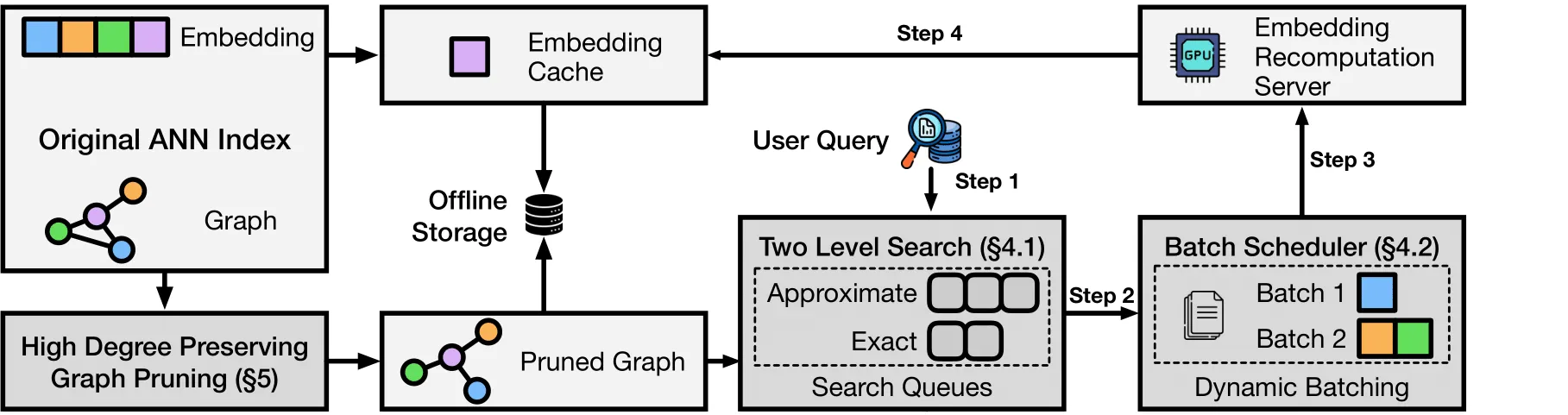
神奇之处:大多数向量数据库存储每个嵌入(成本高昂)。LEANN 存储修剪后的图结构(成本低),仅在需要时重新计算嵌入(速度快)。
核心技术:
- 基于图的选择性重新计算:仅计算搜索路径上的节点嵌入
- 高度保真修剪:保留重要的“枢纽”节点,同时移除冗余连接
- 动态批处理:高效批处理嵌入计算以充分利用 GPU
- 两级搜索:智能图遍历,优先搜索有潜力的节点
后端:
- HNSW(默认):适用于大多数数据集,通过完全重新计算实现最大存储节省
- DiskANN:高级选项,搜索性能更优,采用基于 PQ 的图遍历并实时重新排序,实现速度与准确性的最佳平衡
基准测试
DiskANN 与 HNSW 性能对比 → - 对比两种后端的搜索性能
简单示例:LEANN 与 FAISS 对比 → - 见存储节省的实际效果
存储对比
| 系统 | DPR (210 万) | Wiki (6000 万) | Chat (40 万) | 邮件 (78 万) | 浏览器 (3.8 万) |
|---|---|---|---|---|---|
| 传统向量数据库(如 FAISS) | 3.8 GB | 201 GB | 1.8 GB | 2.4 GB | 1.3 MB |
| LEANN | 324 MB | 6 GB | 64 MB | 79 MB | 6.4 MB |
| 节省 | 91% | 97% | 97% | 97% | 95% |
重现我们的结果
uv run benchmarks/run_evaluation.py # Will auto-download evaluation data and run benchmarks uv run benchmarks/run_evaluation.py benchmarks/data/indices/rpj_wiki/rpj_wiki --num-queries 2000 # After downloading data, you can run the benchmark with our biggest index
评估脚本会在首次运行时自动下载数据。最后三个结果是用部分个人数据测试的,您可以用自己的数据重现!
论文
如果您觉得 Leann 有用,请引用:
@misc{wang2025leannlowstoragevectorindex, title={LEANN: A Low-Storage Vector Index}, author={Yichuan Wang and Shu Liu and Zhifei Li and Yongji Wu and Ziming Mao and Yilong Zhao and Xiao Yan and Zhiying Xu and Yang Zhou and Ion Stoica and Sewon Min and Matei Zaharia and Joseph E. Gonzalez}, year={2025}, eprint={2506.08276}, archivePrefix={arXiv}, primaryClass={cs.DB}, url={https://arxiv.org/abs/2506.08276}, }
✨ 详细功能 →
贡献 →
❓ 常见问题 →
路线图 →
许可证
MIT 许可证 - 详情请参阅 [LICENSE]。
致谢
核心贡献者:Yichuan Wang & Zhifei Li。
活跃贡献者:Gabriel Dehan,Aakash Suresh
我们欢迎更多贡献者!随时打开问题或提交 PR。
这项工作由 伯克利天空计算实验室 完成。
星数历史
⭐ 如果 Leann 对您的研究或应用有用,请在 GitHub 上给我们点赞!
由 Leann 团队用 ❤️ 制作
用 AI 探索 LEANN
LEANN 已在 DeepWiki 上索引,因此您可以使用 Deep Research 向 LLM 提问,探索代码库并获得帮助以添加新功能。
免责声明:
本文档采用基于机器的 AI 翻译服务进行翻译。尽管我们力求准确,但请注意,自动翻译可能存在错误或不准确之处。应以原文语言版本的文档作为权威依据。如需获取关键信息,建议使用专业的人工翻译。对于因使用本翻译而产生的任何误解或误读,我们概不负责。
目录大纲
最新文档
知识宇宙
正在加载知识图谱...