13.1绘制TrueType
文档摘要
## 13.1 绘制TrueType 我们使用的ttf字体,全称是TrueTypeFont。 早期的计算机系统中,文字都是以像素点阵形式存储,这带来一系列的问题,容量过大、放大了模糊。 后期Apple公司开发了TrueType形式的字体结构,在TrueType中,每个字都是以直线和贝塞尔曲线组成,存储数据更少,并且可以任意放大。 不过由于显卡只能处理顶点和纹理,所以必须预先对TrueType中文字的直线和曲线数据做处理,生成对应形状的bitmap,然后才能以纹理的形式进行渲染。 常用的ttf字体渲染库是FreeType2,强大也庞大。 这里只做一些简单应用,所以选择stbtruetype 这个简洁的库。 使用stbtruetype生成bitmap 主要流程如下图。
13.1 绘制TrueType
CLion项目文件位于 samples\draw_font\draw_ttf_font
我们使用的ttf字体,全称是TrueTypeFont。
早期的计算机系统中,文字都是以像素点阵形式存储,这带来一系列的问题,容量过大、放大了模糊。
后期Apple公司开发了TrueType形式的字体结构,在TrueType中,每个字都是以直线和贝塞尔曲线组成,存储数据更少,并且可以任意放大。
不过由于显卡只能处理顶点和纹理,所以必须预先对TrueType中文字的直线和曲线数据做处理,生成对应形状的bitmap,然后才能以纹理的形式进行渲染。
常用的ttf字体渲染库是FreeType2,强大也庞大。
这里只做一些简单应用,所以选择stb_truetype 这个简洁的库。
字体渲染仅做简单介绍,后续GUI功能直接集成开源框架CEGUI。 想了解更多关于TrueType,可以参考以下资料: TrueType Reference Manual:https://developer.apple.com/fonts/TrueType-Reference-Manual/ wikipedia:https://zh.wikipedia.org/wiki/TrueType truetype规范:http://www.truetype-typography.com/ freetype:https://www.freetype.org/freetype2/docs/glyphs/index.html
1. 使用stb_truetype生成bitmap
主要流程如下图。
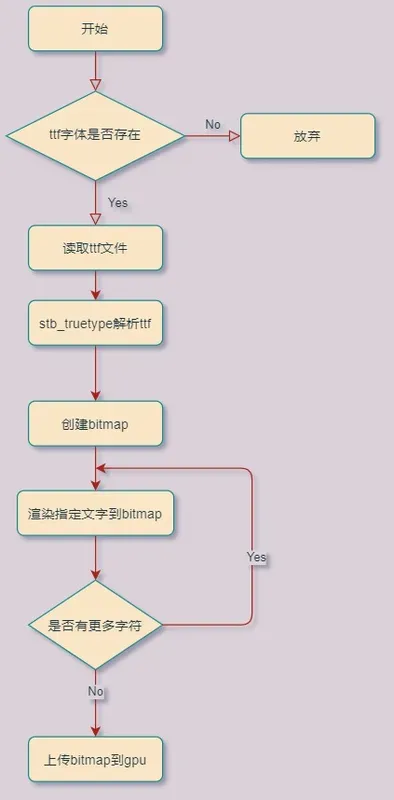
在Texture2D类里面添加函数CreateFromTrueTypeFont,从ttf字体中创建bitmap。
//file:source/renderer/texture2d.cpp line:73 Texture2D *Texture2D::CreateFromTrueTypeFont(std::string ttf_file_path, const char* word) { //加载ttf字体文件 FILE* font_file = fopen((Application::data_path()+ ttf_file_path).c_str(), "rb"); fseek(font_file, 0, SEEK_END); long ttf_file_size = ftell(font_file); fseek(font_file, 0, SEEK_SET); unsigned char* font_buffer = static_cast<unsigned char *>(malloc(ttf_file_size)); fread(font_buffer, ttf_file_size, 1, font_file); fclose(font_file); //初始化stb ttf stbtt_fontinfo font_info; if (!stbtt_InitFont(&font_info, font_buffer, 0)) { spdlog::error("Texture2D::CreateFromTrueTypeFont stbtt_InitFont failed\n"); delete (font_buffer); return nullptr; } int bitmap_width = 512; /* bitmap width */ int bitmap_height = 512; /* bitmap height */ int line_height = 64; /* line height */ //创建一张bitmap,用来存储stb创建的文字图像 unsigned char* bitmap = static_cast<unsigned char *>(calloc(bitmap_width * bitmap_height, sizeof(unsigned char))); //根据指定的行高,计算 font_info float scale = stbtt_ScaleForPixelHeight(&font_info, line_height); int x = 0; int ascent, descent, lineGap; stbtt_GetFontVMetrics(&font_info, &ascent, &descent, &lineGap); ascent = roundf(ascent * scale); descent = roundf(descent * scale); for (int i = 0; i < strlen(word); ++i) { /* how wide is this character */ int ax; int lsb; stbtt_GetCodepointHMetrics(&font_info, word[i], &ax, &lsb); /* get bounding box for character (may be offset to account for chars that dip above or below the line */ int c_x1, c_y1, c_x2, c_y2; stbtt_GetCodepointBitmapBox(&font_info, word[i], scale, scale, &c_x1, &c_y1, &c_x2, &c_y2); /* compute y (different characters have different heights */ int y = ascent + c_y1; /* render character (stride and offset is important here) */ int byteOffset = x + roundf(lsb * scale) + (y * bitmap_width); stbtt_MakeCodepointBitmap(&font_info, bitmap + byteOffset, c_x2 - c_x1, c_y2 - c_y1, bitmap_width, scale, scale, word[i]); /* advance x */ x += roundf(ax * scale); /* add kerning */ int kern; kern = stbtt_GetCodepointKernAdvance(&font_info, word[i], word[i + 1]); x += roundf(kern * scale); } //上下翻转 for (int i = 0; i < bitmap_width; ++i) { for (int j = 0; j < bitmap_height/2; ++j) { unsigned char top_char=bitmap[bitmap_width*j+i]; unsigned char bottom_char=bitmap[bitmap_width*(bitmap_height-j-1)+i]; bitmap[bitmap_width*(bitmap_height-j-1)+i]=top_char; bitmap[bitmap_width*j+i]=bottom_char; } } Texture2D* texture2d=new Texture2D(); texture2d->gl_texture_format_=GL_RED; texture2d->width_=bitmap_width; texture2d->height_=bitmap_height; //1. 通知显卡创建纹理对象,返回句柄; glGenTextures(1, &(texture2d->gl_texture_id_)); //2. 将纹理绑定到特定纹理目标; glBindTexture(GL_TEXTURE_2D, texture2d->gl_texture_id_); //3. 将图片rgb数据上传到GPU; glTexImage2D(GL_TEXTURE_2D, 0, GL_RED, texture2d->width_, texture2d->height_, 0, texture2d->gl_texture_format_, GL_UNSIGNED_BYTE, bitmap); //4. 指定放大,缩小滤波方式,线性滤波,即放大缩小的插值方式; glTexParameteri(GL_TEXTURE_2D, GL_TEXTURE_MAG_FILTER, GL_LINEAR); glTexParameteri(GL_TEXTURE_2D, GL_TEXTURE_MIN_FILTER, GL_LINEAR); delete (bitmap); delete (font_buffer); return texture2d; }
由于生成的文字bitmap是单通道的,所以这里以 GL_RED即R通道上传到GPU,后续渲染出来就是红色的。
2.创建Mesh进行渲染
有了文字bitmap后,还需要创建Mesh,展示图片的话只需要4个顶点组成一个面片即可。
//file:example/login_scene.cpp line:69 void LoginScene::CreateQuad() { vector<MeshFilter::Vertex> vertex_vector={ {{-1.0f, -1.0f, 1.0f}, {1.0f,1.0f,1.0f,1.0f}, {0.0f, 0.0f}}, {{ 1.0f, -1.0f, 1.0f}, {1.0f,1.0f,1.0f,1.0f}, {1.0f, 0.0f}}, {{ 1.0f, 1.0f, 1.0f}, {1.0f,1.0f,1.0f,1.0f}, {1.0f, 1.0f}}, {{-1.0f, 1.0f, 1.0f}, {1.0f,1.0f,1.0f,1.0f}, {0.0f, 1.0f}} }; vector<unsigned short> index_vector={ 0,1,2, 0,2,3 }; //创建模型 GameObject auto go=new GameObject("quad_draw_font"); go->set_layer(0x01); //挂上 Transform 组件 auto transform=dynamic_cast<Transform*>(go->AddComponent("Transform")); transform->set_position({2.f,0.f,0.f}); //挂上 MeshFilter 组件 auto mesh_filter=dynamic_cast<MeshFilter*>(go->AddComponent("MeshFilter")); mesh_filter->CreateMesh(vertex_vector,index_vector); //创建 Material material=new Material();//设置材质 material->Parse("material/quad_draw_font.mat"); //挂上 MeshRenderer 组件 auto mesh_renderer=dynamic_cast<MeshRenderer*>(go->AddComponent("MeshRenderer")); mesh_renderer->SetMaterial(material); }
然后在Update里检测按键C弹起,创建文字bitmap用于渲染。
//file:example/login_scene.cpp line:106 void LoginScene::Update() { ...... //更换贴图 if(Input::GetKeyUp(KEY_CODE_C)){ auto texture2D=Texture2D::CreateFromTrueTypeFont("font/hkyuan.ttf","Hello World"); material->SetTexture("u_diffuse_texture", texture2D); } ...... }
实例运行如下图。
